A WhatsApp CRM is a customer record that sits beside WhatsApp: the chat happens in WhatsApp, and the name, the requirement, the owner and the next follow-up date live somewhere the whole team can see. Managing customer chats as a team comes down to three rules. Every chat has one owner. Every enquiry is written down outside the phone. Every conversation ends with a next date.
You can follow those rules with three different setups, and only one of them needs the WhatsApp Business API. This post compares the three, gives a daily routine that works with the WhatsApp you already have, and says when a small business needs none of it.
What a WhatsApp CRM is, and the two things people mean by it
The phrase covers two different products, and the difference decides what you pay.
- A shared inbox. Your business number is moved to the official WhatsApp Business Platform and connected to software. Chats arrive in that software, several people answer from one number, and the history is stored there.
- A CRM with WhatsApp one tap away. The lead and its follow-up live in the CRM. A button opens the chat in the ordinary WhatsApp on your phone. The conversation stays in WhatsApp; the decision is recorded in the CRM.
Most pages that rank for this subject describe only the first kind, because that is what they sell. Plenty of small teams need the second, or just better habits.
Why WhatsApp breaks down once there is a team
WhatsApp was built for one person and one phone. With three people selling, four things go wrong.
- Nobody knows who replied. Two people answer the same enquiry with different prices, or each assumes the other has answered and nobody does.
- The chat is the only record. What was promised sits forty messages up in one person’s phone. When they are on leave, so is the information.
- There is no next date. WhatsApp shows the newest message first. A customer who said “call me after Diwali” sinks down the list and is never called.
- The owner cannot see the work. You cannot count this week’s enquiries, or see which are still open, without reading other people’s phones.
None of this is a messaging problem. It is a record-keeping problem, which is why the fix is a CRM and not a better chat app.
Three ways to manage WhatsApp chats as a team
| Setup | Who can reply | Where the history lives | What you pay for | It breaks when |
|---|---|---|---|---|
| 1. Own numbers, shared CRM | Each person, from their own WhatsApp | On each phone; notes in the CRM | The CRM only | Notes are not written, or staff use personal numbers and leave |
| 2. One number, linked devices | Up to four devices on the WhatsApp Business app; ten with paid multi-agent | In the one WhatsApp account, on every linked device | The CRM, plus a Meta subscription if you want multi-agent | More people than devices, or nobody can tell whose chat it is |
| 3. Shared inbox on the official platform | As many people as the software allows | In the inbox software | The software, plus Meta’s charge per template message | Volume is too low to justify the fee and the setup |
1. Each person’s own number, one shared CRM
Everyone keeps replying from the WhatsApp on their own phone. The discipline is that every enquiry is also a lead in the CRM, with an owner, a note and a next date. It costs nothing extra and suits two to five people who each handle their own customers. Its weak point is that it relies on people writing the note.
2. One business number on linked devices
The WhatsApp Business app lets you connect up to four devices to one account, so the counter phone, the office laptop and two salespeople can all answer from the shop’s number. WhatsApp’s paid multi-agent feature goes further: up to ten devices, chats assigned to a named person, and a record of which device sent each message. The limits are set out in WhatsApp’s help page on multi-agent.
Customers see one number that never changes when staff do. Without the paid feature, though, every device shows the same inbox with no owner on any chat, so you still need a rule for who answers what.
3. A shared inbox on the WhatsApp Business Platform
Here the number leaves the app and is connected to inbox software through the official API. Chats can be assigned, the history is central, and messages can be sent from templates. Meta charges per template message delivered, a model it moved to on 1 July 2025. Messages you type in reply within 24 hours of the customer’s last message are not charged. The rates by country and category are on Meta’s pricing page. The software provider’s monthly fee comes on top.
Our comparison of the WhatsApp Business API and click-to-chat goes through that choice in detail.
Modified WhatsApp apps and browser extensions that send bulk messages or let many people share a number unofficially are against WhatsApp’s terms. The usual result is a banned number, and a banned business number is every customer you have ever spoken to.
Which setup fits your team
- One or two people, each with their own customers: setup 1. Spend your effort on the notes, not on software.
- A shop or office where customers should always reach the same number: setup 2. Move to the paid multi-agent feature when “who is handling this?” becomes a daily question.
- More than about five people answering, a night shift, or a need to keep every conversation centrally: setup 3.
A sum to do before paying for an inbox
This is a made-up example. Say a solar installer in Nagpur gets 30 WhatsApp enquiries a week across three salespeople. For a fortnight, count the enquiries that got no reply within a day because each person thought someone else had it. Say it is three a week. If one enquiry in ten becomes a ₹1,80,000 job, three missed enquiries a week is roughly one lost job a month.
That number is the budget. If a rule and a shared list fix it, you have spent nothing. If they do not, you know what a shared inbox is worth to you. Do the count with your own figures; the ones above are only there to show the working.
A daily routine that works without the API
This routine works with setups 1 and 2 and any CRM that holds leads and follow-up dates.
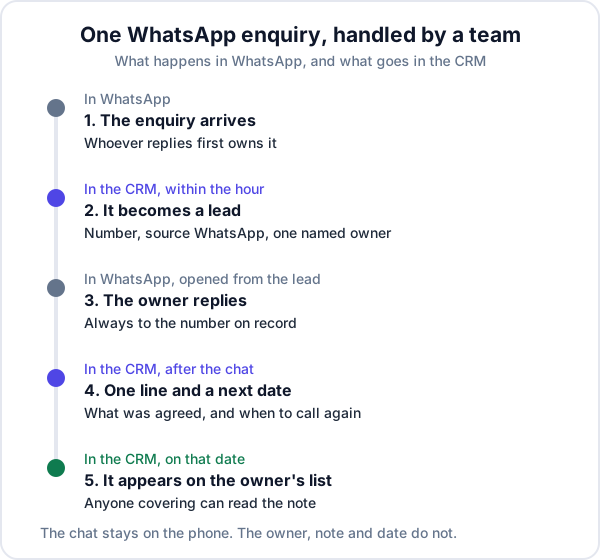
- One owner per chat. Whoever replies first owns it until they hand it over by name. “Someone should reply to this” is how enquiries die.
- Every new enquiry becomes a lead within the hour. Phone number, what they want, source marked as WhatsApp. It takes thirty seconds and is the step most teams skip.
- Reply from the record. Open the chat from the lead, so you are messaging the number on file and the lead is in front of you while you type.
- End every conversation with one line and a date. “Wants 5 kW, roof is asbestos sheet, call Saturday after he checks with his brother.” That line is what a colleague reads when you are on leave.
- Start the day from the list, not the chats. The follow-ups due today come first. New messages come second.
Two features of the WhatsApp Business app are worth using alongside this: labels, to mark a chat as a new enquiry or as quoted, and quick replies, for the address, the bank details and the price list you type ten times a day.
What goes wrong in practice
- The note is not written. The routine fails silently. Check five leads at random each week; if the last note is older than the last chat, say so.
- Personal numbers. A customer who has saved your salesperson’s own number keeps messaging it after they leave. Give selling staff a SIM in the business’s name.
- Double replies on linked devices. Two people see the same unread message. The first-reply-owns-it rule matters most here.
- Buying the inbox first. A shared inbox stores chats. It does not make anyone set a follow-up date. Teams that had no routine before the software usually have none after it.
When you do not need a WhatsApp CRM at all
If you work alone and get a handful of enquiries a day, the WhatsApp Business app with labels and a habit of clearing your chats each evening is enough. A CRM starts to earn its place when you lose enquiries you cannot name, when a second person starts selling, or when you want to know which source your paying customers come from.
Where Enkay CRM fits, and where it does not
Enkay CRM is the second kind of WhatsApp CRM, the one built around the record. A WhatsApp enquiry is added as a lead with only a phone number, marked with WhatsApp as its source and given an owner. A button on the lead opens the chat in your own WhatsApp. Notes and the next follow-up date sit on the lead, and each person’s due follow-ups appear on their Today screen. The details are on the WhatsApp CRM feature page.
What it does not do today: it does not capture incoming WhatsApp messages, it does not store chat history, and it has no shared inbox. A shared team inbox on the official WhatsApp Business Platform is in development. Until it ships, Enkay CRM supports setups 1 and 2 above, not setup 3.
The short version
A WhatsApp CRM for a team is less about the chat and more about three things written down beside it: an owner, a note and a next date. Start with the routine and the WhatsApp you have. Link devices when customers need one number. Pay for a shared inbox when you have counted what the missed chats cost you.
Frequently asked questions
What is a WhatsApp CRM?
A WhatsApp CRM is a customer record system that works alongside WhatsApp. The CRM holds the customer’s name, what they asked for, who is handling them and the next follow-up date, and the chat is either stored inside it or one tap away. It exists because WhatsApp itself keeps conversations, not customers.
Can several people use one WhatsApp Business number?
Yes. The WhatsApp Business app lets you connect up to four devices to one account, so a small team can reply from the same number. WhatsApp’s paid multi-agent feature raises that to ten devices and adds assigning chats to a named person. Beyond that you need the WhatsApp Business Platform with a shared inbox.
Do I need the WhatsApp Business API to manage chats as a team?
Not at first. Two or three people can work well with their own numbers or one linked number, as long as every enquiry is also recorded as a lead with an owner and a next date. The API becomes worth its cost when chat volume is high, several people must answer the same customers, or you need the history kept centrally.
How much does a WhatsApp CRM cost?
It depends on the setup. A CRM that opens your own WhatsApp costs only the CRM subscription. A shared inbox on the WhatsApp Business Platform has two costs: the software provider’s monthly fee, and Meta’s charge for each template message delivered. Replies you type to a customer within 24 hours of their last message are free.
Does Enkay CRM store my WhatsApp chats?
No. Enkay CRM opens a chat in your own WhatsApp in one tap from a lead or customer, and keeps the lead, the notes and the follow-up date. The chat history stays in WhatsApp on the phone that sent it. A shared team inbox on the official platform is in development.
What happens to customer chats when a salesperson leaves?
If they used a personal number, the chats and the customer’s habit of messaging that number leave with them. The protection is to keep the number in the business’s name and to keep the record of each customer, with notes of what was agreed, in a CRM the business owns.
Keep reading
Try Enkay CRM free
Every enquiry in one list, a follow-up date on each one, and your whole team on the same page. Free for one user — not a trial, no credit card.