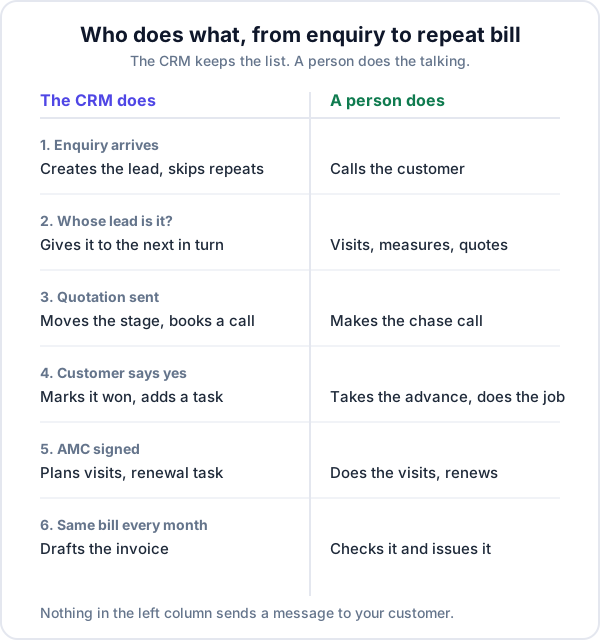
CRM automation means the CRM does a routine step for you: it creates the lead, decides whose it is, books the next call, drafts the bill. For a small business the useful kind is narrow. Automate the record-keeping that people forget. Leave the talking to a person.
This post sorts the steps of a sale into those two piles, then lists the seven things Enkay CRM does on its own today, where each one is switched on, and what it does not do. If you only want the quotation part, that has its own post.
What is CRM automation?
CRM automation is software carrying out a step in your sales or service process when something happens, without a person starting it. An enquiry arrives and a lead is created. A quotation is sent and a call is booked. A contract nears its end and a renewal task appears. The trigger is an event; the result is a record, a date or a task.
Most writing on the subject jumps straight to automatic WhatsApp messages and email sequences. Those exist, but they are the last thing a business of five or ten people needs. The first thing it needs is for nothing to fall off the list.
What to automate first, and what to leave alone
Automate a step when it is the same every time and gets skipped on a busy day. Keep a step with a person when the right action depends on what the customer just said.
| Step | Automate it? | Why |
|---|---|---|
| Copying an enquiry into your list | Yes, first | Identical every time, and the one most often left for “later” |
| Deciding whose lead it is | Yes | A lead with no name against it is nobody’s job |
| Setting the next call date | Yes, as a safety net | People set dates when they remember to |
| Moving the deal to the next stage | Yes, where an event proves it | A sent quotation is a fact, not an opinion |
| Planning repeat visits and renewals | Yes | A date twelve months away is not something anyone remembers |
| Preparing a bill that is the same each month | Draft it, do not send it | Amounts change; a wrong invoice costs more than a late one |
| The first call to a new enquiry | No | You are finding out what they want |
| The follow-up after a quotation | No | The reason for the delay is different every time |
| Negotiating price | No | Obviously |
Seven things Enkay CRM does automatically
This is the product as it works today. Most of it is part of the Business plan; the Free plan is for one user and has no connected lead sources.
1. It creates the lead when the enquiry arrives
Enquiries from IndiaMART, JustDial and your website form are pushed into the CRM and become leads without anyone typing. You set this up once under Settings, in Integrations, and the same page logs every message that came in. Our guide to connecting IndiaMART to a CRM covers the setup. Enquiries on WhatsApp and phone calls are not captured automatically; you add those by hand.
2. It deals with repeats
The same enquiry delivered twice is ignored. The same number enquiring again within 24 hours becomes a note on the existing lead, not a second lead. So one impatient buyer does not get called by two of your people.
3. It shares new leads out in turn
On the Team page you can start sharing new leads. From then on, each lead that arrives from a connected source goes to the next person in a fixed order, and round again. Each team member has a “Gets new leads” switch, so someone on leave drops out of the turn without anyone reshuffling the list.
Say three salespeople, Asha, Imran and Suresh, all have it on, and seven IndiaMART leads arrive on Monday. Asha gets the 1st, 4th and 7th, Imran the 2nd and 5th, Suresh the 3rd and 6th. On Tuesday Imran is at a site all day and his switch is turned off: leads alternate between Suresh and Asha until it is turned back on.
Two things to know. A lead you add by hand stays with whoever added it. And with sharing switched off, new leads arrive unassigned until someone picks them up or a manager assigns them. More on roles and who sees what is on the team management page.
4. It moves the stage when an event proves it
Sending a quotation moves the lead to the Quotation stage of the pipeline, if it was not already there or further. When a quotation is accepted, the lead is marked won and becomes a customer. Every other stage change is yours to make, because only you know whether a call “qualified” someone.
5. It books the next call on every quotation
A chase call two days after sending, a call today when the customer opens the link, a reminder before the quotation expires, a start-work task on acceptance and a retry a week after a no. The timings are yours to change. The full rules are in how quotation follow-up automation works.
6. It plans AMC visits and the renewal
When you create an annual maintenance contract with, say, four visits a year, the four visits are scheduled as jobs straight away, each with your maintenance checklist. Ahead of the end date, 30 days by default, a renewal task is created so the call happens before the contract lapses. Our post on AMC contracts for a service business explains why that month matters.
7. It drafts invoices that repeat
An invoice can be set to repeat monthly, quarterly, half-yearly or yearly, with an optional end date. On the day, the CRM raises a copy as a draft. It is never issued on its own. You open it, check the amount and issue it. That is deliberate: a monthly retainer or rental bill is the same until the month it is not.
How much time does this save? Less than you think
Here is a made-up example. Say you get 60 enquiries a month. Copying each into a sheet takes two minutes, telling someone on WhatsApp that it is theirs takes one, and setting a reminder takes one. That is four minutes a lead, or four hours a month. Useful, but nobody buys software for four hours.
The real gain is in the steps that would not have happened at all. If six of those 60 are never copied in because the day got busy, and your usual rate is one sale in ten enquiries, that is roughly one sale every two months that was lost before anyone spoke to the customer. Put your own average order value against that. Automation of this kind does not make people faster. It makes the list complete.
What Enkay CRM does not automate
- Messages to customers. No automatic WhatsApp, SMS or email. You message from the lead with one tap, on your own WhatsApp.
- Facebook and Instagram lead ads. Not live yet. Those leads are added by hand for now.
- WhatsApp chats and phone calls. An enquiry that arrives on either is not captured on its own.
- Your own rules. There is no workflow builder. The rules above are fixed; you set the timings.
- Issuing invoices or chasing payments. Repeat invoices stop at draft, and payment reminders are sent by you.
- Alerts on your phone. What the CRM books shows inside the app. Someone has to open the Today screen.
Switching it on, in order
- Connect one lead source. Whichever brings the most enquiries. Watch the Integrations log for a few days to see that every enquiry arrives.
- Add your team, then start sharing leads. Only after people have logged in and know where their list is.
- Send quotations through the share link. The quotation rules are on by default; leave the timings alone for the first month.
- Enter your running AMCs. The visits and renewal tasks fill in from the contract dates.
- Set repeats on the invoices that recur. Then put ten minutes in the diary each month to issue the drafts.
Three mistakes to avoid
- Automating a mess. If nobody agrees what “qualified” means, software will not settle it. Agree the process by hand first.
- Trusting it blindly. A source can stop pushing leads because a setting changed on the other side. Check the log weekly.
- Treating a booked call as a made call. The automation fills the list. The morning routine empties it.
The short version
Good CRM automation for a small business is quiet. It creates the lead, puts a name on it, books the next date and drafts the bill, and then it gets out of the way so a person can ring the customer. That is where Enkay CRM draws the line today: seven routine steps handled, and no messages sent on your behalf.
Frequently asked questions
What is CRM automation?
It is the CRM doing a routine step without anyone asking: creating a lead from an enquiry, giving it to a salesperson, booking the next call, drafting a repeat invoice. The step would otherwise depend on someone remembering it.
What should a small business automate first?
Start with the three steps that are skipped most often: getting every enquiry into one list, deciding whose lead it is, and putting a date on the next call. Automate messages to customers last, if at all, and only once your process works by hand.
Does Enkay CRM assign leads automatically?
Yes, on the Business plan. On the Team page you can start sharing new leads. Each lead that arrives from a connected source then goes to the next person in turn who has “Gets new leads” switched on. Leads you add by hand stay with whoever adds them.
Does Enkay CRM send automatic messages to customers?
No. There are no automatic WhatsApp, SMS or email messages to customers. The automation creates leads, assigns them, books calls and tasks, plans AMC visits and drafts repeat invoices. A person makes the call or sends the message.
Can I build my own automation rules in Enkay CRM?
No. There is no workflow builder. The rules are fixed and you choose the timings, such as how many days after a quotation the chase call is booked. That is a limit for a larger sales team, and less to set up for a small one.
Will a repeating invoice be sent to my customer automatically?
No. A repeating invoice is raised as a draft on its day, monthly, quarterly, half-yearly or yearly. You check the amount and issue it yourself, so a customer is never billed for something that changed without you seeing it.
Keep reading
Try Enkay CRM free
Every enquiry in one list, a follow-up date on each one, and your whole team on the same page. Free for one user — not a trial, no credit card.