Quotation follow-up automation means the software books the next step on a quotation, so nobody has to remember it. In Enkay CRM it works like this: when a quotation is sent, opened, about to expire, accepted or declined, a call or a task lands on the right person’s list with a date and a note. It does not message your customer. A person still makes the call.
This post explains each of the five events, the four timings you can change, how the automation behaves when you have already booked a call yourself, and what it does not do. Everything here describes the product as it works today.
Why quotations need chasing in the first place
A quotation is the point where a small business does the most work and then goes quiet. The site visit is done, the price is worked out, the PDF goes on WhatsApp, and then the salesperson moves to the next enquiry. Three weeks later someone asks, “What happened to that Shinde job?” and nobody knows.
The fix is old and simple: every open quotation has a next date. The trouble is that setting the date is one more thing to remember at exactly the moment you are busy. That small step is what the automation takes over.
How quotation follow-up automation works in Enkay CRM
Five events on a quotation each book one next step. The step is either a follow-up on the lead, which shows on the Today screen, or a task for a named person. Each automatic follow-up is also written on the lead’s activity timeline and marked “automatic”, so you can see what booked it.
| When this happens | The CRM books | For when |
|---|---|---|
| You send a quotation, or a revision | A follow-up: “did they get it, any questions?” | 2 days after sending |
| The customer opens the share link for the first time | The follow-up moves up: “call while it is fresh” | Today |
| A sent quotation is close to its valid-until date | A follow-up: “nudge before it lapses”, once per quotation | Today, 2 days before expiry |
| The quotation is accepted | A high-priority task: collect the advance and schedule the job | The next day |
| Accepting it leaves a stock-tracked product low | A “Restock” task for the owner, one per product | Today |
| The customer declines and the lead stays open | A follow-up: “worth a revised price?” | 7 days after the no |
The days shown are the defaults. You can change three of them, as described further down.
1. After you send: a chase call
Sending a quotation books a follow-up two days later. The note carries the quotation number, so whoever opens the Today screen knows which price they are calling about. Sending a revised quotation does the same again.
2. When the customer opens it: call today
Each quotation has a share link that the customer opens on their phone. The first time they open it, the follow-up moves to today. This is the most useful rule of the five. A customer reading your price is thinking about it right now, and a call in the next hour lands very differently from a call two days later.
Only the customer’s first opening counts. A teammate checking the link does not trigger it.
3. Before it expires: one reminder
Every quotation has a valid-until date. Two days before it, the CRM books a call for today, so you can use the deadline as a reason to ring. It does this once for each quotation and checks every hour, using your business’s own date.
4. When it is accepted: start the job
An accepted quotation marks the lead as won. The automation then creates a high-priority task, due the next day, to collect the advance and schedule the job. It goes to the person who owns the lead. If the lead has no owner, it goes to whoever made the quotation.
If you track stock on your products and this order will take one down to its low-stock level once it goes out, the owner also gets a “Restock” task for that product. If a restock task for the same product is already open, a second one is not created.
5. After a no: try again in a week
When a customer declines and you keep the lead open, a follow-up is booked for seven days later, with a note asking whether a revised price is worth offering. If you mark the lead as lost when declining, nothing is booked. Lost means lost.
One quotation, ten days: a worked example
This is a made-up example with the default timings. Say a CCTV dealer in Kolhapur sends a quotation for ₹86,000 on Monday 5 October, valid until Friday 16 October.
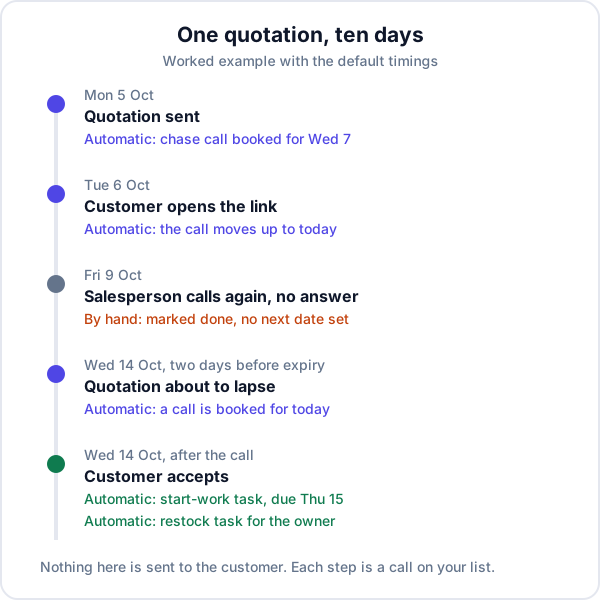
- Mon 5 Oct. The quotation goes out. A chase call is booked for Wednesday 7.
- Tue 6 Oct. The customer opens the link at lunch. The call moves to today. The salesperson rings; the customer wants to ask his brother, and they agree to speak on Friday.
- Fri 9 Oct. No answer. The salesperson marks the follow-up done and, in a hurry, sets no next date. This is the point where the quotation would normally be forgotten.
- Wed 14 Oct. Two days before expiry, a call appears on the Today screen. The salesperson rings, mentions the price holds till Friday, and the customer accepts.
- Same day. A task to collect the advance and schedule the installation is created for Thursday. Once this order goes out, the 8-channel DVR will be down to its low-stock level, so the owner gets a restock task.
The salesperson still made three calls. What changed is that the third one happened.
What happens when you have already booked a call
The earlier date always wins. A lead carries one open follow-up at a time, and the automation will never push a call you promised to a later day.
- You booked a call for tomorrow, then sent the quotation. The two-day chase is later than your date, so your call stays as it is.
- You booked a call for next week, and the customer opens the quotation today. Today is sooner, so the follow-up moves to today with the new note.
- The lead is already won or lost. Nothing is booked.
The four timings you can set
Open Settings and choose Automation. You need permission to manage settings. There is one switch for quotation automation, which is on by default, and four numbers.
| Setting | Default | Range |
|---|---|---|
| Chase a sent quotation | 2 days after sending | 1 to 30 days |
| Try again after a no | 7 days after a no | 1 to 90 days |
| Expiry reminder | 2 days before it expires | 0 to 30 days |
| AMC renewal calls | 30 days before the end | 7 to 120 days |
The AMC setting belongs to annual maintenance contracts, not quotations. It creates a renewal task ahead of a contract’s end date, and it keeps working even if you switch quotation automation off.
Which numbers suit which business
These are starting points from how the buying decision usually goes, not measured results. Change them after a month of watching your own list.
- Quick decisions (AC repair, a small CCTV job, a coaching batch that starts next week): chase after 1 day, expiry reminder at 1 day. The customer will decide this week with or without you.
- Considered purchases (rooftop solar, interiors, a flat): chase after 3 days, expiry reminder at 3, retry after 14 to 30 days. A no in these trades often means “not this month”.
- Contract work (AMCs): start renewal calls 30 to 45 days before the end, so there is time for a visit before the contract lapses.
What the automation does not do
- It does not message the customer. No automatic WhatsApp, SMS or email goes out. It books a call for a person. You can then open WhatsApp from the lead in one tap with your own number.
- It does not notify your phone. The booked calls show inside the app, on the Today screen and the dashboard. Someone has to open the app in the morning.
- It only covers quotations. A new enquiry with no quotation is not chased by these rules. Those show on the Today screen as open leads with no follow-up, and you set the date yourself. The other steps the CRM handles on its own are listed in CRM automation for a small business.
- It cannot see a printout. The “opened” rule depends on the share link. A quotation handed over on paper is never recorded as opened.
- The rules are fixed. You set the days, not the rules. There is no builder for your own triggers, and the five rules switch on and off together.
- It will not make the call. If the Today screen is ignored, the list just gets longer. The fifteen-minute morning routine matters more than any setting.
Should a small business automate messages instead?
Many tools do the opposite of this: they send the customer a WhatsApp or email on day 3, day 7 and day 14. That suits a business with hundreds of small, similar quotes. For a ₹86,000 installation it has a cost. A templated “just checking in” is easy to ignore, and it tells you nothing about why the customer has not decided.
A call does. The customer says the price is high, or the brother has another quote, or the building society has not approved. Each of those has a different answer, and only a person can give it. That is why the automation here stops at putting the call on your follow-up list.
The short version
Quotation follow-up automation in Enkay CRM is five rules and four numbers. Send, open, near expiry, accept, decline: each one books the next call or task, and your own earlier dates are never pushed back. It is on by default on the Business plan, along with quotations and invoices. Send your next three quotations through the share link, open the Today screen each morning for a fortnight, and see how many of those calls you would otherwise have made.
Frequently asked questions
What is quotation follow-up automation?
It is software booking the next step on a quotation without anyone having to remember it. In Enkay CRM that means a follow-up call or a task appears on your team’s list when a quotation is sent, opened, about to expire, accepted or declined. Nothing is sent to the customer.
Does Enkay CRM send automatic WhatsApp, SMS or email reminders to my customer?
No. The automation only books calls and tasks for your own team, inside the app. There are no automatic WhatsApp, SMS or email messages to customers. You call or message the customer yourself, using the one-tap WhatsApp and call buttons on the lead.
Can I change how many days it waits before the chase call?
Yes. Under Settings, in the Automation section, you can set the chase gap from 1 to 30 days after sending, the retry gap after a decline from 1 to 90 days, and the expiry reminder from 0 to 30 days before the quotation runs out. The defaults are 2, 7 and 2 days.
How does the CRM know the customer opened the quotation?
Each quotation has a share link the customer opens on their phone. The first time the customer opens that link, the CRM records it and moves the follow-up call to today. A teammate opening the link is not counted. A quotation sent only as a printout cannot be tracked this way.
Will the automation overwrite a follow-up I set myself?
Not if yours is sooner. A lead carries one open follow-up at a time. If you have already booked a call for an earlier date, the automation leaves it alone. If its date is sooner than yours, the follow-up moves forward to the sooner date.
Can I switch quotation automation off?
Yes. It is one switch in Settings, under Automation, and it is on by default. Switching it off stops all five quotation rules together. You cannot switch the rules off one at a time. AMC renewal tasks are separate and carry on.
Which plan includes quotation automation?
Quotations are part of the Business plan, so the automation is too. New signups get Business features free for 90 days, which is long enough to see whether the booked calls change how many quotations you close.
Keep reading
Try Enkay CRM free
Every enquiry in one list, a follow-up date on each one, and your whole team on the same page. Free for one user — not a trial, no credit card.