To send a quotation on WhatsApp so that it looks professional, send it as a PDF document or a link, not as a photo, and put a five-line message with it: the quotation number, what it covers, the total with GST made clear, the date the price holds until, and what the customer should do next. The message matters as much as the file, because many customers read the message and never open the attachment.
The rest of this post compares the four ways of sending a price on WhatsApp, gives message wording you can copy, and lists the checks to run before you press send. It is about the sending. What goes inside the document is covered in how to write a quotation that gets accepted.
What “professional” means on WhatsApp
On paper, professional meant a letterhead and a stamp. On a phone it means three plainer things. The customer can read the total without zooming. They can find the quotation again a week later. And nobody can be confused about what the price includes. A quotation that passes those three tests looks professional even without a logo. One that fails them does not, however good the design.
Four ways to send a quotation on WhatsApp, compared
| How you send it | Reads well on a phone | Easy to find later | Clean to revise | Use it for |
|---|---|---|---|---|
| Typed message only | Yes | Only by scrolling | No, old prices stay in the chat | One or two items, small amounts |
| Photo or screenshot | Often blurred | No, it is lost in the gallery | No | Nothing; avoid it |
| PDF sent as a document | Yes, if it is one clear page | Yes, by file name | Yes, with a revision mark | Most quotations |
| Share link from quoting software | Yes, it is made for a phone | Yes, same link each time | Yes, the link shows the latest | Quotations you will revise or want accepted online |
Why a photo is the worst choice
A photo of a printed quotation, or a screenshot of Excel, is the commonest way prices travel on WhatsApp and the weakest. WhatsApp compresses images, so small figures blur. The picture has no name the customer can search for. It lands in their gallery between a wedding and a school notice. And it cannot be forwarded to a purchase manager with any dignity.
PDF: attach it as a document
Use the Document option, not the gallery. A document keeps its file name and its quality. Size is not a constraint, since WhatsApp raised its file limit to 2 GB in 2022, but a quotation with heavy product pictures still takes time to download on mobile data. Keep it light.
A link: when the price will change
A link to an online quotation opens in the phone’s browser, sized for the screen. Its advantage shows on the second round. When you revise the price, the same link shows the new version, so the customer is never holding two PDFs and quoting the wrong one back to you. Some quoting tools also record when the link is opened, which a PDF cannot do.
What the message with it must say
Write the message as if the attachment will never be opened. Five lines do it.
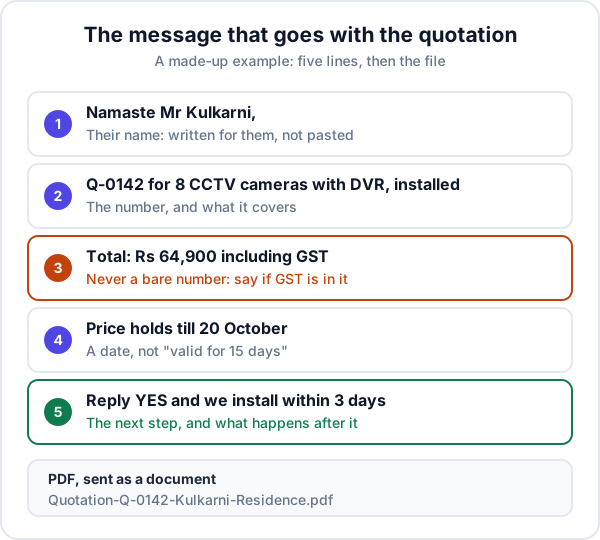
- Their name. It shows the message was written for them and not pasted to forty people.
- The quotation number and what it covers, in one line. “Q-0142 for 8 CCTV cameras with DVR, installed.”
- The total, and whether GST is in it. “₹64,900 including GST” or “₹55,000 plus 18% GST”. Never a bare number. This one line prevents most arguments at billing time.
- The validity date. A date, not “valid for 15 days”, which nobody counts.
- The next step. What you want them to do, and what happens when they do it.
Messages you can copy
These are made-up examples. Change the names, figures and dates.
First send, with a PDF:
Namaste Mr Kulkarni,
Quotation Q-0142 for 8 CCTV cameras with DVR, installed.
Total: Rs 64,900 including GST.
Price holds till 20 October.
Reply YES to confirm and we install within 3 days.
PDF attached. Call me for any change. - Sameer, Trinetra Security
A revision:
Mr Kulkarni, revised quotation Q-0142 R2 attached.
Changed: 6 cameras instead of 8, same DVR.
New total: Rs 52,400 including GST.
Valid till 20 October. Please ignore the earlier file.
A small job, typed with no attachment:
Split AC service, 2 units: Rs 1,400 total, GST included.
Gas top-up, if needed, is extra at Rs 2,200 per unit.
We can come tomorrow between 10 and 12. Shall I book it?
Before you press send: a checklist
- Name the file properly.
Quotation-Q-0142-Kulkarni-Residence.pdf, notDoc1.pdforNew quotation final 2.pdf. The file name is what the customer searches for. - Number and date it. A quotation without a number cannot be referred to on a call.
- Put the total on the first screen. If the customer must scroll through terms to find the price, move the price up.
- State GST the same way in the message and the document. If you are GST-registered, show your GSTIN on the quotation; our guide to what a GST invoice must show covers the bill that follows.
- Send from the business number, with the business name and logo set in the WhatsApp Business profile. A quotation from an unnamed personal number with a holiday photo undoes the letterhead.
- Send it to the person who decides. If you spoke to the site supervisor but the owner approves, ask for the owner’s number too.
- Send it in working hours. A quotation that arrives at 11 pm is read at 11 pm and forgotten by morning.
- Open it once on your own phone before sending. If you have to zoom, so will they.
Revisions without confusion
Negotiation produces versions, and versions produce disputes. Three habits keep them apart.
- Keep one quotation number per job and add R1, R2, R3 for each revision. A new number for every change makes it look like a new job.
- Say in the message what changed and what the new total is. The customer should not have to compare two files.
- Tell them to ignore the earlier one. It is still in their chat and will be found first.
After you send: the part that wins the order
Sending is half the work. Blue ticks mean the message was seen. They do not mean the quotation was opened, understood or shown to the person who pays. Decide your follow-up date at the moment you send, about two days out for most work, and put it somewhere you will see it. Our post on building a sales follow-up process gives a full cadence.
A count worth doing
This is a made-up example. Say you sent 20 quotations last month. Count how many got a second contact from you within a week. If it is eight, then twelve customers heard your price once and nothing more. Whatever your usual win rate, those twelve are where next month’s extra orders are. Do the count from your own WhatsApp before changing anything else.
When WhatsApp is the wrong channel
- Companies with a purchase department. They need the quotation on email, on letterhead, addressed to the company, so it can be filed against a purchase order. Send it by email and use WhatsApp only to say it has gone.
- Tenders and government work. The format and the route are laid down. Follow them.
- Long bills of quantities. A twelve-page BOQ for an interior or an electrical job is unreadable on a phone. Send a one-page summary on WhatsApp and the detail by email.
- Group chats. Do not post a price in a society or project group unless asked. It becomes everyone’s business, including your competitor’s.
Where Enkay CRM fits, and where it does not
In Enkay CRM a GST quotation is made from the lead, with line items, a discount and a validity date. Each one has a share link. Tapping send on WhatsApp opens your own WhatsApp with the message already written and the link in it; you read it and press send. The customer opens the link on their phone and can accept or decline there. A revision goes out on the same quotation, and the first time the customer opens the link, the follow-up on that lead moves to today so you can call while it is fresh.
The limits: it does not send anything by itself, since every message goes from your own WhatsApp when you press send. It cannot tell you whether a printout was read. Quotations are on the Business plan, not the Free plan. And it will not design a letterhead for you; the quotation is clean and consistent, not decorative.
The short version
A professional quotation on WhatsApp is a named PDF or a link, never a photo, with a message that states the number, the scope, the total with GST, the validity date and the next step. Number your revisions, send from the business account, and set the follow-up date as you send. Try it on your next three quotations and see how many fewer questions come back.
Frequently asked questions
How do I send a quotation on WhatsApp?
Send it as a PDF document or a link, never as a photo, and put a short message with it. The message should carry the quotation number, what is being quoted, the total with GST made clear, the validity date and what the customer should do next. Many customers read the message and never open the file.
Should I send a quotation as a PDF or as a photo?
As a PDF, attached as a document. A photo is compressed, cannot be searched for by name, and goes into the customer’s gallery among family pictures. A PDF keeps its file name, prints cleanly and can be forwarded to whoever approves the spend.
What should I write in the message when sending a quotation?
Five things: a greeting with the customer’s name, the quotation number and what it covers, the total and whether GST is included, the date the price holds until, and the next step. Keep it to five or six short lines so the whole message shows without tapping Read more.
Is a quotation sent on WhatsApp valid?
A quotation is an offer of a price, not a tax document, so there is no fixed format it must follow. What matters is that you can show what you offered and when. A numbered, dated quotation with a validity date does that. For a large order, ask for the acceptance in writing in the same chat.
How do I send a revised quotation on WhatsApp?
Keep the same quotation number and add a revision mark, such as Q-0142 R2. In the message, say what changed and state the new total. Do not write “updated quote attached” with nothing else, because the customer will compare the wrong file a week later.
How soon should I follow up after sending a quotation on WhatsApp?
Call or message about two days after sending for most jobs, sooner for quick decisions such as a repair. Blue ticks tell you the message was read, not that the quotation was opened or understood, so do not treat them as a reply.
Can I send quotations on WhatsApp from Enkay CRM?
Yes, on the Business plan. A quotation in Enkay CRM has a share link. Tapping send on WhatsApp opens your own WhatsApp with the message already written and the link included. The customer opens it on their phone and can accept or decline there.
Keep reading
Try Enkay CRM free
Every enquiry in one list, a follow-up date on each one, and your whole team on the same page. Free for one user — not a trial, no credit card.