The pages a business website needs are fewer than most templates suggest, and their order matters more than their design. For a business that wins work through enquiries, the core set is: a page for each service, a home page that points to them, a way to contact you on every page, proof that you have done the work before, an about page, and a privacy policy.
This post goes through them in the order a visitor makes up their mind, says what goes on each page and what goes wrong, and ends with a checklist table and a list of pages to leave off. It is written for owners of service businesses, installers, dealers and contractors, not online shops.
How a visitor decides, and why the order of pages follows it
Most visitors do not arrive on your home page. They search for something like “solar installation Kolhapur” and land on whichever page best matches it. From there they answer four questions in turn, and leave the moment one goes unanswered.
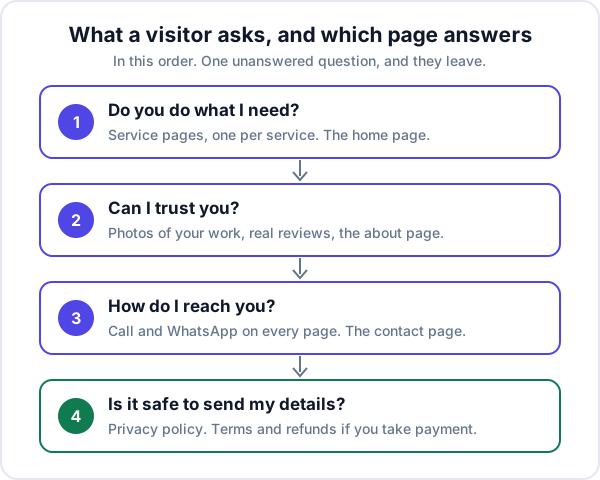
That is why this list starts with service pages rather than the home page.
1. Service pages: one for each thing you sell
A service page is the page most likely to be the first one a new customer sees, so it does the most work. Give each service, or each product group, its own page. “AC installation”, “AC repair” and “AMC for offices” are three pages, not three bullet points on one.
What goes on a service page:
- A heading that says the service and the place, in the words a customer would search.
- Who it is for and what is included, in a few short paragraphs. What you do, what you do not, which brands or sizes.
- A price guide if you can give one: a fixed price, a starting price, or what the price depends on.
- How it works: survey, quote, job, after-sales, with rough timings.
- Photos of this kind of job, taken by you.
- Three or four questions people ask before buying this service, answered.
- A call, WhatsApp and enquiry button, at the top and again at the end.
The common mistake is one “Services” page listing twelve things in a line each. It cannot match anybody’s search for any of them, and it gives a visitor nothing to decide on.
2. The home page: a signpost, not a brochure
The home page is for people who already know your name, from a visiting card, a vehicle, a referral. Its job is to confirm they are in the right place and send them on. In the first screen on a phone: what you do, where you do it, and a way to call or message. Below that, a link to each service page, some proof, and contact again.
Leave out the “Welcome to our website” paragraph, the slider and the mission statement. Nobody reads them, and the slider slows the page on mobile data.
3. Contact: a page, and on every page
Contact is not one page. On a phone, a tap-to-call link and a WhatsApp button should be visible on every page, because a visitor who has to go looking for your number often does not. The contact page then holds the details for people who want them:
- Phone and WhatsApp numbers as links that dial or open a chat when tapped.
- A short form: name, phone number, one line about what they need. Every extra field loses some people.
- Your address and a map, if customers come to you; the areas you cover, if you go to them.
- Working hours, and how quickly you reply.
Then test the form yourself. A form that sends to an inbox nobody opens is one of the five reasons a site gets visitors and no enquiries, and the fix is to send form enquiries into a CRM where each one gets a follow-up date.
4. Proof: your work, reviews and an about page
Every visitor is asking whether you are real and whether you have done this before. Adjectives do not answer it. These do:
- A work or projects page: photos of real jobs, each with a line on what it was and where. Twenty honest photos beat a gallery of stock images.
- Reviews, real ones, with a link to where they were posted so a doubter can check. Never write your own.
- An about page: how long you have been trading, who the customer will deal with, your address, and registration details you are happy to publish. Photos of your premises, vehicles or team do more than a page of history.
Only show client logos and names if those clients have agreed. A wall of famous logos with no permission is a risk, and visitors tend not to believe it anyway.
5. Pages that answer the next question
Once the four core questions are answered, two more pages often earn their place:
- FAQ or pricing guide. The questions you answer on the phone every week: do you charge for a site visit, which brands, how long, what guarantee. Answering them on the site saves calls that were never going to buy.
- Areas you serve. A list on the contact page is usually enough. Separate pages per town only make sense when each has something real to say, such as jobs done there or a branch address. Ten copies of one page with the town name swapped add nothing.
6. Legal pages
A business website that collects names and phone numbers should publish a privacy policy: what you collect, why, who you share it with and how you keep it safe. In many places this is a legal duty, not just good manners. For example, rule 4 of India’s Information Technology (Reasonable Security Practices) Rules, 2011 requires a body corporate that handles personal information to publish a privacy policy on its website covering those points. Other countries have their own rules; ask your accountant or lawyer which apply to you.
If you take payments online, you need more. Razorpay’s activation guide, for example, asks for links to About us, Contact us, Pricing details, Terms and conditions, Privacy policy and Refunds policy before a website is accepted. Write them for your business. A privacy policy copied from another site, still carrying their company name, is worse than none.
7. Two small pages that do a lot
- A thank-you page after the form, saying what happens next and when. It also lets your analytics count enquiries properly, so you can see which pages and which lead sources are paying off.
- A useful 404 page, with your phone number and links to the service pages, for the visitor who followed an old link.
Pages a business website needs: the checklist
| Page | Needed? | What goes on it | Common mistake |
|---|---|---|---|
| Service pages | Yes, one each | Service and place, what is included, price guide, process, photos, questions, contact buttons | One page listing everything |
| Home | Yes | What, where, call or WhatsApp in the first screen, links to services, proof | Slider and a welcome paragraph |
| Contact | Yes, and buttons on every page | Tappable phone and WhatsApp, short form, address or areas, hours | A nine-field form nobody tested |
| Work or projects | Yes | Real photos with a line each | Stock images |
| Reviews | If you have them | Real reviews with a link to the source | Unverifiable quotes |
| About | Yes | Years trading, who they will deal with, address, premises photos | Mission and vision, nothing checkable |
| Privacy policy | Yes, if you have a form | What you collect, why, who sees it, how it is kept safe | Copied from another company |
| FAQ or pricing guide | Recommended | The questions you answer on the phone every week | Questions nobody asks |
| Terms, refund policy | If you take payments | Payment, cancellation and refund terms | Missing until the gateway asks |
| Thank-you page | Recommended | What happens next, and when | A blank page or none |
| 404 page | Recommended | Phone number and links to services | The server’s default error |
| Blog or articles | Later | Answers to questions customers ask before buying | Three posts from years ago |
What to leave off a business website
Every page is something to keep current. A page that is out of date does more harm than a page that does not exist. Leave these off unless you have a real reason:
- Mission and vision pages. Put one honest sentence on the about page instead.
- A news page you will update twice.
- Careers, unless you are hiring now.
- “Coming soon” pages and empty sections.
- A dated blog. A last post from three years ago tells visitors the business may have stopped too.
- Embedded social feeds, visitor counters and autoplay video. They slow the page and show nothing a customer needs.
- Your email address as plain text on every page as the only contact. On a phone, people tap; give them a number to tap.
How many pages that adds up to
Count your services or product groups, then add about five: home, contact, work, about and privacy. An electrician in Nagpur with four services needs roughly nine pages. A dealer with twelve product groups needs roughly seventeen. The page list is also what a developer prices from, so writing it first makes quotes comparable; what a website costs to build and run covers the rest of that conversation.
Where Enkay Technologies fits
Enkay Technologies builds business websites around this structure: a page for each service, contact where the thumb is, proof a doubter can check, and the legal pages you need. You get the page list in a written scope with a fixed price before any work starts, and we can write the page copy if you prefer not to.
We also make Enkay CRM, which your enquiry form can post into. Each submission becomes a lead marked as coming from the website form, with a follow-up date, next to your IndiaMART and JustDial enquiries. It does not build or host your website, does not pick up WhatsApp messages or calls by itself, and has no email field on a lead, so keep the phone number as the one required field on your form.
The short version
The pages a business website needs are the ones that answer a visitor’s questions in order: do you do what I need, can I trust you, how do I reach you, is it safe to send my details. Build a page for each service first, put contact on every page, show real proof, publish the legal pages, and leave off anything you will not keep up to date.
Frequently asked questions
What pages should a small business website have?
A page for each service or product group, a home page that points to them, a contact page, a page of your work or reviews, an about page, and a privacy policy. Add a thank-you page after the form and a useful 404 page. Add terms and a refund policy if you take payments online.
How many pages does a business website need?
Roughly one page per service or product group, plus about five more: home, contact, work, about and privacy. A plumber with four services needs about nine pages; a dealer with twelve product groups needs about seventeen. Add pages when they answer a question a customer actually asks, not to reach a number.
Is a one-page website enough for a small business?
To look real, yes. To be found on search, rarely, because one page cannot match what people search for each service. If you offer one service in one town, a single page can work. If you offer several, give each its own page so each can answer that search.
Does a small business website need a privacy policy?
If the site collects names and phone numbers through a form, you should publish one, and in many places the law expects it. For example, India’s IT Rules, 2011 require a body corporate that collects personal information to publish a privacy policy on its website. Payment gateways such as Razorpay also ask for one before a website is accepted for live payments.
Should I put prices on my website?
Put whatever you can stand behind: fixed prices, a starting price, or the factors that decide the price. Visitors who see a starting price self-select, and the enquiries you get are closer to buying. If every job is genuinely different, say what the quote depends on and how fast you send it.
Does a business website need a blog?
Not on day one. Service pages do more for an enquiry business than a blog with three old posts. Start writing articles when you can keep adding them, and write about the questions customers ask before they buy.
Keep reading
Want a page list for your own business?
Tell us what you sell and where. The scoping call is free, and the written scope lists every page and what goes on it.