CRM customization is not one decision but a choice between three. You can configure a ready-made CRM through its own settings, customise it with code, add-ons or a paid developer, or build a custom CRM that belongs to you. Most small businesses should configure. Customising makes sense for one or two well-defined gaps. Building makes sense when the customising you would need costs about as much as a build and still leaves you renting.
The trouble is that the middle option looks cheap at the start and gets expensive slowly, through plan upgrades, per-seat fees and a developer you cannot replace. This post sets out the three options side by side, gives you a table to find your row, works through three years of costs in rupees, and lists the questions to ask before you pay anyone to customise anything. If the real question is whether to buy a CRM at all, buy or build covers that first.
What is CRM customization?
CRM customization (we spell it customisation) means changing a ready-made CRM beyond what its settings allow: custom code, custom modules or objects, paid extensions, or integrations a developer writes for you. It is different from configuration, which uses the settings the vendor already provides, and from a custom CRM, which is software built for your business alone.
The words get used loosely, and sales pages blur them on purpose. A vendor will say its CRM is “fully customisable” and mean you can rename fields. A consultant will say “we will customise it for you” and mean months of paid work. Before you compare quotes, put every requirement into one of the three columns below.
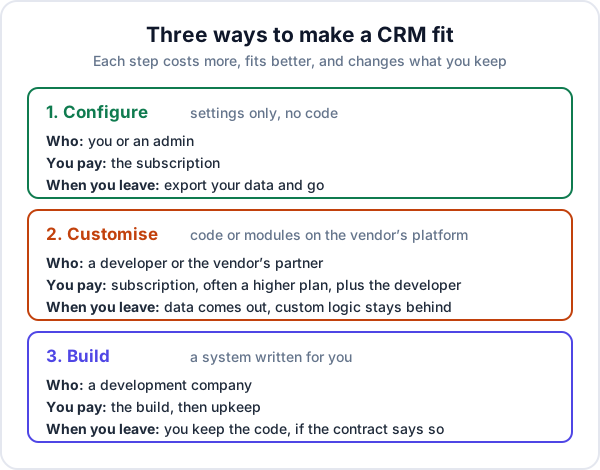
The three options side by side
| Configure | Customise | Build | |
|---|---|---|---|
| What changes | Fields, stages, roles, templates, built-in rules | Custom modules, code, add-ons, integrations on the vendor’s platform | Everything; the system is written for you |
| Who does it | You or an admin, in an afternoon or a week | A developer or the vendor’s partner | A development company |
| What you pay | The subscription | The subscription, often a higher plan, plus the developer | The build, then upkeep |
| Vendor updates | Arrive and keep working | Can break the custom work; someone retests | You decide when anything changes |
| Price grows with | Users, on per-seat plans | Users, and every new custom piece | New features you ask for |
| When you leave | Export your data and go | Data exports; the custom logic stays behind | You keep the code, if the contract assigns it |
Configure first: what settings usually cover
Most requirements that sound unique are configuration. A good CRM’s settings normally handle:
- Extra fields on a lead or customer, and which ones are compulsory
- Your own pipeline stages, or a mapping of your words onto its stages
- Roles, so a salesperson sees only their own leads
- Quotation and message templates, with your terms and GST details
- Simple automatic steps the product already offers, such as a follow-up booked after a quotation goes out
- Importing your old data and exporting it again
The step most businesses skip is writing the gap list down. Take a sheet of paper and list every way the CRM does not match your work. Then, next to each item, write which of three things it is: a setting you have not found, a habit your team would need to change, or a real gap. Often the third column is short. If it is empty, you do not need customising; you need an afternoon in the settings and the two-week rollout plan.
When customising a ready-made CRM makes sense
Customising is the right answer when the gap is real, small and stable. Good examples:
- One integration the product does not have, such as pushing finished jobs into your accounting software in your accountant’s format
- One extra record type, such as tracking which demo unit is at which customer’s site
- One calculation, such as a rate card that prices a quotation by size and distance
What these have in common: you can describe each in one sentence, it will not change every month, and if the vendor stopped supporting it tomorrow you could go back to a spreadsheet for that one thing without stopping the business.
The hidden costs of heavy customisation
One custom piece is manageable. Five, built over two years by whoever was available, is where small businesses get stuck. The costs come from four places.
Updates you did not ask for
A cloud CRM changes under you. Salesforce, for example, says it delivers three seasonal releases every year. Configuration usually rides through these. Custom code may not, so someone has to test each custom piece after each release, and fix what moved. That is a recurring cost that never appears on the first quote.
The plan upgrade, for every seat
The features that make customising possible are often in the top plans only. HubSpot, for example, makes creating custom objects available on Enterprise subscriptions. Plans like these are priced per user, so a gap that matters to two people can move all twelve of your users to a higher price, every month, for as long as you keep the CRM. Check your vendor’s own pricing page for which plan the feature needs before you agree to any work.
Lock-in
When you leave a customised CRM, your records come out as files. The custom modules, rules and code do not, because they were written for that vendor’s platform and run nowhere else. The more you customise, the more it costs to leave, and vendors know it.
The one developer who understands it
Custom work on a CRM is often done by a single freelancer or partner. If that person moves on and nothing was written down, the next one starts by reading someone else’s work at your expense. Ask for documentation and for the custom code to be kept in an account you own.
Three years of each option: a worked example
These are made-up round numbers, not anyone’s prices. Put your own in their place. Say a 12-person team needs one real gap filled: tracking demo units out on loan.
| Option | Assumptions | Three years |
|---|---|---|
| Configure, live with the gap | ₹800 per user a month; the gap stays in a spreadsheet | ₹3,45,600, plus whatever the spreadsheet costs you |
| Customise | Higher plan at ₹2,000 per user a month; ₹1,50,000 for the developer; ₹40,000 a year for fixes after updates | ₹8,64,000 + ₹1,50,000 + ₹1,20,000 = ₹11,34,000 |
| Build | ₹3,50,000 to build; ₹5,000 a month upkeep | ₹3,50,000 + ₹1,80,000 = ₹5,30,000 |
Three things to notice. The customised option costs the most, and most of it is the plan upgrade, not the developer. Configuring and living with the gap is cheapest on paper, so the real question is what that spreadsheet costs in hours and mistakes. And the order changes with team size: at four users, the customised option drops to about ₹5,58,000 and the build costs the same as before, while configuring falls to ₹1,15,200. Small teams should almost always configure. For what moves the build figure itself, see what custom software costs, and for a longer per-user comparison, our custom software guide.
Which one fits you: a decision table
| Your situation | Usually the right move |
|---|---|
| Under five users, ordinary sales work | Configure. Nothing else pays back. |
| The gap list is mostly settings and habits | Configure, then train the team |
| One stable gap, and the current plan already allows custom work | Customise that one thing |
| The gap needs a top-tier plan for every user | Price a build before you upgrade |
| Three or more custom pieces already, and updates keep breaking them | Price a build, or move to a CRM that fits without them |
| The work after the sale (jobs, dispatch, AMC visits) is the real process | Build, or a product made for that work |
| Nobody in the business will own the system after launch | Configure. Custom work of either kind needs an owner. |
Where low-code CRMs fit
Low-code CRM platforms let you or a consultant build modules and rules by configuring rather than coding. They sit between customising and building: quicker than a build, more flexible than settings. The catch is the same as customising. The system lives inside the vendor’s platform, is usually priced per user, and cannot be moved anywhere else. They suit a business with someone in-house who enjoys setting things up. They do not suit one that would hand the work to an outsider and hope.
Questions to ask before paying for CRM customisation
- Can this be done in settings? Ask the vendor’s support first; it costs nothing.
- Which plan does it need, and what will that plan cost for all our users over three years?
- Who retests it after each vendor update, and what does that cost?
- Where is the custom code kept, and is it in an account we own?
- Is it written down well enough for another developer to take over?
- If we leave this CRM, what comes with us and what stays behind?
If the answers add up to more than a build, a custom CRM development quote is worth getting, if only to compare.
When none of this is the answer
If staff do not enter enquiries, no customisation will fix it, and a custom build will not either. If the complaint is that the CRM “feels clunky” but nobody can say what it costs, try a second product before paying a developer. And if you are moving from spreadsheets, start with the ordinary version: move the spreadsheet into a CRM, use it for a month, and only then write the gap list.
Where Enkay Technologies fits
We sit on both sides, so here is what each does and does not do. Enkay CRM, our ready-made product, is a configure-only CRM: you set up roles with 14 switchable permissions, quotation follow-up timings and your lead sources, but there is no workflow builder and no custom rules. It is priced per business, not per seat, so adding users does not raise the bill. If it does the job, it is cheaper than anything custom.
When it does not, Enkay Technologies builds custom CRMs: a fixed written quote, a working first version in about 6 to 10 weeks, quotes starting at about ₹1,50,000 before GST, upkeep from ₹5,000 a month, and the source code and accounts transferred to you on final payment. We also read and extend CRMs someone else built, and sometimes the honest answer is to keep what you have.
Whichever way you go, CRM customization should be the last of the three options you reach for, not the first. Configure, write the gap list, price all three over three years, and pick the one you will still be happy paying for in year three.
Frequently asked questions
What is the difference between configuring and customising a CRM?
Configuring means changing a CRM through its own settings: fields, pipeline stages, roles, templates and the automation rules it already offers. No code is written and the vendor’s updates keep working. Customising means adding code, paid add-ons or a developer’s work on top of the product, so it does something the settings cannot. That work has to be looked after every time the product changes.
How much does CRM customisation cost?
There are usually three parts: the developer or partner who writes the custom work, a higher plan if the feature you need (such as custom objects) is only in a top tier, and fixes after the vendor’s updates. The higher plan is charged for every user every month, so over three years it is often bigger than the developer’s bill. Ask for all three in writing before you start.
Is it cheaper to customise a CRM or build a custom one?
For a small team with one or two gaps, customising is usually cheaper. It stops being cheaper when the gap needs a top-tier plan for every user, when several custom pieces depend on one developer, or when you are paying both a per-user subscription and a developer each month. Price all three options over three years with your real number of users.
What is a low-code CRM?
A low-code CRM is a platform where you, or a consultant, build screens, modules and rules by dragging and configuring rather than writing code. It sits between configuring and building. It is quicker than a custom build, but the system still lives inside the vendor’s platform and pricing, and it cannot be moved anywhere else.
When should a small business build its own CRM instead?
When the part of the work that does not fit costs you a measurable amount every week, when you have tried configuring two products and staff still work around both, or when the customisation you would need costs about as much as a build but leaves you renting. Owning the code only helps if someone will maintain it.
Keep reading
Not sure which of the three you need?
Tell us what the CRM gets wrong today. The scoping call and the written quote are free, and if configuring a ready-made CRM would do the job, we will say so.