The short answer to CRM vs ERP: a CRM (customer relationship management) runs everything up to the moment a customer says yes, and an ERP (enterprise resource planning) runs everything after it. The CRM tracks enquiries, follow-ups and quotations for the sales team. The ERP tracks orders, stock, purchases, dispatch, invoices and accounts for operations and finance.
Most small businesses need a CRM first, because they already have the accounting half of an ERP in software such as Tally, and what leaks is the front: enquiries nobody called back. This post explains both in plain words, puts them side by side, works through one order to show where each takes over, and covers when the two need to talk and when a custom system that does only your slice makes more sense.
What a CRM does
A CRM is a shared list of every enquiry and customer, with a next step and a date on each one. Leads arrive from IndiaMART, JustDial, your website or a phone call; someone is assigned; follow-ups are booked; a quotation goes out; the lead is won or lost, with a reason. The question a CRM answers is who should we be talking to today, and what did we promise them?
Its users are salespeople and the owner. Its records are conversations: calls, notes, quotations, stages. If you want the longer version, what CRM software does day to day walks through it.
What an ERP does
An ERP joins the back-office work of a business into one system: orders, stock, purchases, production, dispatch, invoicing and accounts. Tally Solutions, which makes TallyPrime, puts the split as back office for ERP (accounting, procurement, supply chain) against front office for CRM (marketing, sales, customer service), with ERP data being transaction-based and CRM data interaction-based.
The question an ERP answers is what do we have, what do we owe, and what are we owed? Its users are accounts, stores, purchase and production. Its records are transactions: a sales order, a goods receipt, an invoice, a payment.
CRM vs ERP, side by side
| CRM | ERP | |
|---|---|---|
| Runs | The front: from enquiry to “yes” | The back: from “yes” to money in the books |
| Main users | Sales team, owner | Accounts, stores, purchase, production |
| Main records | Leads, calls, follow-ups, quotations | Orders, stock, purchases, invoices, ledgers |
| Kind of data | Conversations, often incomplete | Transactions that must balance |
| Measures | Response time, conversion, lost reasons | Stock value, margins, receivables, tax |
| Goes wrong when | Nobody updates it, so follow-ups slip | Entries are late or wrong, so the books do not match |
| Setup | Days: import contacts, connect lead sources | Weeks or months: masters, opening stock, processes |
| Who usually pushes for it | The owner or sales head | The accountant or operations head |
The overlap is smaller than vendors make it sound: the customer’s details, the quotation that becomes an order, and the invoice and payment status that a salesperson wants to see before calling. Those three are where the two systems have to agree.
One order, start to finish: where each one takes over
A made-up example. A pump and motor dealer in Rajkot gets an IndiaMART enquiry for borewell pumps for a farm.
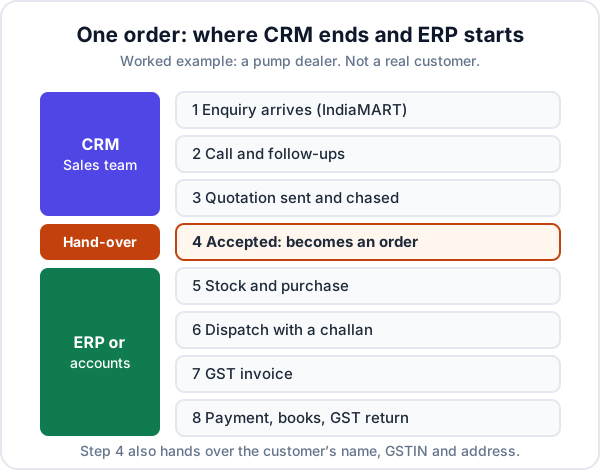
- Enquiry and call. The lead lands, a salesperson calls within the hour, and books a follow-up. CRM.
- Quotation and chasing. A quotation for ₹1,85,000 goes out on WhatsApp; two follow-ups later the farmer accepts. CRM.
- Order. The accepted quotation becomes an order. The hand-over.
- Stock and purchase. Two pumps are in stock; the third is ordered from the manufacturer. ERP or accounts.
- Dispatch, invoice, payment. Goods go out with a challan, a GST invoice is raised, and the money arrives in two parts. ERP or accounts.
- Books and GST return. The accountant closes the month. ERP or accounts.
In most small businesses, step 3 is a person retyping the quotation into Tally, and the salesperson never finds out whether the second payment came in. That gap, not the absence of an ERP, is usually the real problem.
Which does a small business need first?
Start with the system that fixes the leak costing you the most money today. For most businesses that win work through enquiries, that is the CRM: lost leads are invisible and expensive, while the books already get done because the law requires them. Choose operations or accounting software first only if the back end is where money goes missing.
| What you see | Start with |
|---|---|
| Enquiries from portals sit unanswered for hours | CRM |
| Quotations go out and nobody chases them | CRM |
| You cannot say which lead source brings paying customers | CRM |
| Stock in the software never matches the godown | Inventory or ERP |
| Orders ship late because purchase did not know | Inventory or ERP |
| Month-end takes a week and the numbers still do not tie | Accounting or ERP |
| You manufacture to a bill of materials | ERP |
| Sales and accounts both work fine, but someone retypes between them | Neither: connect the two |
If you are not yet sure whether you even need a full CRM, or just a cleaner way of handling enquiries, lead management vs CRM covers that smaller step.
You may already have half an ERP
Plenty of small traders and service firms already keep their books, GST and often their stock in accounting software. Tally Solutions describes TallyPrime as bringing accounting and inventory data together in one system. For a business with one godown and no production, that is most of what an ERP would give you. Buying an ERP on top of it, to get a CRM module, means migrating your accounts to fix a sales problem.
When the CRM and the accounts need to talk
Two separate systems are fine until the same thing gets typed twice. Watch for these signs:
- Every accepted quotation is retyped as an invoice in the accounts software.
- Salespeople phone the accountant to ask whether a customer has paid before quoting again.
- Customer names and GSTINs are spelt differently in each system.
- The owner’s sales figure and the accountant’s never match.
There are three ways to connect them, from cheapest to most work:
| Level | How it works | Good for |
|---|---|---|
| Export and import | The CRM exports the month’s invoices or customers as a file; the accountant imports or checks them | A few dozen invoices a month |
| One-way push | Each invoice or new customer is sent from the CRM into the accounts software automatically | Daily invoicing, one place of entry |
| Two-way sync | Payments and balances also flow back, so sales sees what is owed | Teams that quote repeat customers often |
With Tally, the automatic routes are documented. Tally’s own integration notes say other software can create or update vouchers and masters by sending XML over HTTP, and can read ledgers and reports the same way or through ODBC. To read data, Tally must be running in server mode with its HTTP listener on (port 9000 by default). In practice that means the computer running Tally has to be on, and a CRM in the cloud usually needs a small connector on that computer to pass data across.
Before connecting anything, agree in writing that customers are created in one place and invoices in one place. Two-way sync without that rule produces duplicates faster than a person ever could.
When a custom system makes sense instead
Sometimes the CRM fits, the accounts software fits, and the trouble is the work in between: orders delivered in parts, installations and service visits after the sale, dealer orders arriving as WhatsApp photos. No CRM covers it because it is not sales; no small-business accounting package covers it because it is not accounts. Buying a full ERP for that slice means paying for, and training everyone on, the nine-tenths you do not need.
That is the case for a custom CRM or internal system: one that covers the front of the business and the slice of the back that is yours, then hands invoices to the accounts software you already trust. Enkay Technologies builds these, including the connection to Tally, with a fixed written quote and the code handed over to you. Remember to budget for upkeep afterwards; what software maintenance costs shows what that looks like over a year.
When not to build: if you manufacture to a bill of materials, run several warehouses or companies, or need payroll and full accounting in the same system, buy an ERP. Those are solved problems, and a custom version would cost more and do less. The buy-or-build questions apply here too.
Where Enkay CRM fits
Enkay CRM is a CRM, not an ERP. It brings IndiaMART, JustDial and website enquiries into one list, books follow-ups, runs a sales pipeline, and sends GST quotations with a link the customer can accept from their phone. It also raises GST invoices from a quotation, records payments, tracks products and stock, and gives you a GST summary and an invoice register to export for your accountant.
What it does not do: keep your ledgers, file returns, plan production or run payroll, and it does not connect to Tally directly. For many small businesses that is the right split: Enkay CRM for the front, the accounting software they already have for the books, and the invoice register as the bridge.
Whichever way you go, settle CRM vs ERP by asking where your money is leaking today, not by which system sounds bigger. Fix that end first, then connect the two only when the retyping starts to cost more than the connection would.
Frequently asked questions
What is the difference between CRM and ERP?
A CRM runs the front of the business: enquiries, follow-ups, quotations and customers, up to the moment a customer says yes. An ERP runs the back: orders, stock, purchases, production, dispatch, invoices and accounts, from that yes until the money is in the books. The CRM is used mainly by sales; the ERP by operations and accounts.
Do I need CRM or ERP for a small business?
Look at where money is leaking. If enquiries go unanswered and quotations are never chased, you need a CRM first. If stock counts are wrong, orders ship late or the books do not match, you need better operations or accounting software first. Many small businesses already have the accounting part in software such as Tally and need the CRM.
Is Tally an ERP?
Tally Solutions calls TallyPrime its flagship business software and says it brings accounting and inventory data together in one system. For a small trader that covers the accounts and stock part of what an ERP does. It does not manage enquiries, follow-ups or a sales pipeline, which is why many businesses run a CRM alongside it.
Can a CRM and Tally share data?
Yes. The simplest way is a regular export from the CRM that your accountant imports. Tally also accepts data from other software in its own XML format over HTTP, so a CRM or a custom connector can create invoices and customer records in Tally directly. For that, Tally has to be running with its HTTP listener switched on.
Can one system do both CRM and ERP?
Some large ERP suites include a CRM module, and some CRMs add invoicing and stock. Either can work if the half you need most is the strong half. The trap is buying a big suite for one module and making your whole team learn the rest. A custom system that covers only your slice of each is a third option.
Should I buy an ERP or build a custom one?
Buy, if you manufacture to a bill of materials, run several warehouses or companies, or need payroll and full accounting in the same place. Those are solved problems. Consider a custom build only for the narrow slice no product handles, such as dispatch against part orders or jobs after the sale, and connect it to the accounting software you already use.
Keep reading
Stuck between a CRM and an ERP?
Tell us where work gets retyped or lost between sales and accounts. The scoping call is free, and if a ready-made product would do it, we will say which one.