A small business customer database should hold five things for every customer: who they are, how to reach them, how to bill them, what they bought and when, and when you should next be in touch. Everything else is optional. One row per customer, the same columns for everyone, and the mobile number as the key that ties it all together.
Most guides on this topic list twenty fields and stop there. The fields are the easy part. What decides whether a customer database earns money is three other things: whether it records the dates that tell you when to call, whether it stays clean after the first month, and whether you can find the forty customers due for a service this week in under a minute. This post covers all three, plus what to leave out, which matters more now that India has data protection rules for customer data.
Why a customer database matters more than a lead list
A lead list is a queue: each enquiry is won or lost within weeks and then it is done. A customer database is an asset that grows. The person who bought a water purifier in 2024 needs a filter change in 2025, recommends you to a neighbour in 2026 and replaces the unit in 2029. None of that happens if the only record of them is an invoice in the billing software and a contact saved as “Sharma ji RO” on one salesperson’s phone.
If you are unsure where the line between the two sits, our post on lead management versus CRM covers it. The short version: when a lead is won, it becomes a customer record, and that record is what this post is about.
What to record about every customer
Think of the record in five layers. The first two are needed for everyone; the rest depend on what you sell.
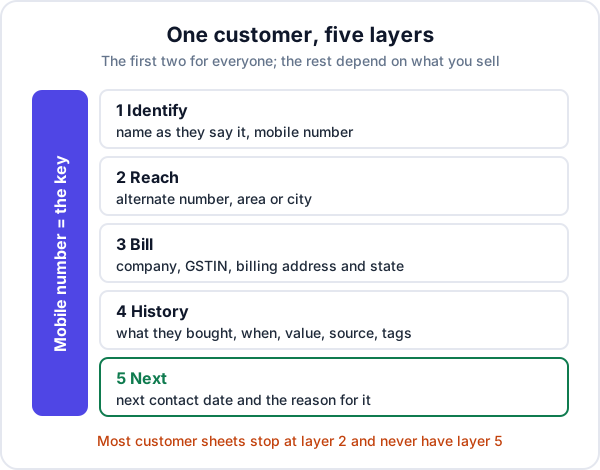
| Field | Why it earns its place | Example |
|---|---|---|
| Name | As the customer says it, so whoever calls uses the right name | Rekha Kulkarni |
| Mobile number | The key. One format, ten digits, no spaces. Finds duplicates and links purchases | 9822012345 |
| Alternate number | The office line, or the spouse who actually answers | 9822054321 |
| Area or city | Plans service routes and local offers | Gangapur Road, Nashik |
| Company and GSTIN | A B2B tax invoice must show a registered buyer’s GSTIN | Kulkarni Dental Clinic, 27AAAAA0000A1Z5 |
| Billing address and state | The state decides CGST plus SGST, or IGST | Maharashtra |
| What they bought | Model, quantity and, for equipment, the serial number | RO purifier, 10 L, serial RX-4471 |
| When they bought it | Every service, renewal and replacement date is worked out from this | 12-Nov-2025 |
| Value | Separates a ₹900 customer from a ₹90,000 one | ₹14,500 |
| Source | Shows which channels bring customers who come back | JustDial, referral |
| Tags | Type and segment, from a fixed list | home, clinic, repeat |
| Next contact date and reason | Turns the list into a call list | 10-Nov-2026, filter change |
For GST invoice details, our post on what a GST invoice must show lists the fields properly. The bold rows in the table are the minimum. If you record nothing else, record those six.
The column most sheets are missing
Look at any customer list kept in a spreadsheet and you will usually find names, numbers and maybe an address. You will rarely find a date in the future. Yet that is the column that makes money. A purchase date tells you what happened; a next-contact date tells you what to do on Monday.
The reason can be anything that fits your trade: a filter change at twelve months, a warranty that ends in March, a service before summer, a school that reorders uniforms every April. If you sell something with no natural repeat, the next date can be a referral request a month after the job, which our post on getting repeat AC service customers walks through for one trade.
What to leave out
A customer database gets worse, not better, when it collects things nobody uses. Every extra column is one more thing to type, one more gap, and one more piece of personal data you are responsible for. Leave out:
- Card numbers, UPI PINs and bank passwords. Never. Record that a payment was made, not how to make one.
- Copies of ID documents unless a law or the job actually requires them. If you do need one, keep it out of the shared sheet.
- Device passwords. Installers often note the CCTV recorder or Wi-Fi password in the customer row so the technician has it next time. Anyone with the sheet now has it too. Ask the customer to keep it, or store it somewhere with its own lock.
- Remarks you would not want the customer to read. “Difficult, haggles” is a judgement, not data, and people can ask for a copy of what you hold about them.
- Date of birth, anniversary, family names, unless you will actually send a greeting. Most businesses collect these once and never use them.
Five rules that keep a customer database clean
A database is only as good as its worst month. These rules are boring, and they are the difference between a list you trust and one you stop opening.
- One row per customer. Purchases go on a second sheet, one row per purchase, with the mobile number in the first column. A customer who buys three times is still one customer.
- The mobile number in one format. Store it as text, ten digits, no +91, no spaces. Otherwise “98220 12345” and “+919822012345” are two different customers and the lookup fails.
- Fixed lists for anything you will filter on. Tags, area and source come from dropdowns, not free typing. “JustDial”, “Just dial” and “JD” are three sources to a filter.
- Dates as dates. One format, in real date cells, so you can sort and filter by month. Not “Diwali last year”.
- No colour as data. Green for paid and yellow for pending means nothing to a filter and nothing to the next person. Make it a column.
Then fifteen minutes a week: merge duplicates, fill in what is missing for the customers added that week, and fix numbers that bounced. Once a quarter, remove people who asked not to be contacted and records you no longer have a reason to keep.
A worked example: one filter, one week of work
An example, with made-up figures. A water purifier dealer in Nashik has 640 customers in a sheet built along the lines above: one row each, the purchase date in a real date column, a source and a next-contact date. In the first week of October, the owner filters for customers whose purchase was between October and December 2025 and who have had no service since.
| Step | Result |
|---|---|
| Customers who bought in Oct–Dec 2025, no service since | 74 |
| Wrong or switched-off numbers | 6 |
| Reached by call or WhatsApp over five days | 52 |
| Booked a filter change at, say, ₹1,400 | 21 |
| Revenue from one filter and one week of calls | ₹29,400 |
The point is not the figure, which will differ for every trade and every month. It is that the work took one filter on two columns. Without a purchase date in a real date cell, the same list is 640 names and a vague memory of who bought last winter. Most owners find that the customer database pays for its upkeep the first time they use it like this. The six numbers that bounced are worth fixing the same day; that is what the weekly fifteen minutes is for.
The same filter works for leads that went cold rather than customers; our post on reviving old leads covers that list.
Spreadsheet or CRM?
A spreadsheet is a perfectly good customer database for one person and a few hundred customers. It starts to fail in predictable ways:
- two or three people edit it and copies multiply on phones and laptops;
- the history of each customer ends up in one ever-longer notes cell;
- quotations, invoices and service visits live somewhere else, so the record is never complete;
- nobody looks at the next-contact column, because nothing brings it to them.
When two of those are true, it is time to move. Our guide to moving from Excel or Google Sheets to a CRM covers cleaning the columns and importing without losing anything. Whichever you use, keep recording the source of each customer; our post on tracking lead sources shows how that tells you which channels bring the customers who come back.
Customer data and the law
If your business is in India, the Digital Personal Data Protection Act, 2023 covers personal data you hold in digital form, which includes a customer spreadsheet. According to the government’s PIB backgrounder on the DPDP Rules, the Rules were notified on 14 November 2025 with an eighteen-month period for phased compliance. The principles it lists are consent and transparency, purpose limitation, data minimisation, accuracy, storage limitation, security safeguards and accountability. People can ask for access to their data, for corrections and for erasure in certain situations, and businesses must answer such requests within ninety days.
For a small business, that translates into habits rather than paperwork: collect what you need for a reason you could explain to the customer, keep it correct, keep the sheet away from people who do not need it, and delete what you no longer have a reason to hold. The “what to leave out” list above is the easiest place to start. This is general information, not legal advice; if customer data is central to your business, speak to a lawyer.
Where Enkay CRM fits, and where it does not
In Enkay CRM, from Enkay Technologies, a won lead is converted into a customer from the lead page, and the two stay linked, so you can always see where the customer came from. A customer record holds name, phone, email, company, GSTIN, address, city and tags. The customer page has call and WhatsApp buttons and lists their quotations, invoices and jobs together. Customers export to CSV on every plan, including Free, and can be imported from CSV on the Business plan.
What it does not do: there are no custom fields, so a serial number or a filter-change date has no column of its own; use tags, or keep that detail in your sheet alongside. Nothing is sent to customers automatically, so the call on Monday is still yours to make. And it does not record consent for marketing messages; if you need that, keep it yourself.
The short version
A good customer database records who each customer is, how to reach and bill them, what they bought and when, where they came from and when to contact them next. Keep it to one row per customer with the mobile number in one format, use fixed lists and real dates, and leave out what you will never use. Spend fifteen minutes a week keeping it clean. Then use it: one filter on a purchase date is often enough to fill a week with calls that customers are glad to get.
Frequently asked questions
What is a customer database?
A customer database is one list of everyone who has bought from you, with the same details recorded for each: who they are, how to reach them, how to bill them, what they bought and when, and when you should next be in touch. It can be a spreadsheet or a CRM. What makes it a database is one row per customer and the same columns for everyone.
What should a customer database include?
At minimum: name, mobile number, what they bought, when they bought it, and how they first found you. Business customers also need the company name, GSTIN and billing address. Add tags for type and area, the date of the last contact and the date of the next one. Leave out anything you will never use.
Can I keep my customer database in Excel?
Yes, for one person and a few hundred customers. Keep one row per customer, store the mobile number as text in one format, use dropdown lists for type and area, and keep purchases on a second sheet linked by mobile number. A sheet starts to fail when several people edit it or when the history lives in a notes cell.
Is it legal to keep customer data?
Yes, for a clear purpose. In India the Digital Personal Data Protection Act, 2023 applies to personal data held digitally. Its principles include collecting only what you need for a stated purpose, keeping it accurate and secure, and deleting it when the purpose is over. Most duties under the 2025 Rules apply after an 18-month phase-in. This is general information, not legal advice.
How often should I clean my customer database?
Spend fifteen minutes a week merging duplicates and filling gaps for customers added that week, and do a fuller check once a quarter: wrong numbers, customers who asked not to be contacted, and old records you no longer have a reason to keep.
What is the difference between a lead list and a customer database?
A lead list holds enquiries that have not bought yet, and each one is either won or lost within weeks. A customer database holds people who have bought, and it grows in value for years through repeat orders, service and referrals. When a lead is won it should become a customer record, not stay a row in the lead list.
Keep reading
Try Enkay CRM free
Every enquiry in one list, a follow-up date on each one, and your whole team on the same page. Free for one user — not a trial, no credit card.