Google Business Profile leads arrive in four ways: a tap on Call, a tap on Website followed by an enquiry form, a request for directions that ends with someone at your counter, and, for some categories, a booking. You get more of them by choosing the right primary category, listing your services, showing photos of real work, asking every customer for a review, and pointing the website link at the page for your main service instead of the home page.
The part most guides skip is what happens next. Google counts taps, not enquiries, and since July 2024 it no longer shows who called. So unless you tag the website link and write “Google profile” on every caller’s lead, you cannot tell how much work the profile brings in, or whether every enquiry it sent was called back. This guide covers both halves.
What a Google Business Profile lead actually is
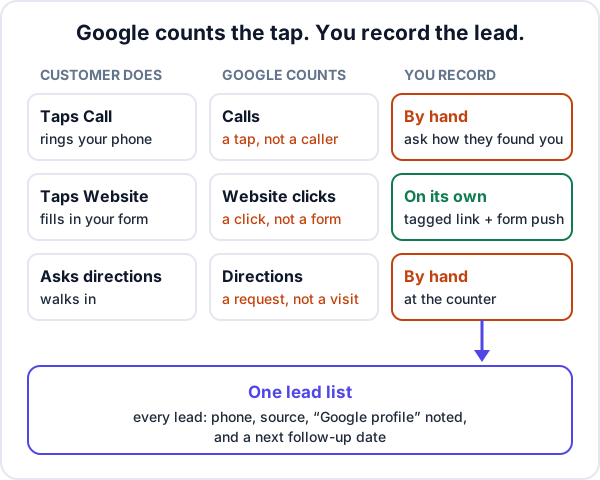
Google’s Performance report shows views, searches, calls, website clicks, directions and, where they apply, bookings. Each number counts an action on the profile, which is not the same thing as a lead in your list.
| What the customer does | What Google counts | What you have to record |
|---|---|---|
| Taps Call | “The number of times a customer clicked on the call button” | The caller as a lead, with the source and a next follow-up date |
| Taps Website, then fills in your form | Website clicks | Nothing by hand, if the form posts into your lead list and the link is tagged |
| Asks for directions, then walks in | Directions | The visitor as a lead, if they leave with a quotation to think about |
| Books through a booking link | Bookings, for categories that support them | The booking in whatever system takes it |
Two older routes have gone. Google switched off chat and call history on 31 July 2024, and its help page now says customers can no longer request quotes through the profile. If an old guide tells you to turn on messaging, it is out of date.
Seven things that decide how many enquiries the profile sends
None of these is a trick. They are the parts of the profile a customer reads before deciding whether to tap Call.
1. The most specific primary category
Google’s category guidance is to pick a specific primary category from its list, and it says plainly that the categories you choose affect your local ranking. Add a few more for other things you do, but “do not select a category for every product or service”. An electrician who mostly installs solar should check whether a solar category fits better than the general one.
2. A service list that matches what people search
Service businesses can add services, including custom ones, each with a description and a price. Write them the way customers say them: “Split AC gas refilling”, not “HVAC maintenance solutions”. Keep prices and phone numbers out of the service names; Google rejects custom services that break its rules.
3. Photos of the work, not stock images
Google’s photo tips suggest at least three photos each of the outside, the inside, your team at work and the team itself, as JPG or PNG. For a business that works at the customer’s site, the at-work photos do the selling: a finished CCTV rack, a solar array on a real roof, a technician with your uniform on.
4. Reviews, asked for every time
Google lets you create a review link or QR code from the profile and recommends asking customers to use it and replying to reviews; it also says more reviews and positive ratings can help your local ranking. What it strictly prohibits is offering anything in return: a discount, a free service, a gift. The habit that works is dull: send the link on WhatsApp the day the job is finished, to every customer, not only the happy ones.
5. Updates with a button
Posts can be an update, an offer or an event, and an update can carry a button with a link. Google archives posts older than six months unless they have a date range, so a monthly update showing a recent job keeps the profile looking alive. Leave phone numbers out of the text; posts with a number Google cannot link to your business may be rejected.
6. A website link that lands on the right page
Most profiles link to the home page, which then makes the visitor hunt. If 80% of your work is one service, link to that service’s page, with a call button, a WhatsApp button and a short form in the first screen. The next section covers tagging the link.
7. A phone that gets answered
The cheapest lead the profile sends is a phone call, and it is the easiest one to lose. Google’s guidelines ask for a local number under the business’s direct control. Make it a number someone answers during your listed hours, and keep the hours right, including holidays.
Do not add “Best AC repair Pune” to your business name; Google’s guidelines do not allow unnecessary information in the name. If you work from home and go to customers, hide your address, as the guidelines ask of service-area businesses. And never pay for reviews.
How to track leads from Google Maps and your profile
Tracking needs two separate fixes, because enquiries arrive two ways: through your website, and straight to your phone.
Tag the website link with UTM parameters
Without a tag, a visit from your profile is not labelled as one in Google Analytics, so you are left guessing. Add the three parameters Google’s campaign URL guide says to always use:
https://www.yourbusiness.com/ac-repair/?utm_source=google&utm_medium=organic&utm_campaign=gbpValues are case sensitive, so pick one spelling and keep it. Google’s profile guidelines forbid links that redirect people to pages other than your own business’s; they do not mention tracking parameters, and a tagged link to your own page is still your website. Analytics will now show visits and form submissions from the profile as their own line.
That tells you how many form enquiries came from the profile. It does not put the source on each lead. If you want that too, the form has to carry it: ask whoever built the site to add a line such as “via Google profile” to the message the form sends whenever the page was opened from the tagged link. Then send the form straight into your CRM, so the enquiry becomes a lead with that line in its requirement, not an email.
Ask every caller, and write it down
Calls are where tracking breaks. Google no longer lists them, and the Calls figure counts taps. So the only reliable record is the one you make: on every new call, ask “How did you find us?”, and add the caller as a lead with the source and a note saying Google profile or Google Maps. Walk-ins who came by directions get the same treatment.
Compare the two numbers once a month
Here is a made-up example. An AC service business in Nagpur opens its Performance report for September and sees 48 calls. Its lead list has 29 leads marked as coming from the Google profile. That leaves 19 taps to explain:
- Existing customers who searched your name to find the number. Not new leads, and fine.
- Taps that never rang: a pocket tap, a change of mind. Nothing to do.
- Missed calls nobody returned. Check the call log on the business phone against the month.
- Calls answered but never written down. The most expensive line, because nobody followed them up.
You will never get the two numbers to match, and that is not the aim. The aim is to see whether the gap is growing, and which of the last two lines it comes from. A full method for comparing channels in rupees is in how to track lead sources and know which ones pay.
Make sure every Google enquiry is followed up
Someone who finds you on Google Maps sees your competitors on the same screen, and can ring the next one in a few seconds. Treat a missed call from the profile as a lead that is already shopping around. Three rules cover most of it:
- Return missed calls within the hour during working hours. For why, and how to measure your own speed, see how fast to reply to a new lead.
- Give every lead a next follow-up date before you put the phone down: the site visit, the quotation, the call back after they speak to the landlord.
- Keep one list. Profile callers, website forms, IndiaMART buy-leads and WhatsApp messages in one place, so a busy week does not decide which ones get called.
Honest limits
- The profile is not a switch. Google says local results rest mainly on relevance, distance and how well known a business is, and that there is no way to pay for a better local ranking. A complete profile can still sit below a competitor nearer the searcher, or one that has been collecting reviews for years.
- UTM tags count visits, not customers. They tell you the profile sent 60 visitors and 7 forms; whether those became paid jobs is in your lead list.
- Linking the profile to Google Analytics shows calls, website clicks and directions next to your site data, but Google’s help page says only the last six months are available, and the figures cannot be filtered by profile.
- If calls come in and nothing comes of them, the fix is not in the profile. Read why a website gets visitors and no enquiries for the website side, and look hard at the follow-up for the rest.
Where Enkay CRM fits
Lead management in Enkay CRM handles the second half of this guide, not the first. It has no Google Business Profile connection, so it does not read your calls, reviews or Performance figures.
What it does: a profile caller is added by hand in a few seconds, with a phone number as the only required field, the Phone call source, and “Google profile” in the requirement. There are no custom source labels, so that note is how you tell profile callers from other calls. If your website form posts to Enkay’s push URL, form enquiries arrive as leads on their own, tagged Website form, and the message the form sends becomes the requirement. Enkay does not read UTM parameters itself. Every lead gets a next follow-up date, and the Today screen shows overdue ones first, so a profile caller cannot sit forgotten.
If the profile is set up and the website is the weak link, Enkay Technologies also builds business websites with a page per service and a form that posts into your CRM.
Google Business Profile leads are cheap to get and easy to lose. Fill in the profile once, tag the link, ask every caller where they found you, and give every enquiry a date. Then the profile becomes a number you can check, not a feeling.
Frequently asked questions
How do I get more leads from my Google Business Profile?
Choose the most specific primary category, list each service with a short description, add photos of your team at work, ask every finished customer for a review using Google’s review link or QR code, and point the website link at the page for your main service rather than a generic home page. Then answer the phone: calls from the profile are worth nothing if they ring out.
Can I see who called my business from Google Maps?
No. Google switched off call history in Business Profiles on 31 July 2024. The Performance report still shows a Calls figure, but Google defines it as the number of times someone tapped the call button, not a list of callers or connected calls. To know which callers came from the profile, ask “How did you find us?” and write it on the lead.
Can I put a UTM link in my Google Business Profile website field?
Google asks for the full URL of your website and forbids links that redirect people to landing pages other than your own business’s, but its guidelines do not mention tracking parameters. A UTM-tagged link to a page on your own site is still your website, and many businesses use one. Tag it with utm_source, utm_medium and utm_campaign so Google Analytics can separate those visits.
Why does my profile show more calls than I have leads?
Because the Calls figure counts taps, not new enquiries. It includes existing customers looking up your number, people who tapped and hung up before it rang, calls you missed, and calls that were answered but never written down. The last two are the ones to fix. Compare the figure with your lead list every month.
Does Google Business Profile still have messaging or quote requests?
No. Google ended chat in Business Profiles on 31 July 2024, and its help page says customers can no longer request quotes through the profile. Enquiries now come as calls, visits to your website, direction requests and walk-ins, plus bookings for categories that can add a booking link.
Can Enkay CRM pull leads from Google Business Profile?
No. Enkay CRM has no Google Business Profile connection. Profile callers are added by hand in a few seconds, with the Phone call source and “Google profile” in the requirement. Enquiries sent through the form on your website arrive on their own, tagged Website form, if the form posts to Enkay’s push URL.
Keep reading
Try Enkay CRM free
Every enquiry in one list, a follow-up date on each one, and your whole team on the same page. Free for one user — not a trial, no credit card.