A landing page for Google Ads is a page built for one ad campaign: it repeats the promise the ad made, shows proof, and puts a call button, a WhatsApp button and a short form in the first screen on a phone. It should not be your home page. A home page talks to everyone; the person who clicked your ad wants the one thing the ad offered, and will leave if they have to hunt for it.
The same applies to a landing page for Facebook ads, with one difference covered below. This guide sets out what goes on the page, gives a checklist you can hold your current page against, and shows how to work out what each enquiry costs you in rupees, because that number, not the click count, tells you whether the page works.
Why a landing page for Google Ads beats your home page
Google’s advice to advertisers is direct: choose a landing page that closely matches your ad and keywords, and don’t make people hunt around for information. Landing page experience is one of the three parts of Quality Score, defined as how relevant and useful the page is to people who click your ad. Google also says higher-quality ads typically cost less per click, and it counts the landing page experience in that quality.
Meta puts it as a rule rather than advice. Its Advertising Standards say the products and services promoted in an ad must match those promoted on the landing page, and that review can include the landing page.
| Home page | Landing page | |
|---|---|---|
| Written for | Everyone: customers, suppliers, job seekers | People who clicked one ad |
| Services shown | All of them | The one in the ad |
| Headline | Your company name or a slogan | The ad’s promise, in the same words |
| Ways out | A full menu and a dozen links | Call, WhatsApp, form |
| What you can measure | Enquiries mixed with every other visitor’s | Enquiries from that campaign alone |
The last row is the one owners underrate. When ads go to the home page, enquiries from the ad are mixed with enquiries from everything else, and nobody can say what the ad spend bought.
What goes on a landing page for a service business
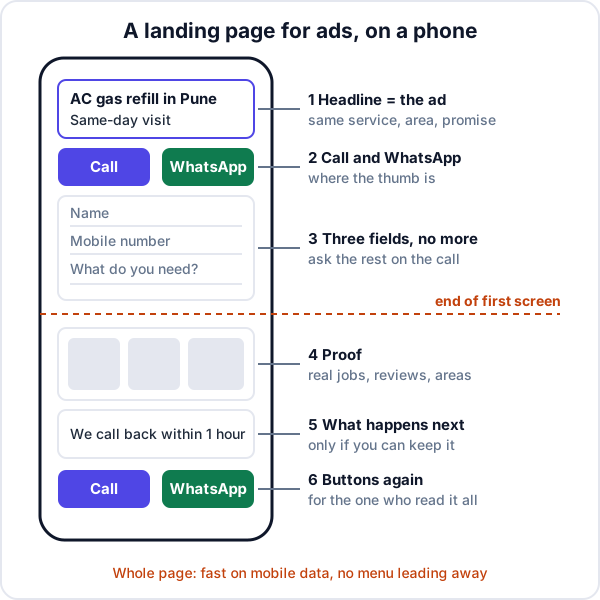
One service, one offer
If the ad says “AC gas refill”, the page is about AC gas refill. Not your installation work, not your AMC plans, not the fridges you also repair. A second offer is a second decision, and a visitor who has to make two decisions often makes neither. Running ads for three services means three pages.
A headline that repeats the ad
The visitor has just read your ad. The headline should confirm they are in the right place, in the same words: the service, the area and the promise. “AC gas refill in Pune, same-day visit” beats “Welcome to Cool Air Services”. Google’s wording is to keep messaging consistent from ad to landing page, and to mirror the ad’s call to action.
Call, WhatsApp and a form in the first screen
Google reminds advertisers that many customers will visit on a mobile device. Put a tap-to-call button, a WhatsApp button and the form where the thumb already is, and repeat the buttons at the bottom. Some people would rather type than talk; some would rather talk than wait. Give both. If you are unsure which WhatsApp route suits a small team, see WhatsApp Business API or click-to-chat.
A form that asks for almost nothing
Name, mobile number, one line about what they need. That is enough to call back. Budget, email, address and “how did you hear about us” can all be asked on the call. You already know how they heard: they clicked your ad.
Proof a stranger can check
Photos of jobs you did, not stock images. Reviews, ideally with a link to where they live. The areas you cover, named. A real address or at least a real phone number. Prices or a “from” price, if your trade allows it. Google suggests adding reviews that show real opinions from customers.
What happens after they enquire
One line: “We call back within the hour, 9 am to 7 pm, Monday to Saturday.” It sets an expectation and commits you to it. Only write it if you can keep it.
Speed on mobile data
Google tells advertisers to make the site mobile friendly and improve loading speed. Open your page on your own phone with Wi-Fi switched off. Large photos straight off a camera, sliders and chat widgets are the usual reasons it crawls. More on this in why a website gets visitors and no enquiries.
Google Ads and Facebook ads: one page or two?
The anatomy is the same; the visitor is not. Someone who clicks a Google search ad typed “AC gas refill near me” a moment ago. They want a price, a time and a number. A short page works.
Someone who clicks a Facebook or Instagram ad was scrolling. They may not have thought about their AC until they saw the ad. They need more of the page: why now, what it costs, what other customers said. If you run both, a longer version of the page for Meta traffic is usually worth the extra hour. Either way, Meta requires the page to promote what the ad promoted.
Meta also runs lead ads with instant forms, which open straight from the ad with some fields filled in automatically, so no landing page is involved. Meta itself points to a form on your website for higher-consideration purchases, or when the customer needs your site to get a quote. A form that takes two taps can also bring in people who were barely interested, so judge either route by cost per customer, not cost per form.
Landing page checklist
Hold your current page against this. Every “no” is a reason some of the people you paid for left.
| Check | Why it matters | How to check |
|---|---|---|
| One service, matching the ad | A second offer is a second decision | Read the ad, then the page. Same service? |
| Headline repeats the ad’s words | Confirms they are in the right place | Put ad and headline side by side |
| Call and WhatsApp buttons in the first screen | Phone visitors do not scroll to find you | Open on your phone; do not scroll |
| Form of three fields or fewer | Every field loses some people | Count them |
| Real photos and named areas | A stranger needs a reason to trust you | Would a doubter believe it? |
| Loads quickly on mobile data | Slow pages lose visitors before they see anything | Wi-Fi off, count the seconds |
| No menu leading elsewhere | Every link out is a way to wander off | Count the links that are not call, WhatsApp or form |
| Form reaches a person | A form posting into nothing wastes the whole budget | Submit it yourself and see where it lands |
| Separate page or tag per campaign | Otherwise you cannot tell which ad paid | Can you count this campaign’s enquiries alone? |
Measure cost per enquiry, then cost per customer
The number that tells you whether the landing page works is cost per enquiry: what you spent on the ads, divided by the enquiries they produced. Count calls and WhatsApp messages as well as forms, and count them from your lead list, because a click is not an enquiry.
Here is a made-up example. A Pune AC service business spends ₹20,000 in a month on Google Ads and gets 800 clicks. The rates of enquiry below are invented to show the arithmetic, not benchmarks; your own will differ.
| Ads to home page | Ads to landing page | |
|---|---|---|
| Spend | ₹20,000 | ₹20,000 |
| Clicks | 800 | 800 |
| Enquiries (forms, calls, WhatsApp) | 12 | 32 |
| Cost per enquiry | ₹1,667 | ₹625 |
| Jobs won | 4 | 10 |
| Cost per customer | ₹5,000 | ₹2,000 |
If an average job is worth ₹4,500, the home page version loses money on every customer and the landing page version does not. Same ads, same budget, same clicks. The only thing that changed is what the visitor saw after the click.
Now suppose that of the 32 landing page enquiries, 8 were never called back because they arrived on a busy Saturday. The business paid ₹5,000 for those 8 and got nothing. A better page cannot fix that; a follow-up habit can. For comparing ads against IndiaMART, JustDial and referrals the same way, see how to track lead sources and know which ones pay.
Follow up every enquiry fast
An enquiry from an ad is the most expensive lead you get, because you paid for the click whether or not anyone called back. Three habits protect it:
- Send the form somewhere with a list, not a mailbox. Sending the form into a CRM makes each enquiry a lead with a follow-up date.
- Call within the hour during working hours. Someone who clicked an ad may well have clicked a competitor’s too. How fast to reply to a new lead sets targets by type of lead.
- Write the source on every lead, including the calls and WhatsApp messages from the page, so the arithmetic above has real numbers in it.
When a landing page will not help
- The offer is the problem. If your price is well above the market or the service area is too wide, a better page brings the same “no” faster.
- The ads are wrong. Clicks on keywords that are not your service will not turn into enquiries on any page.
- Too little budget to tell. With 50 clicks a month, a difference of one or two enquiries is noise. Run the page for long enough to get a few hundred clicks before judging it.
- Nobody calls back. If enquiries arrive and go cold, the leak is after the page, not on it.
Where Enkay Technologies fits
Enkay Technologies builds business websites and landing pages for ads: a page for each campaign with one offer and one form, call and WhatsApp buttons on every page on a phone, Google Analytics counting enquiry clicks and form submissions, and a form that posts to your email and your CRM. Business websites start at about ₹25,000 before GST, quoted in writing after a free scoping call; see all our services.
On the follow-up side, Enkay CRM takes website form enquiries automatically, tagged Website form, with the message the form sends as the requirement. It does not read UTM tags, so if you run several campaigns, have each page’s form add the campaign name to its message. Facebook and Instagram lead ads do not flow in automatically yet (the connection is waiting on Meta’s approval), so instant-form leads are added by hand with the Facebook & Instagram source.
A landing page for Google Ads is not complicated: one service, the ad’s words, a way to call, a reason to trust you, and a page that loads. Build it, count enquiries from your lead list, and call every one of them back. Then the ad budget becomes a number you can defend.
Frequently asked questions
Should Google Ads go to the home page or a landing page?
A landing page, for almost every service business. Google’s own advice is to choose a landing page that closely matches your ad and keywords, and its Quality Score rates how relevant and useful the page is to people who click. A home page speaks to every visitor at once; a landing page answers the one question the ad raised.
What should a landing page for a service business include?
One service and one offer; a headline that repeats the ad’s promise; call and WhatsApp buttons and a short form in the first screen on a phone; proof a stranger can check, such as photos of your work, reviews and the areas you cover; what happens after they enquire; and a page that loads quickly on mobile data.
Can I use the same landing page for Google Ads and Facebook ads?
You can, but it often works less well for one of them. Someone who clicks a Google search ad is already looking for the service; someone who clicks a Facebook ad was scrolling and needs more explanation and proof before they enquire. Meta also requires the products and services in the ad to match those on the landing page.
How many fields should a landing page form have?
As few as you need to call the person back: usually a name, a mobile number and one line about what they need. Every extra field is one more reason to give up. Ask the rest on the call.
How do I measure if my landing page is working?
Divide what you spent on the ads by the enquiries the page produced, counting forms, calls and WhatsApp messages. That is cost per enquiry. Then divide the same spend by the jobs you won to get cost per customer. Count enquiries from your lead list, not from clicks.
Does Enkay Technologies build landing pages for ads?
Yes. Enkay Technologies builds business websites and landing pages for ad campaigns, with one offer and one form per campaign, call and WhatsApp buttons, and a form that can post straight into Enkay CRM or another CRM. Every project is quoted in writing after a free scoping call.
Keep reading
Want a landing page built for your next campaign?
Tell us the service you advertise and where the ads run. The scoping call and the written quote are free.