A mobile CRM app lets you work your leads from your phone: see who to call today, call or WhatsApp them in one tap, note what was said, set the next date and send a quotation, all without going back to the office. The question that decides whether it helps is not whether it comes from an app store. It is whether those five or six daily jobs take seconds on the cheapest phone in your team, on mobile data, with one hand.
Most small businesses already run sales from phones. The leads arrive on WhatsApp, the owner calls back from the car, the salesperson sends photos from a site. The trouble is that all of it stays on the phone it happened on. A mobile CRM is worth having when it moves that information into one shared list without adding office work.
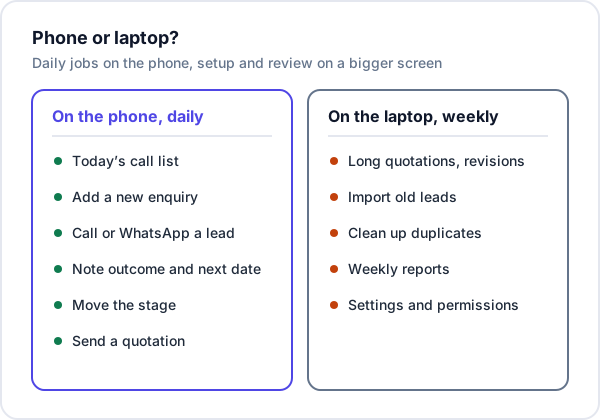
The six jobs a mobile CRM has to do well
Vendor lists compare dozens of features. On a phone, almost all the real use comes down to six jobs. If a CRM is slow at any of these, people stop updating it and go back to WhatsApp and memory.
| Job | When it happens | What good looks like |
|---|---|---|
| See today’s calls | First thing in the morning, between visits | One screen: overdue first, then today, opens straight from the home screen |
| Add a new enquiry | A call or WhatsApp comes in while you are out | A phone number and one line of requirement, saved in under 20 seconds |
| Call or WhatsApp a lead | Through the day | One tap from the lead, so you are already on the right record when the call ends |
| Note the outcome and next date | Straight after the call or visit | Outcome, a short note and a date in three or four taps |
| Move the stage | After a site visit, quotation or decision | Visible on the lead, changed without opening a separate screen |
| Send a quotation | At the customer’s site or the same evening | Sent on WhatsApp as a link or PDF the customer can open on their phone |
Notice what is missing: dashboards, custom fields, report builders. They matter, but they are laptop work. A CRM that tries to put everything on the phone usually makes the six daily jobs slower.
App from the Play Store, or a CRM in the browser?
There are two ways a CRM reaches your phone. A native app is installed from the Play Store or App Store. A web app runs in the phone’s browser; most can be added to the home screen, where they open full-screen with their own icon and look much like an installed app. On Android, Chrome shows an install option only for sites that meet conditions such as HTTPS and a proper app manifest (Chrome’s install criteria). On an iPhone, it is Safari’s Share button, then Add to Home Screen.
Neither is better in general. They are better at different things:
| Question | Native app | Web app on the home screen |
|---|---|---|
| Works with no signal? | Often, if the vendor built offline sync | Usually not |
| Reads the call log automatically? | Some Android apps, with permission | No |
| Push notifications for follow-ups? | Usually | Depends on the CRM; many show reminders only inside the app |
| Install and update | Each person installs; updates go through the store | Nothing to install; everyone is on the latest version |
| Older or low-storage phones | Needs space and a recent Android version | Needs only a current browser |
| Same screens on phone and laptop? | Often fewer features on the app | Same system, laid out for each screen |
A simple way to decide: if your people regularly work where there is no signal, or you want calls logged without anyone typing, shortlist CRMs with a native app and test those features hard. If your team has signal most of the day and uses a mix of phones, a CRM that works properly in the browser is simpler to roll out and nobody gets left on an old version.
How much offline do you actually need?
Offline is the feature most often listed and least often checked. Ask what “offline” means for that CRM: can you only read leads you opened earlier, or can you add a new lead and change a stage, and what happens if two people edit the same lead before it syncs? For many teams the honest answer is that a dead zone lasts twenty minutes. Jotting the key points in the phone’s notes app and updating the lead in the car park does the job, as the post on CRMs for field sales teams describes.
Automatic call logging: useful, with a catch
An app that attaches every call to the right lead saves typing and gives the owner real activity numbers. The catch is that it reads the call history of the phone it is on. On a company phone that is reasonable. On a salesperson’s personal phone it also sees calls to their family, and some people will quietly stop using it. Agree the rule before you choose the tool, not after.
The 10-minute phone test for any CRM trial
Most people judge a CRM on a laptop during the demo and then hand it to a team who will use it only on phones. Run this test instead, on a phone, during the trial:
- Use the cheapest phone in your team, not yours. If it is slow there, it is slow for the person who uses it most.
- Turn off Wi-Fi. Use mobile data, ideally somewhere with two bars rather than five.
- Add a lead one-handed, standing up, from a WhatsApp message you just received. Time it. Over 30 seconds and people will skip it.
- Call the lead from the CRM, then record the outcome and a next date. Count the taps.
- Open tomorrow’s list from the home screen icon. Is the lead there, on the right day?
- Send a quotation on WhatsApp and open it on a second phone, as the customer would.
- Log out and log in again. If someone forgets a password at a customer’s site, how long are they stuck?
- Try it in aeroplane mode, so you know exactly what happens without signal rather than finding out in a basement.
The step most people skip is the first one. The owner has a good phone, the salespeople do not, and the CRM that felt fast in the office feels slow on the road.
What a slow phone screen costs: a worked example
Say a solar installer in Nashik gets 40 enquiries a month, the average job is ₹1,20,000, and about one in five enquiries becomes an order. These numbers are made up; use your own.
If noting a call on the phone is awkward, the salesperson does it “later”. Say that later never comes for 3 leads a month: no note, no next date, and nobody calls them again. At the usual one-in-five rate, that is 0.6 of an order a month, or roughly ₹72,000 of work a month that drifts to whoever called back. Over a year, that is about seven installations.
That is why the tap count in the test above matters more than the feature list. Speed of reply matters for the same reason; the post on lead response time covers it.
When the phone belongs to the salesperson
In most small businesses the CRM runs on personal phones. That is fine, provided you are clear about what lives where:
- In the CRM: the lead, every note, the stage, the next date, quotations and invoices. When someone leaves, you switch off their login and all of this stays with the business.
- On the phone: their WhatsApp chats, their call log and any contacts they saved. These leave with them.
So the habit to build is simple: whatever the customer said on WhatsApp that matters (budget, timing, who decides) goes into a note on the lead. Three more rules help: a screen lock on every phone that opens the CRM, one login per person rather than a shared one, and each person seeing only their own leads unless their job needs more. The post on running WhatsApp as a team goes further into keeping chats from walking out of the door.
What a phone is bad at
Running sales from a phone does not mean running everything from it. Some work is faster and less error-prone on a laptop:
- quotations with many line items, or a revision with changed prices;
- importing old leads from Excel, and cleaning up duplicates afterwards;
- the weekly look at reports: sources, conversion, who is overloaded;
- settings, roles and permissions.
A sensible split for a small team is phones through the day and half an hour at a laptop once a week. If your enquiries still live in a spreadsheet, start with moving from Excel to a CRM, which is laptop work you do once.
Where Enkay CRM fits, and where it does not
Enkay CRM, from Enkay Technologies, is a web app. It runs in the phone’s browser with a phone layout and a bottom tab bar, and you can add it to the home screen. The Today screen shows overdue follow-ups above today’s, plus open leads with no follow-up at all. Call and WhatsApp are one tap from a lead, using your own WhatsApp. You log a call by hand with an outcome such as Interested or No answer, a note and the next date. Quotations go out on WhatsApp as a link the customer opens on their phone to accept or decline.
What it does not do on a phone: there is no Android or iPhone app, no offline mode, and nothing is read from the phone, so there is no automatic call log or call recording. Reminders show inside the app, not as push, SMS or WhatsApp alerts. If your team works without signal for hours, or you need calls logged automatically, choose a CRM with a native app instead.
Who sees which leads is set per person on the team management page, and the plans are on the pricing page.
Frequently asked questions
Do I need a separate CRM app to use a CRM on my phone?
No. What matters is that the CRM works well on a phone screen, not where it is installed from. Some CRMs ship an app from the Play Store or App Store; others run in the phone’s browser and can be added to the home screen so they open like an app. Test the jobs you do every day on your own phone before choosing either.
Is there a mobile CRM that works without internet?
Some native CRM apps let you read and update records offline and sync when the signal returns. Many browser-based CRMs, including Enkay CRM, need a data connection. If your team often works in basements, factories or outside town, ask the vendor exactly what works offline and test it with aeroplane mode on.
Can a mobile CRM record my calls automatically?
Some Android CRM apps read the phone’s call log and attach calls to leads, which needs permission to the call history on that phone. Browser-based CRMs cannot read the call log. Decide first whether you are comfortable with an app reading call history on staff phones, especially personal ones.
What happens to my leads when a salesperson leaves with their phone?
If every lead, note and quotation was kept in the CRM, you deactivate their login and nothing leaves with them. What does leave is anything kept only on the phone: WhatsApp chats on their own number, the call log and contacts saved there. That is why notes belong on the lead, not in the chat.
Does Enkay CRM have an Android or iPhone app?
No. Enkay CRM runs in the phone’s browser with a phone layout and a bottom tab bar, and can be added to the home screen. There is nothing to install from an app store. It needs a data connection; there is no offline mode.
Keep reading
Try Enkay CRM for 15 days
Every enquiry in one list, a follow-up date on each one, and your whole team on the same page. ₹49 for 15 days of the full Standard plan, unlimited users.