Who owns my website domain? Whoever is named as the registrant at the registrar, the company that sold the domain. Not whoever paid for it, not whoever built the site. If your developer registered the name in their own account and their own name, they control it today, however many invoices you have paid.
The fix is usually straightforward if you start before there is a dispute. This guide shows how to check who holds your domain when public lookups hide the name, the other accounts that make up “your website”, how to get them back from a developer who has stopped replying, the transfer rules and lock periods, and a handover checklist to insist on before you pay the last instalment.
How to check who owns your website domain
Do it in three steps. The first is quick but incomplete; the third is the one that settles it.
1. Run a public lookup
For .com, .net and other generic names, use ICANN’s lookup tool. For a .in name, use the .in registry’s WHOIS. Since 28 January 2025, generic-domain registries and registrars have no longer been required to run the old WHOIS service, apart from .com, .name and .post, and the data now comes through RDAP, which ICANN describes as the replacement for WHOIS. For you, the result looks much the same.
2. Read what it does and does not tell you
| A lookup shows | Why it matters |
|---|---|
| The registrar | The company whose account holds the name. This is who you will deal with. |
| Creation and expiry dates | Whether a 60-day lock might apply, and how long before it lapses. |
| Status codes, such as transfer prohibited | Whether the name is locked against transfer. A lock can be removed by whoever controls the account. |
| Name servers | Where the DNS is run, which may be a different company from the registrar. |
| Often hidden: the registrant’s name | The one thing you wanted to know. |
The name is hidden on purpose. ICANN’s Registration Data Policy, in effect since 21 August 2025, requires registrars to redact personal data such as the registrant’s name where the law requires it, and lets them redact in other cases. The organisation name is published only if the holder agrees. A privacy service shows its own details instead of yours. So “Redacted for privacy” tells you nothing about whether it is you or the developer.
3. Check the registrar account itself
Log in to the registrar account and open the domain’s contact details. The registrant should be your business, with an email address you control. If you have no login, you do not control the domain, even if the registrant is you. Look at whose card pays the renewal and whose inbox gets the renewal reminder; if both are the developer’s, the name lapses the day they stop paying attention.
The accounts that make up your website
The domain is the most important account, but it is not the only one. A developer who builds a site typically opens six or seven, and each can be in the wrong name.
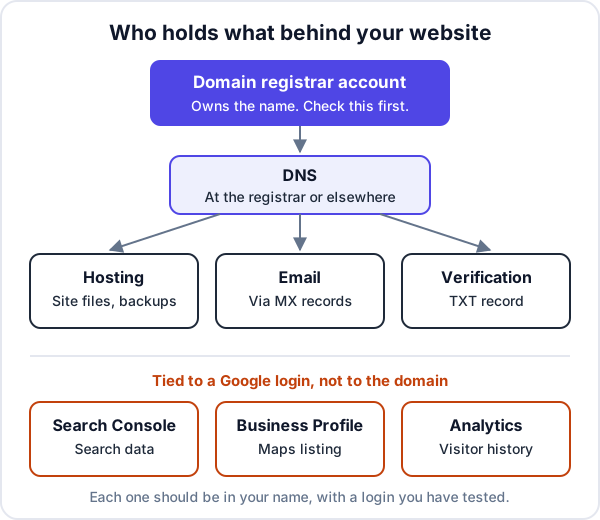
| Account | What it controls | If the developer holds it |
|---|---|---|
| Domain registrar | Ownership, renewal, transfer, name servers | They can let it lapse or refuse to move it |
| DNS | Where the website and email point | Every change, even a new email service, goes through them |
| Hosting | The site’s files, database and backups | You cannot move the site or take a copy |
| Your @yourbusiness addresses and their history | Years of customer mail sit in their account | |
| Google Search Console | Search data, sitemap, indexing requests | You cannot see how people find you |
| Google Business Profile | Your listing on Google Maps and its reviews | They can edit your hours, phone number and photos |
| Google Analytics | Visitor and enquiry history | The history stays with them |
| Website admin and paid licences | Editing the site; premium themes and plugins | Licences lapse on their account and updates stop |
How to get your domain back from a developer who has gone quiet
Most developers are not holding anything hostage. They are busy, or they have changed jobs, or they forgot the domain was in their account. Start politely and in writing, and escalate only if that fails.
- Collect your evidence. Invoices that mention the domain, the quote or contract, and the messages where you asked for the site. Note the expiry date from the lookup.
- Open your own registrar account first. Ideally at the same registrar, so the domain can be moved between accounts there, which is often quicker than a transfer between registrars. Ask the registrar how a change of account works on their side.
- Send one dated, specific request. List exactly what you want: the domain moved to your account (or the transfer code and the lock removed), the hosting login or a full backup, and the Google accounts. Give a date. A list gets done; “please hand over everything” gets put off.
- If the registrant is you but the login is theirs, contact the registrar’s support with your proof of identity and business documents. They answer to the registrant, not to whoever holds the password.
- If the registrant is the developer, you need their cooperation or a legal route. Do not wait for it to expire hoping to re-register it: an expired name sits in a redemption period first, and once it is released anyone can register it, including someone who wants to sell it back to you.
- If they refuse or ask for an unreasonable sum, take advice from a lawyer on your contract. This is general information, not legal advice.
For the Google accounts, you do not always need the developer:
- Search Console. Verify the site yourself with your own Google login, for example through a DNS record once you control DNS. You become a verified owner. Google’s help on Search Console owners explains that to remove an old verified owner you also delete their verification tokens, or they can verify again.
- Business Profile. If they own the profile, use Request Access on it. Google’s page on requesting ownership says the current owner has 3 days to respond; if they do not, a Verify option may appear, but not always. A new owner also has to wait 7 days before they can remove others or transfer primary ownership.
- Analytics. An Administrator has to add you; Google’s access guide notes the last Administrator cannot remove themselves. If nobody answers, start a new property in your own account. You lose the old history, not the future.
Domain transfer rules: the code and the 60-day locks
Moving a domain from one registrar to another needs a transfer code, called the auth code or EPP code, from the current registrar. Here are the rules as they stood when we checked ICANN’s Transfer Policy and its FAQ for domain holders on 15 October 2026.
| Rule | Generic domains (.com and others) | .in domains |
|---|---|---|
| Who gives the code | The registrar, to the registered holder, within 5 calendar days of the request if it is not self-service | The current registrar shown in WHOIS |
| After first registration | Registrar may refuse a transfer within 60 days | No registrar transfer in the first 60 days |
| After a previous transfer | Registrar may refuse within 60 days | Ask the registrar |
| After a change of registrant | Registrar must refuse for 60 days, unless the holder opted out beforehand | Ask the registrar |
| How long the move takes | Varies by registrar | Completes in five 24-hour periods once started |
| Expired name | Can still be transferred; in redemption it must be restored first | Ask the registrar |
The .in figures come from the registry’s policies page and its transfer procedure. Disputes over .in names go through the registry’s .IN Dispute Resolution Policy.
If the developer first changes the registrant on the domain to your name, the 60-day change-of-registrant lock can stop you moving it to another registrar for two months. If you want it at a different registrar, transfer it into your own account there first, then update the contact details at the new registrar. Or ask for the opt-out before the change is made.
These rules are being rewritten. A set of revised transfer recommendations, put to ICANN’s Board in 2026, would rename the code the Transfer Authorization Code, cut the locks after registration and after a transfer to 30 days, and drop the lock after a change of registrant. Until your registrar says the new rules apply, plan on the table above.
If a registrar refuses a transfer for a reason the policy does not allow, ICANN’s FAQ says you can file a transfer complaint with ICANN. If the registrar is acting on the registrant’s instructions and the registrant is the developer, that complaint will not help; the dispute is with the developer.
The handover checklist to agree before the last instalment
Your final payment is the only leverage you have, so tie it to the handover. Put this list in the quote or contract, and tick each item by logging in yourself, not by being sent a screenshot.
- The domain registered with your business as registrant, in a registrar account under your email, with auto-renew on your card.
- A copy of the DNS records, and DNS either at your registrar or in an account you own.
- The hosting account in your name, or transferred to you, with the control panel login tested.
- A full backup of the site: files and, for WordPress, the database. Kept somewhere you control.
- For a hand-built site, the source code in a repository you own, with a short note on how to deploy it.
- An administrator account on the website for you, not an editor account. The developer’s own admin account removed or downgraded later, when you choose.
- Business email accounts created under your own email service account, with you as its administrator.
- You as a verified owner in Google Search Console, primary owner of the Business Profile, and Administrator in Google Analytics.
- A list of every paid licence, theme, plugin, font or service, with the account it is on and its renewal date. Ideally bought on your account.
- In the contract, the copyright in the design and code assigned to you in writing. Our post on owning custom software explains why paying the invoice is not enough on its own.
Developers who do this properly will not mind. A developer who resists the list is telling you something useful before you have paid in full.
Mistakes that cost businesses their domain
- A “free domain” bundled with a developer’s hosting package, registered in their reseller account. Free to start, awkward to leave.
- The renewal reminder going to a former employee’s email. The domain lapses and the site and email stop on the same day.
- Email on the developer’s account. Changing developer then means migrating years of mail as well as the site.
- Waiting until there is a falling-out. Asking for logins while relations are good takes one message. Asking during a dispute over a payment takes weeks.
How Enkay Technologies hands a website over
When we build a business website, the domain is registered in your business’s name and the hosting account is in your name or handed to you. On final payment, the source code and every account created for the project are transferred to you, with nothing that stops you moving to another developer. If you want us to keep the site running, a care plan with hosting, SSL, daily backups and security patches starts at ₹5,000 a month before GST, and it is optional. We also take over sites that others built; the first job is usually this checklist. More on how we work is on our custom software page.
The same thinking applies to the enquiries the site produces. If your enquiry form feeds Enkay CRM, every plan, including the free one, lets you export your leads and customers to CSV whenever you like. Enkay CRM does not register domains, host websites or hold your Google accounts; those stay with you.
The short version
Who owns your website domain is decided by one field at the registrar, not by who paid. Check it this week: run the lookup, then log in to the registrar account and read the registrant. If you cannot log in, ask for the domain to be moved into an account in your name while everyone is still on good terms, mind the 60-day locks, and gather the Google accounts too. If you are about to have a site built, make the handover checklist part of the deal, and once the site is yours, make sure it actually brings in enquiries.
Frequently asked questions
Who owns my website domain if the developer registered it?
The registrant does: the person or business named as the holder at the registrar, whoever paid. If the developer registered it in their own name, they hold it until they change the registrant to you or transfer it to your account. Your invoices and messages help prove what was agreed, but they do not change the registration by themselves.
How do I check who owns my domain?
Run a lookup at ICANN’s lookup tool, or the .in registry’s WHOIS for a .in name, to see the registrar, dates and status. The owner’s name is often redacted, so the reliable check is to log in to the registrar account yourself and read the registrant contact, or ask the registrar who the registrant is.
How long does it take to transfer a domain away from a developer?
Getting the transfer code is the slow part, because it depends on whoever controls the account. Under ICANN’s current policy the registrar must give the holder the code within five calendar days of asking. For a .in name, the registry says a transfer completes in five 24-hour periods once the new registrar starts it.
Why can I not transfer my domain for 60 days?
Under ICANN’s current Transfer Policy a registrar may refuse a move to another registrar within 60 days of registration or of a previous transfer, and must refuse within 60 days of a change of registrant unless the holder opted out first. The .in registry does not allow registrar transfers in the 60 days after a name is created.
Can I get my Google Business Profile back from a developer?
If you are the primary owner, remove them under People and access. If they own it, request access from the profile page: Google gives the current owner 3 days to respond. If they do not, a Verify option may appear in your confirmation email, but Google says it is not always available.
What should I get from a web developer before the final payment?
The domain in your name in a registrar account you log in to, the hosting login, the DNS records, admin access to the website, the source files and a backup, ownership of email, Search Console, Business Profile and Analytics, and the list of paid licences with their renewal dates. Test each login yourself before you pay.
Keep reading
Want a website that is yours from day one?
We register the domain in your name, set up hosting you can log in to, and hand over the code and every account at the end. The scoping call and the quote are free.