If your website is slow on mobile, the cause is almost always one of a short list: photographs uploaded far too large, a slider at the top of the home page, a page builder or theme that loads a lot of code on every page, too many plugins, chat and social widgets, or cheap shared hosting that is slow to answer at all. Most of these can be fixed without a new website.
The work goes in three steps. Test the site the way a customer meets it, on a phone over mobile data. Read the numbers Google gives you, which are less confusing once you know which ones matter. Then fix things in order of effort and effect, starting with the cheap ones. This guide covers each step and, at the end, how to tell when a rebuild is the honest answer.
We touched on speed briefly in why a website gets visitors and no enquiries. This is the longer version.
Test 1: a real phone, the way a customer sees it
Your own phone on office Wi-Fi is the most flattering test there is. To see what a customer sees:
- Switch Wi-Fi off and use mobile data. If you can, try it somewhere with an ordinary signal, not next to the tower.
- Open a private or incognito tab, so nothing is cached from your last visit.
- Type your address and start a stopwatch. Note three moments: when you can read the first useful line, when the call or WhatsApp button responds to a tap, and whether anything jumps after you have started reading.
- Do it three times, and on your service pages as well as the home page. A customer from Google usually lands on an inner page.
- If you have an older or cheaper Android phone in the office, repeat it there. Your customers do not all carry this year’s flagship.
Write the numbers down. They are rough, but they are real, and they give you something to compare after each fix.
Test 2: PageSpeed Insights, read properly
Paste a page address into PageSpeed Insights (pagespeed.web.dev) and choose the mobile tab. The report has two halves, and Google’s own documentation explains they are different things:
- Real-user data (the Core Web Vitals assessment). Collected from real Chrome visitors over the previous 28 days. It passes when all three Core Web Vitals are good. If a page has too few visitors, PageSpeed Insights falls back to data for the whole site, and if the site is also too small, it shows no real-user data at all. That is normal for many small business sites, not a fault.
- The lab test (the 0 to 100 score). A single simulated load on a mid-range phone on a mobile network. 90 to 100 is green, 50 to 89 amber, 0 to 49 red. It is a diagnostic tool: useful for finding problems, but a good lab score does not guarantee a good experience for real visitors.
So if a developer shows you a score of 95, ask about the real-user section too. And if your score jumps a few points between two runs, that is the nature of a lab test; look at the trend and the diagnostics, not one number.
Core Web Vitals in plain words
Core Web Vitals are three measurements Google uses for how a page feels to use. The thresholds below are from Google’s web.dev guidance, measured at the 75th percentile of visits, separately for phones and computers.
| Metric | What it means for your customer | Good | Poor |
|---|---|---|---|
| Largest Contentful Paint (LCP) | How long until the main thing on the screen, usually the big photo or headline, appears | 2.5 s or less | over 4 s |
| Interaction to Next Paint (INP) | How quickly the page reacts when they tap a button, open a menu or type | 200 ms or less | over 500 ms |
| Cumulative Layout Shift (CLS) | How much the page jumps about while loading, so they tap the wrong thing | 0.1 or less | over 0.25 |
The “poor” thresholds come from web.dev’s pages on LCP, INP and CLS. Anything in between needs improvement.
Does speed affect where you rank?
Somewhat. Google’s page experience documentation says Core Web Vitals are used by its ranking systems, but that good scores do not guarantee a top position, and that it will still show the most relevant content even when the page experience is sub-par. Google also uses the mobile version of your site for indexing and ranking. For a small business the larger cost is simpler: people who wait for a blank screen leave before they ring.
The usual culprits on small business sites
Photographs straight from the camera or phone
A photo of a finished installation taken on a phone can be several megabytes and several thousand pixels wide, shown in a box 400 pixels wide. It is usually the biggest single cause of a slow LCP. Resize images to roughly the size they are shown, compress them, and use a modern format such as WebP. Give every image its width and height so the page does not jump when it arrives.
The slider at the top of the home page
Five large images, a script to rotate them, and the first one is usually the LCP element. Most visitors never see slide three. One strong photo with your phone number beside it is faster and does the job better.
Page builders and heavy themes
Drag-and-drop builders and multipurpose themes make a site easy to assemble and often load styles and scripts for every feature they offer, on every page, whether used or not. This is a common reason for poor INP on cheaper phones.
Too many plugins
Each plugin may add its own files to every page. A sign: plugins installed for one campaign three years ago that nobody remembers. Remove what is unused rather than adding a “speed” plugin on top.
Chat bubbles, pop-ups and other widgets
Live chat, floating WhatsApp plugins, review carousels, embedded social feeds and newsletter pop-ups usually load code from another company’s server. A plain link that opens WhatsApp does the same job as a chat plugin with none of the weight. Pop-ups that appear after the page loads also push content around.
Cheap shared hosting
If the server is slow to send the first byte, nothing else can start. Google’s guide to optimising LCP warns that a high time to first byte can make a 2.5 second LCP hard or impossible. Page caching helps; if it is still slow with caching on, the hosting itself may be the limit.
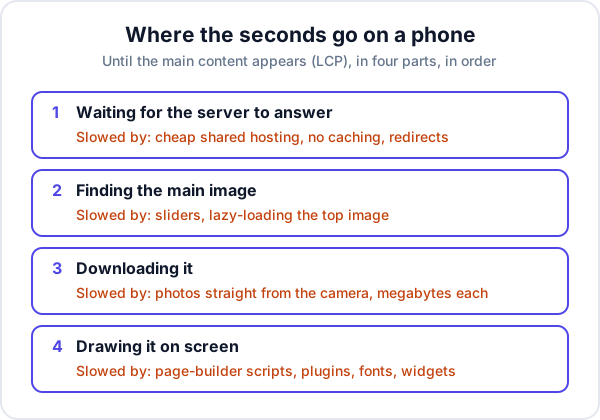
What to fix first: effort against effect
Work down this list. Retest on your phone and in PageSpeed Insights after each line, so you know what made a difference.
| Fix | Effort | Usual effect | Who can do it |
|---|---|---|---|
| Resize and compress the large images, starting with the top of each page | Low | High | You, with an image tool |
| Replace the slider with one image | Low | High | You or your developer |
| Delete unused plugins, chat and social widgets | Low | Medium to high | You, carefully, after a backup |
| Give images width and height; stop pop-ups pushing content | Low to medium | Fixes CLS | Developer |
| Turn on page caching and compression | Medium | Medium | Developer or host |
| Do not lazy-load the main top image; lazy-load the rest | Medium | Medium | Developer |
| Move to better hosting | Medium | High if the first byte is slow | Developer or host |
| Replace the page builder or theme | High | High | Usually a rebuild |
The lazy-loading line trips people up. Lazy-loading delays images until they scroll into view, which is good for photos further down, but web.dev advises not to lazy-load images likely to be on screen when the page opens, especially the main one. Some speed plugins lazy-load everything and make LCP worse.
When to rebuild instead of fixing
Fixing is cheaper, so start there. A rebuild becomes the sensible answer when:
- You have done the low-effort fixes and the main content still takes well over four seconds to appear on a mid-range phone.
- The slowness is in the foundation: a theme or builder that loads its full weight on every page, and removing it means rebuilding every page anyway.
- Nobody can safely update the site, because the person who built it has gone and every change breaks something.
- The site also needs rewriting for other reasons: no page per service, no clear contact button, a form nobody receives.
If you rebuild, write speed into the brief: target LCP, INP and CLS in the good range on mobile, image sizes agreed, no slider, and the hosting named. Ask to see the PageSpeed Insights report before final payment.
Where Enkay fits
Enkay CRM does not make a website faster; it is not a website tool. Its part starts after the page has loaded and the visitor has filled in your form: that enquiry can post straight into Enkay CRM as a lead tagged “Website form” with a follow-up date, as described in connecting your website form to a CRM. Then the dashboard shows how many leads came from the website each month, which is a better test of your speed work than any score.
If your site needs the rebuild, Enkay Technologies does business website development with mobile speed as part of the scope. A fast site is also the foundation for local SEO for a small business: there is little point ranking for “near me” searches if the page takes too long to open on the phone that searched.
Frequently asked questions
Why is my website slow on mobile but fine on my computer?
Your computer is usually faster, on a wired or Wi-Fi connection, and has your site cached from earlier visits. A customer’s phone has a slower processor and a mobile connection, and is often loading the site for the first time. Large images, sliders, page-builder code and third-party widgets cost far more on that phone than on your desk.
What is a good PageSpeed Insights score?
PageSpeed Insights colours its 0 to 100 performance score green from 90, amber from 50 to 89 and red below 50. But the score is a lab test on a simulated mid-range phone. The more important line is the Core Web Vitals assessment from real visitors, which passes when LCP, INP and CLS are all good. Many small sites have too few visitors for that real-user data.
What are good Core Web Vitals scores?
Google’s web.dev guidance sets “good” as Largest Contentful Paint within 2.5 seconds, Interaction to Next Paint of 200 milliseconds or less, and Cumulative Layout Shift of 0.1 or less, measured at the 75th percentile of page visits, separately for mobile and desktop.
Does website speed affect Google ranking?
Google says Core Web Vitals are used by its ranking systems, but also that good scores do not guarantee a top position and that relevant content can still rank with a sub-par page experience. For a small business the bigger cost of a slow site is visitors who leave before they call.
Should I rebuild my website or fix the speed?
Fix first: images, sliders, unused plugins and widgets are cheap to change. Rebuild when the slowness comes from the foundation, such as a heavy theme or page builder loading on every page, or hosting that is slow to send even the first byte, and when the site needs rewriting for other reasons too.
Keep reading
Try Enkay CRM free
Every enquiry in one list, a follow-up date on each one, and your whole team on the same page. Free for one user — not a trial, no credit card.