Local SEO for a small business is not a trick and not a monthly retainer you have to take on faith. For a service business that covers one city and the towns around it, it is five pieces of ordinary work: a page for each service, honest pages for the areas you actually cover, the same business details everywhere, a little structured data, and a steady habit of asking for reviews.
Do those properly and you give Google every reason to show you in “near me” searches. Then measure the result in enquiries, not in rankings. This guide covers each piece, the line between an area page and a doorway page, and a 30-day plan you can work through yourself or hand to whoever looks after your website.
How local search decides who to show
Google is unusually open about this. Its help page on local ranking says local results are based mainly on three things:
- Relevance: how well a business matches what someone searched for.
- Distance: how far the business is from the person searching, or from the place named in the search.
- Prominence: how well known the business is, which Google says includes how many websites link to it and how many reviews it has.
You cannot move your office, so distance is mostly out of your hands. That leaves relevance, which your website and profile control, and prominence, which you earn slowly. Everything below is aimed at one of those two.
One page per service, not one page for everything
The most common problem on a small business site is a single “Services” page listing twelve things in bullet points. Someone searching “AC gas refilling in Baner” lands on it, or more likely does not, because nothing on the site is about gas refilling.
Give each service you want enquiries for its own page. A useful service page has:
- A title and H1 that say the service and the city, in the words customers use: “AC repair and gas refilling in Pune”, not “Climate solutions”.
- What the job involves, how long it takes and what affects the price. A rough range beats “call for a quote”.
- Photos of your own jobs, not stock pictures.
- The common questions you answer on the phone every week, answered on the page.
- A call button, a WhatsApp button and a short form, on every page and within the first screen on a phone.
Five good service pages will do more than one long home page. If you are not sure which services deserve a page, look at the jobs that make you money and the questions callers ask most. That list is your site map.
Area pages: useful, or doorway pages?
This is where most local SEO advice goes wrong. The cheap version is a page for every suburb, each one the same text with the town name swapped: “Best AC repair in Wakad”, “Best AC repair in Aundh”, and forty more.
Google’s spam policies describe exactly this as doorway abuse. Their examples include “multiple domain names or pages targeted at specific regions or cities that funnel users to one page” and “substantially similar pages that are closer to search results than a clearly defined, browseable hierarchy”. A site built that way risks being treated as spam, and even when it is not, the pages rarely help a reader.
An area page is fine when it tells a person in that area something they could not learn from your other pages. Before you write one, run this test.
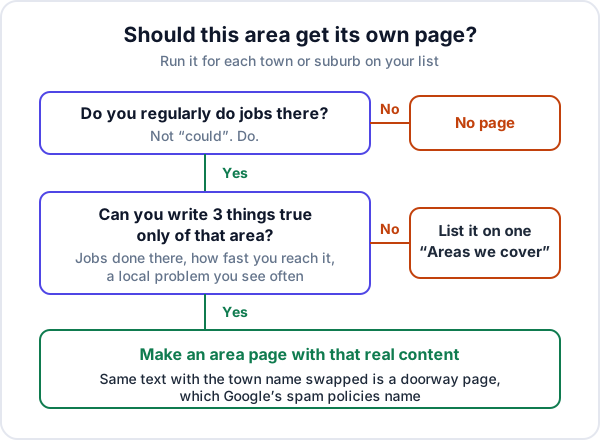
Things that make an area page real:
- Jobs you have done there, with photos and the type of building (housing societies, row houses, shops, a factory estate).
- How you reach it: same-day visits, which days your technician is in that part of town, any extra visit charge.
- A local problem you see often, such as hard water damaging geysers in one area or salty air corroding outdoor units on the coast.
- Reviews from customers in that area, quoted with their permission.
If you cannot write those things for an area, put it in a plain list on one “Areas we cover” page. That page is honest, it still tells Google and customers where you work, and it does not need forty siblings.
Keep your name, address and phone identical everywhere
The same business appears in many places: your website, your Google Business Profile, JustDial, IndiaMART, Facebook, trade directories, your letterhead. Over the years these drift. One listing has the old landline, another has “Sharma Cooling Pvt Ltd” where the board says “Sharma Cooling Services”, a third has the address before you moved.
Customers who ring a dead number do not try again, and inconsistent details make it harder for anyone to be sure these listings are the same business. Pick one exact form of your name, address and phone number, put it in the footer of every page, and correct every listing you can log in to. A spreadsheet with one row per listing and a “fixed on” date is enough.
Two traps:
- Tracking numbers. A different number on every listing helps you measure, but it breaks consistency. Use your main number on listings and track enquiries another way (see below).
- A business name with keywords stuffed in. Google’s Business Profile guidelines say the name should reflect your real-world name and should not include service descriptions or location details. “Sharma Cooling Services”, not “Sharma Cooling AC Repair Best Pune”.
LocalBusiness schema, done properly
Schema markup is a small block of code that states your business details in a form search engines read directly. Google’s local business documentation lists name and address as required, recommends properties such as telephone, url, openingHoursSpecification and geo, and says to use the most specific subtype you can. Schema.org lists subtypes such as HomeAndConstructionBusiness and ProfessionalService, and an areaServed property for the places you cover. A trimmed example:
{
  "@context": "https://schema.org",
  "@type": "HomeAndConstructionBusiness",
  "name": "Sharma Cooling Services",
  "url": "https://example.com/",
  "telephone": "+91-00000-00000",
  "address": {
    "@type": "PostalAddress",
    "addressLocality": "Pune",
    "addressRegion": "Maharashtra",
    "addressCountry": "IN"
  },
  "areaServed": ["Wakad", "Baner", "Hinjewadi", "Aundh"]
}
Three rules keep it out of trouble:
- Mark up only what the page shows. Google’s structured data guidelines say not to mark up content that is not visible to readers. If you do not publish your street address, do not put it in the schema.
- No star ratings for your own reviews. The same local business page says
aggregateRatingandreviewapply only to sites that capture reviews about other local businesses. Plugins that add five stars to your own home page are asking for a problem. - Test it. Run the page through Google’s Rich Results Test after any change, as the documentation recommends.
Your Google Business Profile, briefly
For most service businesses the map results come from the Google Business Profile, so it needs to be complete and accurate: the right primary category, your hours, your services, real photos. If you visit customers rather than receive them, Google’s guidelines say to hide your address and set a service area, which generally should not extend beyond about two hours’ drive from your base. Link the profile to the matching service page or your home page, not to a page that redirects.
Reviews: ask everyone, the same way
Reviews feed prominence, and Google’s ranking page says more reviews and positive ratings can help. They also do the selling for you: a stranger choosing between three AC technicians reads the reviews before they ring.
The rules are strict and worth knowing. Google’s contribution policy prohibits offering incentives such as payment, discounts or free services for a review, and prohibits selectively asking only the customers you expect to be happy. Reviews from current or former staff count as a conflict of interest.
What works within the rules is boring: when a job is closed, send every customer the same short WhatsApp message with your review link, then reply to every review, good or bad, briefly and specifically. A customer who complained and got a polite, useful reply often reads better to the next visitor than a wall of five-star ratings.
A 30-day local SEO checklist
This assumes one owner or one staff member with a couple of hours a week. Do the weeks in order; each one makes the next more useful.
| Week | Do this | Done when |
|---|---|---|
| 1 | Decide the exact name, address and phone. Claim or check your Google Business Profile: category, hours, service area, photos. Start counting enquiries by source. | Profile complete and verified; enquiry log started |
| 2 | List every other listing (JustDial, IndiaMART, Facebook, directories) and correct each one. Put the same details in your site footer. | Spreadsheet of listings, each with a “fixed on” date |
| 3 | Write or rewrite your top three to five service pages. Run the area test; write the area pages that pass and one “Areas we cover” page. | Pages live, each with call and WhatsApp buttons |
| 4 | Add LocalBusiness schema and test it. Submit your sitemap in Search Console. Start the review message on every closed job. | Schema passes the test; first review requests sent |
After week four, the work is maintenance: a new service page or a real area page when you have the material, reviews asked for on every job, and a monthly look at the numbers.
Measure enquiries, not rankings
Rankings are a poor scoreboard for a local business. They change with where the searcher is standing, so the position you see on your own phone in your own office is not the one a customer three kilometres away sees. And a ranking has never paid an invoice.
Measure the thing you want: enquiries, and what they turn into. Three sources are enough:
- Your Business Profile’s performance page, which Google describes as showing calls from the profile, website clicks, direction requests and the search terms people used. It is available only for verified profiles.
- Search Console, for which pages appear in search and get clicked.
- Your own enquiry log, where every call, WhatsApp message and form gets a source. Ask callers “how did you find us?” and write it down. We cover the habit in how to track lead sources.
Here is a made-up example of what a month of that log can tell you. Say an AC service business in Pune records 62 enquiries in October: 21 from Google (profile and website together), 18 from JustDial, 15 from referrals and 8 from IndiaMART. Of the Google enquiries, 9 became jobs. That is a number you can compare month to month, and it answers the question rankings never do: is this work bringing in customers?
If enquiries rise and jobs do not, the problem is no longer SEO. Check what happens on the page with why a website gets visitors and no enquiries, and check how fast someone replies with lead response time. A site that crawls on mobile data will also undo much of this work; see why a website is slow on mobile.
Where local SEO does not help much
To be fair to your budget:
- If you sell mainly to other businesses through tenders, distributors or marketplaces, local search is a minor channel.
- If your area is crowded with competitors that have hundreds of reviews and years of links, the first months will be slow. Service pages and reviews still pay off, but expect it to take longer.
- If you cannot answer enquiries quickly, more enquiries mean more lost ones. Fix the follow-up first.
Where Enkay CRM fits, and where it does not
Enkay CRM does not do SEO. It does not track rankings, manage your Business Profile or collect reviews. What it does is the measuring end: the enquiry form on your website can post straight into it, so each form enquiry becomes a lead tagged “Website form” with a follow-up date (see sending your website form into your CRM). Calls and WhatsApp messages are added by hand with the source picked from a list; there is no separate “Google” label, so put “Google Maps” or “Google search” in the note. The dashboard shows leads by source, and on the Business plan the lead sources report shows the win rate for each source.
If you would rather have the site itself built this way, with a page per service, schema, Search Console and forms that land in a CRM, that is what our business website development service does. Either way, the order is the same: be relevant, be consistent, earn reviews, and count the enquiries.
Frequently asked questions
What is local SEO for a small business?
Local SEO is the work that helps a business show up when people nearby search for what it does, such as “AC repair near me” or “solar installer in Nashik”. For a service business it comes down to a page for each service, honest pages for the areas you really cover, the same name, address and phone everywhere, LocalBusiness schema, and a steady flow of genuine reviews.
Are city or area pages bad for SEO?
Not in themselves. Google’s spam policies name doorway abuse, which includes multiple pages targeted at specific regions or cities that funnel users to one page, and substantially similar pages. An area page with real local content, such as jobs done there and how you reach it, is useful. Twenty copies with only the town name changed are not.
How long does local SEO take to work?
New and changed pages usually take weeks to be crawled and reflected in results, and the effect of reviews builds over months. Give the 30-day plan in this article a further two to three months before judging it, and judge it on enquiries by source, not on where you rank on a given day.
Do I need a Google Business Profile for local SEO?
Yes, for most local service businesses it is where the map results come from. Google’s own help page says local results are based mainly on relevance, distance and prominence. If you visit customers rather than receive them, Google says to hide your street address and set a service area instead.
Should I put review stars in my schema markup?
Usually no. Google’s local business documentation says the aggregateRating and review properties apply only to sites that capture reviews about other local businesses. Reviews about your own business, marked up on your own site, are not eligible for review stars in search.
Can I offer a discount for a Google review?
No. Google’s policies prohibit offering incentives such as payment, discounts or free services in exchange for a review, and prohibit selectively asking only happy customers. Ask every customer, the same way, after the job.
Keep reading
Try Enkay CRM free
Every enquiry in one list, a follow-up date on each one, and your whole team on the same page. Free for one user — not a trial, no credit card.