WordPress vs custom website is not really a question about technology. It is a question about who will change the site, how often, and who will keep it patched. If someone in your business will add pages or posts every month, WordPress usually wins. If the site changes a few times a year and has to be fast on a phone, a hand-built site is cheaper to run and has less to go wrong.
There is a third option most comparisons treat as a footnote: a website builder such as Wix, where you rent the whole thing. It is the cheapest start and the hardest to leave. This post compares all three for a small business that wins work through enquiries: editing, plugins and updates, speed, hosting, three years of cost, and lock-in. Enkay Technologies builds both WordPress and hand-built sites, so we have no reason to push you either way.
What the three options actually are
The words get used loosely, so first the definitions this post uses.
- WordPress is free, open-source software, released under the GPLv2 or later, that you install on hosting you pay for. A theme decides the look; plugins add features such as forms, bookings or a shop. Many WordPress sites also use a page builder plugin to lay out pages by dragging blocks around.
- A custom website here means a hand-built site: pages written in code by a developer, often served as plain files with no database. People also call it a static site or a custom-coded site. (A developer can also write a custom theme for WordPress. That is still WordPress, with all its upkeep.)
- A website builder is a hosted service such as Wix, where the editor, the hosting and the updates all come from one company for a monthly fee.
WordPress vs custom website: the decision table
Read across your situation, not down a column. The right answer is the column that matches most rows.
| Question | WordPress | Hand-built site | Website builder |
|---|---|---|---|
| Who edits pages? | You or your staff, in an editor | A developer, or you in a small editor if one is built in | You, by dragging blocks |
| How often does it change? | Weekly or monthly | A few times a year | Any time |
| Features like booking or a shop | A plugin, often quick | Built for you, or a linked service | Whatever the platform offers |
| Upkeep | Core, theme and plugin updates, plus backups, for life | Very little: no database or plugins to patch | Done by the platform |
| Speed on mobile data | Good if built carefully, slow if loaded with plugins | Usually the fastest | Depends on the platform and the template |
| Hosting | PHP and a database | Any cheap hosting, even file-only | Included, cannot be changed |
| Moving to someone else later | Easy: any WordPress developer | Easy if the code is handed over and readable | Rebuild the site; only the domain moves |
| Cost to start | Medium | Medium | Lowest if you build it yourself |
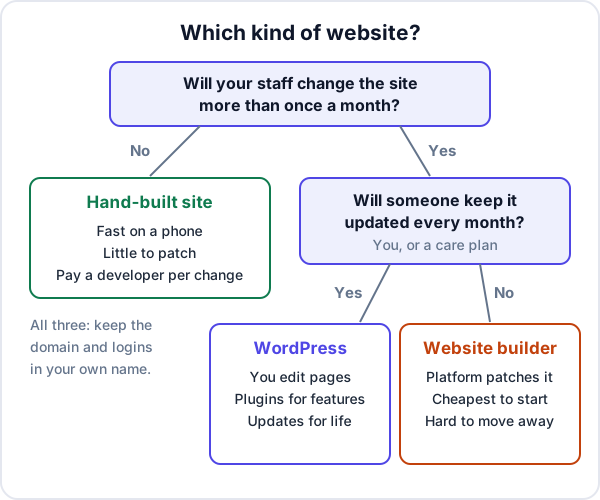
Who edits the site, and how often
This is the question that decides it, and the one sales pitches skip.
Be honest about the last year. If your current site has changed twice, once for a new phone number and once for a new service, you are not going to start writing weekly posts because the new site has an editor. A hand-built site, with changes sent to a developer, costs less and stays faster. If you do have someone who will add a project photo every week, a product page every month, or a price list that changes with the season, paying a developer for each of those soon costs more than WordPress’s upkeep.
A middle path exists. A hand-built site can have a small editing screen for the one thing that changes, such as a list of projects or job openings, while everything else stays as code. Ask for it if only one part of your site changes often.
Plugins and security updates: the cost nobody quotes
A WordPress site is not finished on launch day. It is three layers of software from different authors, each released on its own schedule: WordPress itself, the theme and every plugin.
WordPress’s own documentation is plain about this. Its security guide says older versions of WordPress are not maintained with security updates, lists old and outdated plugins among common targets, and tells you to back up regularly. According to its upgrading guide, existing sites get minor core updates automatically, but plugins and themes update in the background only in special cases. Someone has to press the button, and someone has to check the site still works after.
What goes wrong in practice:
- Nobody owns the updates. The developer built the site and moved on. Two years later the site runs plugins with known holes, and an update now breaks the layout because it skipped several versions.
- Premium licences lapse. A paid theme or form plugin was bought on the developer’s account. When the licence ends, updates stop, and you may not even know it was paid.
- Too many plugins. One for the slider, one for the form, one for WhatsApp, one for speed. Each is another author you are trusting and another update to apply.
- The host falls behind. WordPress recommends PHP 8.3 or newer and MySQL 8.0 or MariaDB 10.11 or newer. Cheap hosting left on old versions holds the whole site back.
None of this makes WordPress a bad choice. It makes upkeep a real line in the budget. A hand-built site with no database and no plugins has very little to patch: the server, the certificate and the form handler.
Speed and hosting
A hand-built static site sends finished files. WordPress builds each page from the database through PHP, the theme and the plugins, unless a cache stores the result. So a static site is fast by default, and WordPress is fast when it is built with care: a light theme, few plugins, caching, and images sized for a phone.
Speed matters because your visitors are mostly on mobile data. A heavy page-builder layout with a video background and five tracking scripts loses the enquiry before the call button has drawn. If your current site is slow, our post on why a website gets visitors and no enquiries has a half-hour audit that starts there.
Hosting follows from the choice. WordPress needs PHP and a database, and its hosting is where most of the yearly cost and most of the risk sit. A static site will run on almost any hosting, including file-only services.
What each costs over three years: a worked example
These are made-up round figures to show how the sums work, not quotes from anyone. Domain renewal is the same for all three, so it is left out. Put your own numbers in.
| Example cost, before GST | WordPress | Hand-built | Builder (DIY) |
|---|---|---|---|
| Build | ₹35,000 | ₹35,000 | ₹0, your own time |
| Hosting or plan, 3 years | ₹5,000 a year = ₹15,000 | ₹3,000 a year = ₹9,000 | ₹1,200 a month = ₹43,200 |
| Paid theme and plugin licences | ₹8,000 a year = ₹24,000 | None | Paid apps, if any |
| Updates and backups | ₹1,500 a month = ₹54,000 | Included in hosting | Included |
| Changes made by a developer | None, you edit | 8 a year at ₹1,500 = ₹36,000 | None, you edit |
| Three-year total | ₹1,28,000 | ₹80,000 | ₹43,200 |
Now change one assumption. If the site needs a change every week instead of eight times a year, the hand-built column gains 52 × ₹1,500 = ₹78,000 a year, and WordPress becomes the cheaper of the two. That is the whole argument in one line: the cost of a website over three years is mostly the cost of changing it and patching it, not building it.
The builder column looks cheapest, and for a business owner who enjoys doing it, it can be. The hidden cost is time, and the design you can make with it.
Lock-in: page builders and website builders
Lock-in is the cost you pay when you leave, and it is rarely mentioned when you join.
Website builders lock in the most. Wix’s own help centre says a Wix site has to be hosted on Wix’s servers and cannot be moved to another host. You can take your domain with you, but the site itself has to be rebuilt elsewhere. With any hosted builder, read its export page before you start, not when you want to leave.
Page builders inside WordPress lock in a little less. Your text and images stay in WordPress, but the layouts are stored in the builder’s own format. Switching builders, or dropping one to speed the site up, usually means laying the pages out again.
Hand-built sites lock you in only if you do not hold the code. If the files, the hosting login and the domain are yours, any competent developer can take over. If the developer keeps them, you are more locked in than on any builder. That is a bigger subject, and the same goes for WordPress: whoever holds the domain and the admin login holds the site.
When a custom website is the wrong choice
- You want to publish often and do it yourself. Use WordPress, or a builder. A hand-built site will make every post a request to someone else.
- You need a full online shop. A mature shop platform or plugin already handles carts, payments, tax and stock. Building that by hand is rarely worth it for a small catalogue.
- The budget is close to zero. Build it yourself on a builder, keep the domain in your own name, and spend the money on good photos of your work.
- Nobody will own the content. No platform fixes a site that never changes because nobody has time. Decide who writes the service pages first.
And WordPress is the wrong choice when nobody will keep it updated. A neglected WordPress site is worse than a plain static page, because it keeps running old code on the open internet.
What Enkay Technologies builds, and what it costs
We build business websites both ways. If you will edit pages often, we recommend a content management system; if the site changes rarely and must load fast, a hand-built site. The written scope says which one and why. Our quotes for a business website start at about ₹25,000 before GST, and most sites take 2 to 4 weeks once the content is in. A care plan with hosting, SSL, daily backups, security patches and version updates starts at ₹5,000 a month, and you can take it or not. Either way, the domain is registered in your name and the code and accounts are handed to you at the end.
Whichever way the site is built, the enquiry form matters more than the platform. Ours can post each enquiry into Enkay CRM as a lead with a follow-up date, as well as to your email; connecting a website form to a CRM shows how that works with WordPress, Wix and hand-built forms. Enkay CRM does not build or host the website itself. That part is our custom software service.
The short version
The WordPress vs custom website choice comes down to two questions. Will someone in your business change the site more than once a month? And will someone keep it updated every month? Yes and yes: WordPress. No to the first: a hand-built site. Yes to the first and no to the second: a website builder, accepting you cannot take it with you. Whatever you choose, keep the domain, the hosting login and the admin account in your own name from day one.
Frequently asked questions
Is WordPress good for a business website?
Yes, when someone in the business will add or change pages often, or when you need a feature a plugin already does well, such as bookings or a shop. The price of that flexibility is upkeep: WordPress itself, the theme and every plugin need updating and backing up for as long as the site is live.
Is a custom-coded website better than WordPress?
Not in general. A hand-built site is usually faster and has far less to keep patched, so it suits a site that changes a few times a year. It is worse when you want to edit pages yourself every week, because each change goes back to a developer. Decide by who edits the site and how often.
Static site vs WordPress: what is the difference?
A static site is a set of finished pages that the server simply sends. WordPress builds each page from a database using PHP, plugins and a theme, unless a cache stores the result. Static pages are lighter and have fewer moving parts to attack; WordPress gives you an editor and a large plugin directory.
Should I use a website builder like Wix instead of a developer?
A builder is the cheapest way to start if you will build and edit the site yourself, and the platform handles its own updates. The trade-off is that you rent it. Wix, for example, says its sites cannot be hosted anywhere else, so leaving means rebuilding. You can still take your domain with you.
Can I move from WordPress to a custom site later, or the other way round?
Yes, but treat it as a rebuild of the design, not a copy. Your text, photos and domain move across; the theme and page-builder layouts do not. Keep the same page addresses, or set up redirects from the old ones, so you do not lose what Google has already indexed.
Does Enkay Technologies build WordPress websites?
When it suits the job, yes. If you want to edit pages often yourself, we recommend a content management system. For a site that changes rarely and must load fast, we recommend a hand-built site. The written scope says which one and why, and the code and accounts are handed to you at the end.
Keep reading
Not sure which kind of website you need?
Tell us what you sell and who will update the site. The scoping call and the written quote are free, and the quote says WordPress or hand-built, and why.