The usual Zoho CRM alternatives for a small business are Bigin (Zoho’s own simpler CRM), Freshsales, HubSpot, Pipedrive and Bitrix24, with LeadSquared for high-volume sales teams. Which one is right depends less on features than on why Zoho CRM is not working for you: too much to set up, the bill growing with every user, or a team that simply does not use it.
That last reason matters, because switching does not fix it. This post starts with a quick test of whether to leave at all, then matches each alternative to the problem it actually solves, prices them in rupees for a real team, and covers what to export from Zoho before you cancel. Prices and limits are taken from each vendor’s own pages on 15 October 2026.
First: is it Zoho, or is it the habit?
Most complaints about Zoho CRM in reviews are about complexity: a busy screen, many modules, and setup that needs an administrator or a consultant. Those are real. But a CRM a team does not open will fail in any brand. Before you move, answer these honestly.
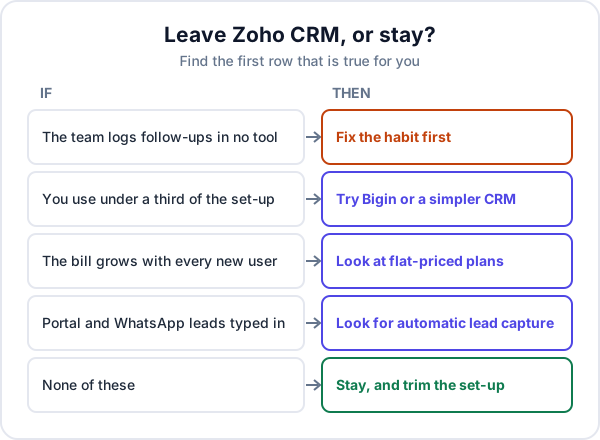
- Does anyone log follow-ups anywhere? If not, the problem is the daily routine. Our guide to rolling out a CRM in a small business covers that, and it applies to Zoho too.
- Do you use most of what was set up? If a consultant built fifteen modules and the team uses leads and deals, you are paying in clicks for things nobody needs.
- Is the bill the problem? Per-user pricing hurts most when you add field staff or telecallers who only need a little access.
- Do enquiries arrive by themselves? If someone copies IndiaMART, JustDial or WhatsApp enquiries in by hand, that gap loses leads whatever CRM you use.
Zoho CRM alternatives, by what you need
| If your problem is… | Look at | What to know |
|---|---|---|
| Too complicated, want to stay with Zoho | Bigin by Zoho | Pipeline-first, fewer modules. Free plan for 1 user and 500 records; paid plans add an email and WhatsApp Business integration |
| Too complicated, open to moving | Pipedrive | Built around the sales pipeline and the next activity. 14-day trial; its site says there is no free version |
| Need a free plan for a small team | HubSpot | Free CRM for up to 2 users and 1,000 contacts, no expiry. Check the paid tier you would grow into |
| Want a fuller sales suite, still per user | Freshsales | Per-user plans from ₹749 paid yearly; 21-day trial, no free plan on its pricing page |
| Per-user bill keeps growing | Bitrix24 | One flat price per block of users (Basic covers 5). Also has a free plan |
| High enquiry volume, large sales team | LeadSquared | Built for high-volume sales teams. ₹2,500 per user per month billed yearly; sold through demos |
Sources: Bigin pricing, Pipedrive, HubSpot free CRM, Freshsales pricing, Bitrix24 prices and LeadSquared pricing, checked on 15 October 2026. Plans change; open the page before you decide.
Why Bigin deserves a look first
If your complaint is complexity, the cheapest move is often sideways. Bigin is Zoho’s own CRM for small teams, built around pipelines rather than modules. Staying inside Zoho keeps you with the Zoho apps you may already use, and moving is a smaller job than leaving for another company. Check what it leaves out before you assume it will be enough: it is deliberately smaller.
What the switch costs a 5-person team
An example with a made-up team: a solar installer in Coimbatore with five people who need logins. One year, paid yearly, before GST:
| Plan | Price used | Year for 5 users |
|---|---|---|
| Zoho CRM Standard (where you are) | ₹800 per user a month | ₹48,000 |
| Bigin Express | ₹400 per user a month | ₹24,000 |
| Freshsales Growth | ₹749 per user a month | ₹44,940 |
| Bitrix24 Basic | ₹1,910 a month for up to 5 users | ₹22,920 |
| LeadSquared Sales Pro | ₹2,500 per user a month | ₹1,50,000 |
Two things the table does not show. Monthly billing costs more on all of these; Zoho CRM Standard paid month to month is ₹1,300 a user, not ₹800. And the switch has its own cost: a few days of someone’s time exporting, cleaning and importing, and a few weeks of the team learning new screens. Our post on CRM pricing in India works through GST, monthly billing and the extras in more detail.
Before you leave: export everything
Do this before you cancel or let the plan lapse, not after. From Zoho’s export help page:
- Check you have the Export permission. Only users whose profile has Export (Module) can do it.
- Export each module. Setup → Data Administration → Export, one module at a time: Leads, Contacts, Accounts, Deals, Tasks, Notes, and any custom modules. CSV takes up to 200,000 records per export; XLSX up to 50,000.
- Mind the daily limit. Exports per day depend on the edition: 10 on Free, 100 on Standard, 250 on Professional.
- Request a full backup as well. An administrator can ask for one from Data Administration. Paid editions include a couple of free backups; the Free edition has to buy one. The download link lasts 7 days.
- Save what the backup leaves out. According to Zoho’s backup help page, email content and attachments, documents and data from integrations are not included. Download the attachments you need, such as signed quotations, separately.
What will not come across
No other CRM can import Zoho’s workflow rules, blueprints, custom functions or scoring rules. Write down each automation you actually rely on, in plain words (“new IndiaMART lead is assigned to Ravi”), and rebuild only those. Most teams find they rely on three or four. Our guide to moving data into a CRM covers cleaning the CSV files before import: duplicate numbers, merged columns and missing stages.
When staying with Zoho CRM is the right call
- You run the business on other Zoho apps. Books, Desk and Campaigns linked to the CRM are worth a lot of clicks.
- Your automation genuinely works. If rules route leads and book follow-ups correctly, rebuilding them elsewhere is cost with no gain.
- The problem is one screen, not the product. Hiding unused modules and fields, and trimming the layout, often fixes “too complicated” for free.
- The team does not use any CRM well yet. Fix the routine first. Our post on building a sales follow-up process is where to start.
Where Enkay CRM fits, and where it does not
Enkay CRM, from Enkay Technologies, suits a team that wants leads, follow-ups and quotations without setup work. Leads from IndiaMART, JustDial and your website form arrive by themselves; each lead has an owner and a next follow-up date; the Today screen lists overdue and due calls; and GST quotations and invoices sit with the lead. It is priced per business: a Free plan for one user, and Business at ₹499 a month or ₹4,990 a year with unlimited users. CSV import is on the Business plan, so Zoho exports can come across once matched to the import template.
It is a smaller product than Zoho CRM, so check the gaps. There is no workflow builder or custom modules, no native mobile app (it runs in the phone’s browser), no built-in email campaigns or calling, and no WhatsApp, SMS or email reminders yet. The shared WhatsApp inbox is in development. If you rely on those, stay with Zoho or pick one of the alternatives above. The pricing page lists what each Enkay plan includes.
The short version
Pick a Zoho CRM alternative by the reason you are leaving: Bigin or Pipedrive if it is too complicated, HubSpot for a free plan, Bitrix24 if per-user pricing is the problem, LeadSquared for high volume. If the team does not log follow-ups in any tool, switching will not fix it. Whatever you choose, export every module and request a full backup before you cancel, and save attachments separately.
Frequently asked questions
What is the best alternative to Zoho CRM for a small business?
It depends on why you are leaving. If Zoho CRM feels too complicated, Bigin (Zoho’s simpler CRM) or Pipedrive are built around a plain sales pipeline. If you want a free plan for more than one person, HubSpot’s covers two users and Zoho CRM’s own covers three. If per-user pricing is the problem, Bitrix24 charges one flat price for a block of users.
Is there a cheaper alternative to Zoho CRM?
Zoho CRM is already one of the cheaper paid CRMs, at ₹800 per user per month on the Standard plan paid yearly, before GST, on 15 October 2026. Cheaper options exist, such as Bigin at ₹400 per user or a flat-priced plan for a whole team, but price is rarely the main reason small businesses leave. Fit and day-to-day use usually are.
Is Bigin better than Zoho CRM?
Bigin is simpler, not better. It is Zoho’s pipeline-first CRM for small teams, with fewer modules and less to set up, and it costs about half as much as Zoho CRM Standard. If your team only needs leads, a pipeline and follow-ups, it may suit you better. If you need Zoho CRM’s custom modules and automation, it will feel limited.
How do I export my data from Zoho CRM?
Go to Setup, then Data Administration, then Export, or use Export from a module’s actions menu. You can export each module as CSV (up to 200,000 records at a time) or XLSX (up to 50,000), and you need the Export permission in your profile. An administrator can also request a full backup, but it leaves out email content, attachments and documents.
Will I lose anything when I leave Zoho CRM?
Usually your workflows, blueprints, custom functions, email history and attachments do not come across, because other CRMs cannot import them. Records come across as CSV files, and any automation has to be rebuilt by hand in the new tool. List what you rely on before you cancel.
Keep reading
Try Enkay CRM free
Every enquiry in one list, a follow-up date on each one, and your whole team on the same page. Free for one user — not a trial, no credit card.