A CRM requirements document is two to four pages, in plain language, that say what your business needs a CRM to do: the problem it must fix, who will use it, the path an enquiry takes from first call to payment, the documents it must produce, what it connects to, and the old data that has to come across. You write it before asking anyone for a quote.
Why bother? Because “a simple CRM for my business” sent to three developers comes back as three different products at three prices, and you cannot tell which is cheap and which is incomplete. The same page sent to all three gets you quotes you can compare. Below is a fill-in template, a worked example, what to bring to a scoping call, and the list of things to keep out of version one.
What is a CRM requirements document?
It is the business owner’s description of what a CRM must do, written before any developer is involved. It describes problems, people, steps and data, not screens or databases. A developer turns it into a written scope with a price. For a small business it replaces the long software requirements specification that large companies pay consultants to write.
You do not need technical words. “The technician should see today’s jobs and the customer’s address, but not the price” is a perfectly good requirement. It is also one that changes the quote, which is why it belongs on paper rather than in a phone call.
The fill-in template
Copy this into a document and answer each line. Where you do not know, write “not sure” rather than leaving it out; that tells the developer what to ask about.
1. THE PROBLEM
What goes wrong today:
What it costs each month (hours, jobs, money):
How we do it now (Excel, WhatsApp, paper, a tool):

2. PEOPLE
Who uses it, how many, on phone or laptop:
What each kind of user may see and do:

3. ONE ENQUIRY, START TO FINISH
Where enquiries come from:
Every step until we are paid:
Who does each step:

4. WHAT WE RECORD
About a lead:
About a customer:
About a job or order:

5. DOCUMENTS IT MUST PRODUCE
(attach a sample of each)

6. WHAT IT MUST CONNECT TO

7. OLD DATA TO BRING ACROSS
What, how many rows, where it lives:

8. THE MORNING REPORT
The one screen I would open first:

9. NOT IN VERSION ONE

10. BUDGET RANGE AND DEADLINE
Who decides on our side:
Most of these lines take a minute. Three of them take thought, and they are the three that decide the price.
Write the journey of one enquiry
Pick a real enquiry from last month and write down every step it went through, in order, with who did it. Not the process you wish you had; the one you actually run. For example, made up but typical, for a solar installer in Nagpur with eight staff:
- Enquiry arrives from IndiaMART or a WhatsApp message to the owner’s phone.
- Sales calls back, asks for a recent electricity bill on WhatsApp.
- Site survey booked; the surveyor sends roof photos and measurements.
- Sales builds the quotation in Excel from a rate card, about twenty minutes each.
- Customer accepts; 30% advance collected.
- Material ordered, installation scheduled, net-metering paperwork filed.
- Installation done; balance invoiced; first service visit due in six months.
Seven lines like these tell a developer more than a list of forty features. They also show where the money leaks: here, it is step 4 and the follow-up between steps 3 and 5.
Say who sees what
The number of different kinds of user is the biggest single thing that moves the price of a custom CRM, and it is the one owners most often forget to mention. A small table settles it:
| Who | Sees | Must not see or do |
|---|---|---|
| Owner | Everything | — |
| Salesperson (3) | Own leads, quotations, follow-ups | Other salespeople’s leads; give discounts above 5% |
| Surveyor (1) | Today’s surveys, address, phone | Prices, invoices |
| Installer (2) | Today’s jobs, checklist, photo upload | Prices, other jobs |
| Accounts (1) | Invoices, payments, outstanding | Delete anything |
Count the old data
Moving data from the old system is the item most often left out of quotes and argued about later. Say what it is and how big: “2,800 customers in one Excel file, phone numbers sometimes two to a cell; 400 open leads in a WhatsApp group; three years of invoices in Tally.” Attach a few rows with the customer details blanked out. Our guide to moving off a spreadsheet shows what cleaning usually involves.
CRM requirements checklist: what goes in version one
Once the template is filled in, sort every requirement into one of three piles. This is the step that turns a wish list into something you can afford.
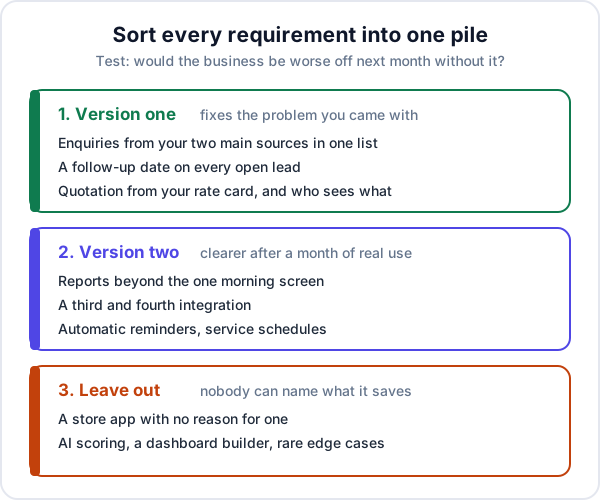
The test for version one: would the business be worse off next month without it? If the answer is “a bit less convenient”, it goes in the second pile. The custom CRMs we build start with the smallest set of parts that fixes the problem you came with, and add the rest once staff are using it.
What to leave out of version one
These are the requests that most often double a first version without fixing anything. Each can be added later, when you know whether anyone needs it.
- A native app in the Play Store and App Store. A web app that works on a phone is enough unless staff work without signal, or photos and GPS are part of the job. A store app adds two platforms to maintain.
- A dashboard with twenty charts. Name one report. Build that. You will find out within a month which other numbers you actually look at.
- “It should integrate with everything.” Each connection is a small project with its own approvals and failure modes. Pick the two that carry most of your enquiries or money.
- A workflow builder or custom-field designer. Useful in software sold to thousands of businesses. In software built for one, it is cheaper to change the rule when the rule changes.
- AI lead scoring. It needs months of your own data to mean anything. A rule like “IndiaMART enquiries with a quantity above 50 go to the senior salesperson” does the same job on day one.
- Every edge case. The customer who pays in three currencies once a year can stay on a spreadsheet.
It protects you as much as the developer. When the scope comes back, you can see that the things you chose to leave out really are out, and that the price is not quietly paying for them.
What to bring to the scoping call
A scoping call is where a developer asks questions until they can write a scope. Thirty to forty-five minutes is usually enough if you bring the right things:
- The filled-in template, sent a day ahead so the call starts from questions, not a reading.
- One real quotation, one invoice and one job sheet or delivery challan, with the customer’s details hidden.
- An export of the spreadsheet you run the business on, or a screenshot of its columns.
- The names of the tools you already pay for: accounting software, a portal subscription, a WhatsApp number.
- The person who will answer questions during the build. If it is not you, they should be on the call.
- Your budget range and the date that matters, such as the start of the season.
Do not bring passwords. Nobody needs your IndiaMART or Tally login to quote, and nobody should get it before a contract.
Mistakes that make a requirements document useless
- Listing features instead of problems. “Lead scoring, pipeline, dashboard” tells a developer nothing about your business. “We lose quotes because nobody follows up after the site visit” does.
- “Like Salesforce, but simpler.” Every developer reads that differently, and none of them will build Salesforce for your budget.
- Describing the process you wish you had. The system will be built for it, and your staff will carry on with the real one.
- Writing it alone. Ask the salesperson and the person who does the invoices what slows them down. They know steps the owner never sees.
- No numbers. How many enquiries a month, how many users, how many rows of old data. Numbers decide the hosting, the migration effort and the price.
After the quotes come back
A developer worth hiring sends back a written scope: every screen, field, rule and report, with a price and dates. Put it beside your requirements and tick each line. Anything in your document that is missing from the scope is not in the price, however the call went. Ask about each gap in writing before you pay anything.
If you are comparing several developers, the questions to ask them and the red flags to look for are in our post on choosing a CRM development company. And if the totals surprise you, what custom software costs explains which of your requirements is the expensive one.
Where Enkay Technologies fits
Enkay Technologies builds custom CRMs. Send us your requirements document, or just the first section, and we will do a free 30 to 45 minute scoping call, then send a written scope with a fixed price and dated plan within two to three days. A working first version usually takes 6 to 10 weeks from the agreed scope, and quotes start at about ₹1,50,000 before GST. We will sign an NDA before the call if you want one.
We also make a ready-made CRM, and filling in the template sometimes shows you do not need a build. If your must-have pile is leads from IndiaMART, JustDial and your website form, follow-up dates, a pipeline and GST quotations, Enkay CRM does that today. Leads and follow-ups are on the free plan; quotations and invoices are on the Business plan at ₹499 a month. It will not take your rate card and price a solar system from roof measurements, and it has no workflow builder or native app. If those are on your list, that is a build, and buy or build will help you decide how much of it.
The short version
A good CRM requirements document is short, specific and written in your own words: the problem and its cost, who sees what, one enquiry from start to finish, the documents, the connections, the old data, one morning report, and a list of what waits for version two. Write it before the first call. It is the cheapest hour of the whole project, and it is yours to send to anyone.
Frequently asked questions
What should a CRM requirements document include?
Ten things: the problem and what it costs you, who will use the system and what each person may see, the path one enquiry takes from first contact to payment, the fields you record, the documents the system must produce, what it must connect to, the old data that has to come across, the one report you would read every morning, what is left out of version one, and your budget range and deadline.
How long should a CRM requirements document be?
For a small business, two to four pages. Shorter than that and it leaves out the parts that move the price, such as permissions and data migration. Much longer and it usually means features have been listed for their own sake. A sample quotation and a spreadsheet export attached to it are worth more than ten extra pages.
Do I need a technical specification before hiring a CRM developer?
No. Write the business side: problems, people, steps, documents, connections and data. Turning that into screens, fields and a database design is the developer's job, and it should come back to you as a written scope with a price. If a developer asks you for a technical specification, ask what their scoping covers.
Should I tell the developer my budget?
Give a range. Without one, a developer has to guess whether you want the smallest working version or the full system, and the quotes you get back will not be comparable. A range lets them say what fits inside it and what would have to wait for version two.
What is the difference between requirements and scope?
Your requirements say what the business needs and why. The developer's scope says exactly what will be built for the price: every screen, field, rule and report, and what is not included. Check the scope against your requirements line by line before you pay anything, because whatever is not in the scope is not in the price.
Can I use the same document to compare ready-made CRMs?
Yes, and you should, before paying for a build. Take the journey of one enquiry and the permissions table to two or three ready-made products and try them on real work. If one handles everything on your must-have list, buying it is usually cheaper than building.
Keep reading
Have your requirements written down?
Send them to us. The scoping call and the written quote are free, and if a ready-made CRM would cover your must-have list, we will tell you which one.