Good follow-up message templates are short, name the enquiry, give one reason for writing and end with an easy question. Below are templates for WhatsApp and SMS for each moment of a sale, in the order they happen: the first reply, a missed call, after the first conversation, before a visit, after a quotation, chasing, the last message, payment and the review.
Most template lists online are emails written for US software sales, or SMS written for US shops. Small businesses that sell through enquiries follow up on WhatsApp, often from the owner’s phone, to customers who asked three other sellers the same question. The examples use a made-up CCTV dealer in Nashik; swap in your own name, trade and details. A table further down shows what to change for other trades.
What makes a follow-up message work
A follow-up message works when the customer can tell in the preview who it is from and what it is about, and can reply without thinking. Four parts do that: who you are, which enquiry, one new thing, and one question. Everything else is optional.
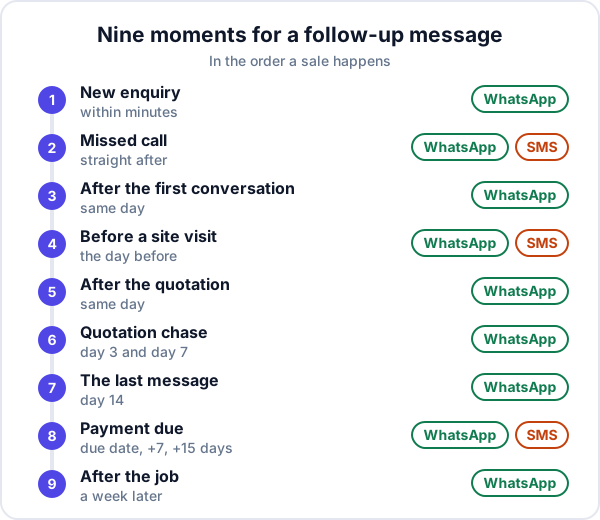
Follow-up message templates, moment by moment
1. A new enquiry: acknowledge within minutes
Send this when you cannot call straight away. It is not a substitute for the call; it tells the customer the enquiry landed and stops them moving on to the next seller.
WhatsApp: “Namaste, Sameer from Shree Security, Nashik. Got your enquiry for CCTV. I will call you within the hour. Meanwhile, roughly how many cameras, and inside, outside or both?”
Hindi in Roman script, for customers who write that way: “Namaste! Shree Security se Sameer. Aapki CCTV enquiry mil gayi. Ek ghante mein call karta hoon. Kitne cameras chahiye, andar ya bahar?”
Reply in whatever language the customer used. How fast this should go out is covered in lead response time.
2. A missed call: write straight after
WhatsApp: “Hello, Sameer from Shree Security. I just tried calling about your CCTV enquiry. What time suits you today? If it is easier, send a photo of the shop front and I will suggest camera positions.”
SMS (128 characters): “Hi, Sameer from Shree Security. I tried calling about your CCTV enquiry. When can I call you today? Or call back on this number.”
3. After the first conversation: put it in writing
The most skipped message, and one of the most useful. It shows you listened, and it gives the customer something to forward to whoever else decides.
WhatsApp: “Thank you for your time, Mr Joshi. As discussed: 6 cameras for the shop and godown, night vision at the back, 30 days of recording. I will visit on Thursday at 11 to check cabling. Does that still suit you?”
4. Before a site visit: confirm the day before
WhatsApp: “Confirming tomorrow, Thursday, 11 am at your shop on Gangapur Road. Sameer will come, about 30 minutes. Is the godown key available then?”
SMS (149 characters): “Reminder: Shree Security site visit tomorrow (Thu) 11 am at your shop, Gangapur Road. Sameer will come. Reply or call this number to change the time.”
5. After the quotation: check it arrived, same day
WhatsApp: “Sent the quotation for 6 cameras, ₹48,500 including installation and GST, valid till 31 October. Have you received it? Happy to go through it on a call.”
Put the total and validity in the message itself, so the customer does not have to open a PDF to know the answer. More on this in sending a quotation on WhatsApp.
6. Chasing the quotation: day 3 and day 7
Day 3, ask for questions, not a decision: “Any questions on the camera models or the 30-day recording? Some customers ask about adding the godown later; that works too.”
Day 7, offer something concrete: “Mr Joshi, we can start installation next Tuesday if you confirm by Saturday. Or, if the budget is the issue, a 4-camera option covers the counter and entrance for less. Which would help?”
7. The last message: day 14
WhatsApp: “I have not heard back, so I will assume the plan is on hold and stop messaging. If anything changes, reply here and I will pick it up straight away.”
This one often gets the reply the others did not, because it takes the pressure off. Then actually stop, and record why the lead was lost. If the customer said “later”, come back on that date; see how to revive old leads.
8. Payment due: gentle, firm, final
On the due date: “Hi Mr Joshi, a gentle reminder that invoice SS-0142 for ₹48,500 is due today. You can pay by UPI from the link on the invoice. Please ignore this if already paid.”
SMS (156 characters): “Hi Mr Joshi, invoice SS-0142 for Rs 48,500 was due on 10 Oct. You can pay by UPI from the link on the invoice. Please ignore if already paid. Shree Security”
After 7 days: “Mr Joshi, invoice SS-0142 for ₹48,500 is now a week overdue. Could you let me know when to expect it? If there is a problem with the work, tell me and I will sort it first.”
After 15 days: “Mr Joshi, ₹48,500 on invoice SS-0142 is still pending from 10 October. I will call you tomorrow at 11 to agree a date. The next AMC visit will be scheduled once this is cleared.”
Chase payment in a one-to-one chat, never in a group. The invoice side is covered in what a GST invoice must show.
9. After the job: ask for a review or a referral, a week later
WhatsApp: “Hope the cameras are working well, Mr Joshi. If you are happy with the job, a short Google review would help us a lot. And if a neighbour needs CCTV, we would be glad to help.”
What to change for your trade
The structure stays the same. The details that make a message sound like it came from someone who knows the job change by trade.
| Trade | The detail to mention | The useful thing to send |
|---|---|---|
| CCTV and security | Number of cameras, recording days, inside or outside | A photo of a similar installation |
| Solar | System size in kW, roof type, monthly bill | A rough generation and payback sheet |
| Interiors and modular kitchens | Rooms, possession date, budget band | Two photos of past work in that budget |
| Coaching institutes | Course, batch timing, the student’s class | The batch start date and a demo class slot |
| AC service | Number of units, tonnage, last service | The pre-summer service slots |
| B2B supplier | Product spec, quantity, delivery location | A price for the exact quantity, with lead time |
WhatsApp or SMS: which to use
Use WhatsApp for almost everything: customers read it, reply on it and can receive a quotation or photo in the same chat. Use SMS when the customer is not on WhatsApp, for a short reminder that must be seen, and when a WhatsApp message has shown one tick for a day. Keep an SMS within 160 characters, or it is sent as more than one message.
Two sets of rules matter. On WhatsApp, the ordinary Business app works like any chat. The WhatsApp Business Platform (the API) is stricter: a business can send free-form messages only within 24 hours of the customer’s last message, and after that only pre-approved templates, each categorised as marketing, utility or authentication.
For SMS in India, TRAI’s commercial communication regulations require businesses sending promotional or commercial SMS to register as senders, with registered headers and content templates. Commercial messages from an unregistered sender are treated as unsolicited and can get the connection capped or cut. The regulations do not separately address a one-to-one reply about the customer’s own enquiry, so keep SMS to individual, specific messages, and never paste an offer to a list of numbers from your own SIM.
Save them as quick replies
A template you have to find in your notes app is a template you will not use. In the WhatsApp Business app, save each one as a quick reply with a short shortcut, such as “ack”, “missed”, “quote” or “pay1”. Set a greeting message for first-time chats and an away message for outside working hours. Use labels to mark chats as New, Quoted or Payment due, so you can see who needs which message.
Before sending, edit the name, the number and the date every time. A template sent with last week’s customer’s name in it does more harm than no message.
Messages that fail, and why
- “Just checking in.” There is nothing to reply to. Ask a question.
- A wall of text. The preview shows a line or two. If the point is not there, it is not read.
- A voice note as the first contact. Many customers cannot play it at work, and it cannot be skimmed.
- A PDF with no summary. “PFA” and an attachment makes the customer do the work. Put the total and validity in the text.
- The same message three times. Each follow-up should add something, or it reads as pressure.
- Chasing payment in a group with the customer’s staff or family in it. It embarrasses them and delays payment.
- Sending at 10 pm. Schedule your own habit: messages between 10 am and 7 pm.
How to tell which templates work
Count, roughly, for a month. For each template, tally how many you sent and how many got a reply within two days. If the day-7 chase gets one reply in ten, rewrite it; if the missed-call message gets most people calling back, leave it alone. Change one template at a time, or you will not know what made the difference. The bigger picture of whether follow-ups are happening at all is in our post on building a sales follow-up process.
When a template is the wrong tool
Templates save time on routine moments. They are wrong when a customer complains, when a large deal is at the negotiating stage, or when someone has told you something personal. Write those messages fresh, or better, call. And a template never replaces the call it was meant to lead to: a quick acknowledgement followed by no call is worse than no message.
Where Enkay CRM fits, and where it does not
In Enkay CRM, from Enkay Technologies, every open lead carries a next follow-up date, and the Today screen lists who is overdue, who is due today and which leads have no date at all, so you know who needs which message. From a lead you call or open WhatsApp in one tap, with the number filled in. Quotations, invoices and job reports are sent on WhatsApp with the message already written, and the invoice carries a UPI payment link. See follow-up management.
What it does not do: it does not store your template library, send SMS, or send any message automatically. Reminders appear inside the app only. Keep your templates as quick replies in WhatsApp Business and use Enkay to know who to send them to. A shared team WhatsApp inbox with approved templates is in development.
The short version
Follow-up message templates should be short, name the enquiry, add one new thing and end with a question. Use the nine moments above, in order, mostly on WhatsApp, with SMS as the fallback for missed calls, visit reminders and payments. Save them as quick replies, edit the details every time, count which ones get replies, and stop after the last message. Start by saving the first three today.
Frequently asked questions
How do you write a polite follow-up message?
Say who you are, mention the specific enquiry or quotation, give one new piece of information or a reason for writing, and end with a question that can be answered in a word. Keep it to three or four short lines, and avoid “just checking in”, which gives the customer nothing to reply to.
How long should I wait before sending a follow-up message?
For a new enquiry, minutes, not days. After a quotation, confirm it arrived the same day, ask for questions on day 2 or 3, and offer something concrete around day 7. If two messages get no reply, send one polite last message and then stop.
Should I follow up on WhatsApp or SMS?
WhatsApp for most follow-ups, because customers read and reply there and you can attach a quotation or photo. SMS for people not on WhatsApp, for short reminders such as a visit time, and as a fallback when a WhatsApp shows one tick for a day.
Can I send follow-up messages after 24 hours on WhatsApp?
On the ordinary WhatsApp Business app, yes: it is a normal chat. The 24-hour rule applies to the WhatsApp Business Platform (the API), where a business can send free-form messages only within 24 hours of the customer’s last message, and needs a pre-approved template after that.
How do I save follow-up templates on WhatsApp?
In the WhatsApp Business app, save each template as a quick reply with a short shortcut, then type the shortcut in any chat to insert it. Edit the name and details before sending. The app also has a greeting message for new chats and an away message for outside business hours.
Does Enkay CRM send follow-up messages automatically?
No. Enkay CRM tells you who to follow up today and opens WhatsApp from the lead in one tap, and quotations, invoices and job reports go out with the message already written. You choose the words and press send. It does not send SMS or automatic WhatsApp messages.
Keep reading
Try Enkay CRM free
Every enquiry in one list, a follow-up date on each one, and your whole team on the same page. Free for one user — not a trial, no credit card.