Your lead conversion rate is the share of leads that became paying customers: leads won ÷ leads received, × 100. Forty enquiries and six jobs is 15%. The formula is the easy part. The number is only worth acting on if both sides of the fraction describe the same leads, and if the bottom of the fraction counts real enquiries rather than every row that landed in your sheet.
Most guides stop at the formula. This one covers the three decisions that change the answer more than the arithmetic does: which leads to count, which month a sale belongs to, and whether a lead still waiting counts against you. Then it splits the rate by stage and by source, and gives formulas you can paste into Excel or Google Sheets.
Step 1: decide what counts as a lead
Before you divide anything, clean the bottom of the fraction. Every entry that could never have become a sale makes your rate lower, and it makes the source that sent it look worse.
- Duplicates. The same person enquiring twice, through IndiaMART and then your website form, or calling and then sending a WhatsApp message. Count the person once. Pick a rule for which source gets the credit (the first contact is the usual choice) and keep to it.
- Junk. Spam form submissions, wrong numbers, job seekers, suppliers pitching to you, people asking for a product you do not sell at all. Mark these and leave them out.
- Existing customers. A customer asking about a repair on something you sold them is service, not a new lead. A customer asking for a new job eight months later is a new lead. Write the rule down.
Do not leave out leads simply because they were poor. A lead who wanted a price far below yours is still a lead you lost. Removing it would make the rate look better and teach you nothing. The test is: could this person have bought from us? If yes, it counts.
Step 2: follow each month’s leads, not each month’s sales
The common mistake is to divide this month’s sales by this month’s leads. If your customers take a few weeks to decide, most of September’s sales came from July and August leads. The fraction compares two different groups of people.
The fix is to follow a month’s leads, sometimes called a cohort. Take every lead that arrived in September and ask what has happened to each of them: won, lost, or still open. That fraction always describes one group.
The catch: a recent month is not finished yet
Followed this way, the latest month always looks bad, because its leads have not had time to decide. Find your usual time to win first: for each won lead, the days from enquiry to the order, and take the middle value (the median). If that is five weeks, a month’s figure is close to final only around two months after the month ends. Until then, label it “so far”.
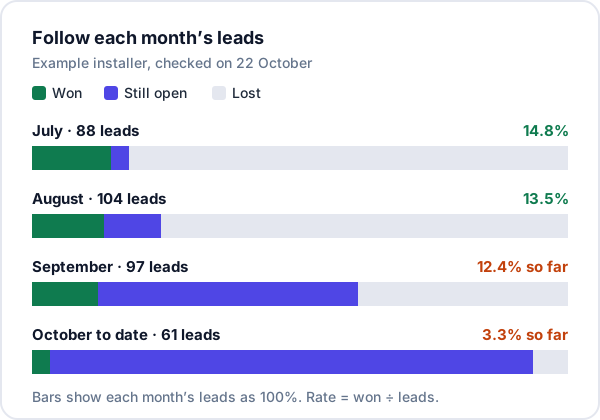
A worked example
Here is a made-up solar installer, checking its numbers on 22 October. Its usual time from enquiry to order is about five weeks.
September’s sheet has 120 rows. Fourteen are duplicates and nine are junk, which leaves 97 real leads. Of those, 12 have been won, 38 lost and 47 are still open. In the calendar month of September the business closed 19 orders, most of them from earlier leads.
| Way of counting | Sum | Rate |
|---|---|---|
| September’s sales ÷ all September rows | 19 ÷ 120 | 15.8% |
| September’s leads won ÷ real leads (so far) | 12 ÷ 97 | 12.4% |
| September’s leads won ÷ decided leads | 12 ÷ 50 | 24.0% |
Three honest-looking numbers, from 15.8% to 24%. The first mixes two groups of leads. The third ignores the 47 people who have not decided, many of whom will not buy. The second is the real conversion rate, with a note that it will rise a little as open leads close. When it does, compare it with July (14.8%) and August (13.5%), which have had time to finish.
Won ÷ all real leads is your conversion rate. Won ÷ (won + lost) is a win rate on decided leads. The second is useful for a closed month, or for judging a salesperson once their leads have run their course. For a recent month it flatters you.
Step 3: split the rate by stage
One overall rate tells you whether things are getting better. It does not tell you where leads are lost. For that, count how many leads reached each stage of your sales pipeline and divide each stage by the one before it. Use a month that has finished. Here is July for the same installer:
| Stage reached | Leads | From previous stage |
|---|---|---|
| Real leads | 88 | – |
| Contacted | 84 | 95% |
| Site visit | 37 | 44% |
| Quotation sent | 29 | 78% |
| Won | 13 | 45% |
Multiply the stage rates together and you get the overall 14.8% back. The weak step here is contacted to site visit: more than half the people the team spoke to never agreed to a visit. That points at the first call (was the price range given too early? was a visit actually offered?), not at the quotation. If quotation to won had been the weak step, the place to look would be the quotation itself and the follow-up after it.
For stage counts to work, a lead has to pass through the stages in order, and someone has to move it when it does. If your stages are vague, fix them first; how to track your sales pipeline covers defining when a deal moves.
Step 4: split the rate by source
This is the split that decides where money goes. Take July and August together, so each source has enough leads to say something:
| Source | Leads | Won | Rate |
|---|---|---|---|
| IndiaMART | 70 | 6 | 8.6% |
| JustDial | 38 | 3 | 7.9% |
| Website form | 34 | 6 | 17.6% |
| 28 | 4 | 14.3% | |
| Referral or phone | 22 | 8 | 36.4% |
Two cautions. First, look at the won column before the rate. JustDial has three wins; one more would lift it from 7.9% to 10.5%. Small groups swing, so combine months until each source has at least a few dozen leads, and do not act on a gap of a few points. Second, a low rate is not the same as a bad source. A paid listing with a low rate can still be the cheapest way to win a job if it sends many leads. Divide what you paid by the wins: if the IndiaMART listing cost, say, ₹10,000 for those two months, that is about ₹1,670 per job won. CRM metrics for small businesses has the cost-per-job formulas.
A source split only works if every lead has its source recorded the day it arrives. Tracking lead sources explains how to keep that list short and consistent.
The spreadsheet: formulas that work in Excel and Google Sheets
Keep one sheet called Leads, one row per enquiry, with these columns:
A  Date in        B  Phone        C  Source
D  Counts? (Yes/No)               E  Status (Open / Won / Lost)
F  Stage reached                  G  Date closed
Flag repeat numbers in a helper column H, starting at row 2 and filled down. It marks the second and later rows for the same phone number:
=IF(COUNTIF(B$2:B2,B2)>1,"Duplicate","")Set Counts? to No for those rows and for junk, after a quick look at each.
On a summary sheet, put the first day of a month in cell A2 (for example 1 September). Then:
Real leads   =COUNTIFS(Leads!A:A,">="&A2, Leads!A:A,"<"&EDATE(A2,1), Leads!D:D,"Yes")
Won          =COUNTIFS(Leads!A:A,">="&A2, Leads!A:A,"<"&EDATE(A2,1), Leads!D:D,"Yes", Leads!E:E,"Won")
Still open   =COUNTIFS(Leads!A:A,">="&A2, Leads!A:A,"<"&EDATE(A2,1), Leads!D:D,"Yes", Leads!E:E,"Open")
Conversion   =Won / Real leads
Win rate     =Won / (Real leads - Still open)
Add Leads!C:C,"IndiaMART" to any of them for one source. For stage counts, it is easier to swap column F for one Yes/No column per stage (did this lead reach a site visit? a quotation?) and count the Yes values the same way. Copy the row down with 1 October, 1 November and so on in column A, and you have the month-by-month view from the chart above.
For your usual time to win, add a column I with =IF(E2="Won",G2-A2,"") and take =MEDIAN(I:I). MEDIAN skips the blank cells.
Mistakes that make the number lie
- Counting sales in the month they closed against leads in the month they arrived. Follow each month’s leads instead.
- Judging the latest month too early. Wait as long as your usual time to win, or compare months at the same age.
- Leaving duplicates and spam in. Portal sources suffer most, so their rate looks worse than it is.
- Removing leads you did not like. “Not serious” leads that could have bought still count.
- Comparing yourself with a published average. Rates vary so much by trade, price and source that someone else’s figure tells you little. Compare your months and your sources with each other.
- Leads that never get closed. If dead leads stay “open” for ever, nothing ever finishes. Mark them lost with a reason once you have given up.
- Missing the step before the lead. Conversion starts on your website. If visitors cannot find a phone number or a short form on a phone screen, you lose people before they become a lead at all; see why a website gets no enquiries.
Where Enkay CRM helps, and where it does not
If leads are recorded in Enkay CRM, you do not keep the sheet above by hand. On the Business plan (₹499 a month for the whole business), the lead conversion report follows the leads received in the period you choose: how many reached Contacted, Quotation and Won, and how many are still open or lost. It also shows the step where most of them stopped. The lead sources report shows how many leads each source sent, how many were won and the win rate. The same enquiry delivered twice is ignored, and a lead’s page shows other leads with the same number so you can merge them.
What it does not do: the reports are fixed, and they count every lead that arrived, so junk you have not cleared out still sits in the total. The headline win rate counts won ÷ (won + lost), so read it beside the still-open number. For your own cuts, such as stages by source or months compared at the same age, export leads to CSV and use the formulas above.
If you want those reports built into your system, Enkay Technologies also builds custom CRMs around how a business actually sells. And because the rate starts with the enquiry, we build websites and landing pages whose forms send each enquiry, with its source, straight into the CRM.
Frequently asked questions
What is the formula for lead conversion rate?
Lead conversion rate = leads that became paying customers ÷ leads received, × 100. Take both numbers from the same group of leads: the leads that arrived in one month, and how many of those same leads later bought. Count real enquiries only, after removing duplicates and junk.
Should I divide by all leads or only the ones that are closed?
Report both, but know what each says. Won ÷ all leads is your conversion rate. Won ÷ (won + lost) is a win rate on decided leads, and it looks higher while many leads are still open. For a recent month, the first understates the final result and the second usually overstates it.
Why is my conversion rate for last month so low?
Usually because many of last month’s leads have not decided yet. If your typical lead takes five weeks to buy, a month that ended a fortnight ago is far from finished. Compare months only once each has had as long as your usual time to win, or compare them at the same age.
How many leads do I need before the rate means anything?
There is no exact cut-off, but with a few dozen leads and a handful of wins, one extra sale moves the rate by several points. As a rule of thumb, combine months or sources until a group has at least a few dozen leads, and treat any difference of a few points as noise.
Do duplicates and spam really change the number much?
They can. Portal leads often arrive twice, the same customer calls and also fills the website form, and some enquiries are job seekers or suppliers. Each one adds to the bottom of the fraction and never to the top, so the rate drops and the source that sent most of them looks worse than it is.
Does Enkay CRM calculate lead conversion rate?
Yes, on the Business plan. The lead conversion report follows the leads received in the period you choose and shows how many reached Contacted, Quotation and Won, and how many are still open or lost. The lead sources report shows the win rate for each source. Reports are fixed; for your own cuts, export leads to CSV.
Keep reading
Try Enkay CRM free
Every enquiry in one list, a follow-up date on each one, and your whole team on the same page. Free for one user — not a trial, no credit card.