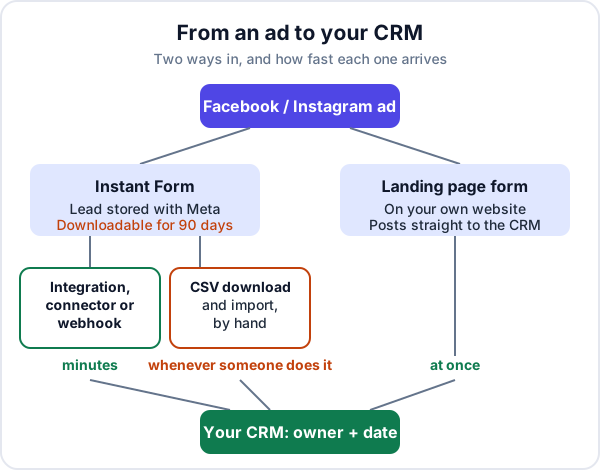
To get Facebook lead ads into a CRM you have to pull them out of Meta, because that is where they stay. A lead from an Instant Form is stored against your Facebook Page, and nobody is alerted unless something is connected. The fast routes are your CRM’s own Meta integration, a connector such as Zapier, or a custom webhook. The slow route is downloading a spreadsheet, and Meta only lets you download a lead for 90 days.
There is also a fifth option many businesses skip: send the ad to a landing page whose form posts straight into your CRM, and avoid the problem altogether. This guide compares the routes, explains when an Instant Form beats a landing page and when it does not, and covers the two things that decide whether the leads turn into customers: how fast someone calls, and how many of the numbers were real in the first place.
Where Facebook and Instagram lead ads actually put your leads
A lead ad with an Instant Form keeps the person inside Facebook or Instagram. They tap the ad, a form opens with their name and number already filled in, they submit, and the lead is saved with Meta. Meta’s developer documentation is plain about it: all leads generated via a lead ad belong to the Facebook Page.
From there, Meta’s help centre lists where you can download or retrieve your leads: Ads Manager, the Instant forms page in Meta Business Suite, Leads Center, the API, or a connected CRM. What it does not do, unless you set it up, is put the lead in front of the person who has to call.
Meta says leads data is available to download for up to 90 days from the time the form is submitted. Your campaign results will still count older leads, but you cannot download them. If your process is “download the sheet when we get time”, some leads will simply disappear.
Four ways to get Facebook lead ads into a CRM
| Route | Lead arrives in | Effort and cost |
|---|---|---|
| Your CRM’s built-in Meta integration | Minutes | Low, if your CRM is supported |
| A connector service (Zapier and similar) | Minutes | Low to set up; a monthly fee that grows with volume |
| Custom webhook and API | Close to real time | A developer, plus Meta app review for the leads permission |
| Download a CSV and import it | Whenever someone does it | Free, and manual every time |
What tends to go wrong with each:
- Built-in integration: someone changes Page roles or leads access, and leads stop arriving without an error anyone sees.
- Connector: field mapping breaks when you edit the form, or the connector account belongs to an ex-employee or agency.
- Webhook: nobody owns it after launch; a token expires and nobody notices.
- CSV: days pass between downloads, leads expire after 90 days, and the same lead gets imported twice.
Meta’s own CRM guide says a partner integration is a good method if your CRM is supported, that webhooks need developer resources, and that manual download is not recommended except as a temporary fallback. The help centre also has a page on connecting a CRM through Zapier, so that route is an accepted one, not a hack.
Whichever you choose, the test is the same: fill in your own form from a phone, and time how long it takes to appear in the CRM with the right name, number and source. Then do it again a month later. Integrations rarely fail on day one; they fail quietly in month three.
Instant Form or landing page?
This is the decision most guides skip, because they assume you will use Instant Forms. You do not have to. A Facebook or Instagram ad can just as well send people to a page on your own website with a short form, and that form can post directly into your CRM as a lead.
| Instant Form | Landing page with a form | |
|---|---|---|
| Effort for the visitor | Two taps; details prefilled | Page loads, they type their number |
| Number of leads | Usually higher | Usually lower |
| How deliberate each lead is | Mixed; some never meant to enquire | Higher; they read and typed |
| Getting it into the CRM | Needs an integration, connector or download | The website form posts it in directly |
| Room to explain and show proof | An intro section and a few lines | Photos, prices, reviews, areas you cover |
| Expiry | Download within 90 days | None; it is already yours |
As a rough rule: if your offer is simple and people already understand it, such as a free site survey or a callback about a course, Instant Forms work well. If the buyer needs convincing first, such as a higher-value job, a service with options, or anything where the price matters, a landing page usually brings better enquiries. What goes on such a page is covered in our guide to landing pages for Google and Facebook ads.
The follow-up starts the minute the form is submitted
Someone who fills in a lead form while scrolling has not set aside time to deal with you. An hour later they are doing something else and may not remember tapping the ad. Meta’s own advice on responding to leads starts with this: capture leads immediately through an integrated CRM or Leads Center, because downloading them by hand takes longer, and run lead ads during your business hours so you can start a conversation quickly.
Three practical rules follow:
- Ads run when someone can call. A lead at 11 pm is a lead at 10 am the next day. Schedule the campaign, or accept the delay knowingly.
- Every lead has an owner the moment it lands. A lead in a shared list that “someone” will call is a lead nobody calls. Assign it automatically, or name one person per shift. Our guide to assigning leads fairly covers the options.
- A missed call is not a follow-up done. Record the attempt and set the next try for later the same day. Many ad leads answer on the second or third attempt.
The reasoning behind the first hour is in our post on lead response time.
Junk leads: why so many numbers do not answer
Every business that runs Instant Forms meets the same complaint from the sales team: half these people do not remember filling anything in. That is partly the design. Meta describes the default More volume form as one that makes it easy to submit quickly on a phone and is built to generate a larger number of leads. Its Higher intent form type adds a line saying the business may follow up and a review screen where people confirm their details, which Meta says helps avoid submissions from people who are only marginally interested.
Ways to raise the quality, roughly in order of effort:
- Switch to a Higher intent form if every lead needs a call. Expect fewer leads.
- Add one question that takes a moment of thought: the area they are in, the size of the job, when they want it done.
- Say on the form when and how you will contact them, so the call is expected.
- Call within minutes, while they still remember the ad.
- Record an outcome on every lead: reached, not reachable, wrong number, not interested, quoted, won. Without outcomes you can only judge a campaign by how many leads it produced, which is the number that misleads most.
A worked example: cost per lead against cost per customer
This is a made-up example, not data from any business. Say a home services company spends ₹15,000 on each of two campaigns in a month.
| Instant Form | Landing page | |
|---|---|---|
| Leads | 100 | 40 |
| Cost per lead | ₹150 | ₹375 |
| Reached on the phone | 45 | 30 |
| Became customers | 6 | 8 |
| Cost per customer | ₹2,500 | ₹1,875 |
Judged by cost per lead, the Instant Form wins by a wide margin. Judged by cost per customer, it loses. Your numbers may well come out the other way round; the point is that you can only tell if every lead, from both routes, sits in one list with its source and outcome recorded. Tracking that is covered in how to track lead sources and know which ones pay.
A setup checklist that holds up after month one
- Map the fields once, on purpose. Name, phone, and the one question you added. Decide where the answer goes in the CRM.
- Label the source. Every lead from these ads should say Facebook & Instagram, or carry the landing page it came from, so reports mean something.
- Check phone numbers arrive in a format your team can dial, with the country code handled.
- Watch for duplicates. People submit twice, or submit and then call. Your CRM should merge them, not create two owners.
- Keep admin access in the business’s own name. Meta requires Page access or assigned leads permissions to read leads. If the only admin is an agency or a former employee, you can lose the connection overnight.
- Put a weekly check in the diary: compare the lead count in Ads Manager with the count in the CRM for the same week. If they differ, find out why that day.
Getting Facebook lead ads into Enkay CRM today
Enkay CRM, made by Enkay Technologies, is a lead and follow-up CRM. Here is what it does for ad leads now, and what it does not.
- The direct Meta connection is not live yet. A “Connect with Facebook” option for lead ads has been built and is waiting on Meta’s side before it can be switched on. Until it is, Enkay CRM does not pull Instant Form leads automatically.
- Landing page forms work now. The website enquiry form push turns each form submission into a lead automatically, with duplicates handled and, on the Business plan, leads shared in turn across the team.
- Instant Form leads can come in by CSV import or by hand. Import a CSV downloaded from Meta (Business plan, up to 2 MB per file), or add each lead by hand with Facebook & Instagram as its source.
- Every lead gets an owner and a next follow-up date, and the Today screen puts overdue ones first. Reminders appear inside the app, not by SMS or email.
If you run ads now and want leads in Enkay CRM without waiting, the honest answer is a landing page. Enkay Technologies also builds business websites and ad landing pages, with the form posting straight into Enkay CRM or another CRM that accepts it. If you already have a site and a CRM you are happy with, you do not need either; connect the two and run the checklist above.
In short
Getting Facebook lead ads into a CRM is not hard; keeping it working and acting on the leads quickly is. Pick a route that delivers leads in minutes, give every lead an owner, call while the person still remembers the ad, and judge each campaign by what it cost per customer. If the Instant Form leads are mostly people who never pick up, try a landing page for a month and compare.
Frequently asked questions
Where do Facebook lead ads leads go?
Leads from a lead ad with an Instant Form stay with Meta, attached to your Facebook Page. You can see and download them in Ads Manager, on the Instant forms page or in Leads Center in Meta Business Suite, or have them sent to a connected CRM. Nobody is told by default, so unless someone checks or a CRM is connected, they wait.
How long does Facebook keep lead ads data?
Meta’s help centre says leads data is available to download for up to 90 days from the time the form is submitted. After that it cannot be downloaded, even if your campaign results still count the lead. Download often, or connect a CRM, so nothing expires.
How do I connect Facebook lead ads to my CRM?
There are four routes: a built-in integration if your CRM is one Meta supports, a connector service such as Zapier that passes each new lead across, a custom integration using Meta’s webhooks and API, or downloading a CSV and importing it. The first three can deliver leads within minutes; the CSV route only as often as someone remembers to do it.
Why are so many of my Facebook leads junk?
Usually because the form is too easy. The default More volume form is built to be quick to submit on a phone, so people tap through with prefilled details they did not mean to share. Switching to a Higher intent form, which adds a review screen, adding one real question, and calling within minutes all raise the share of people who answer.
Should Facebook ads use an Instant Form or a landing page?
Instant Forms usually bring more leads at a lower cost per lead, but more of them are casual. A landing page with a short form brings fewer, more deliberate enquiries and lands them straight in your CRM through the website form. Run both for a month and compare the cost per customer, not the cost per lead.
Keep reading
Try Enkay CRM free
Every enquiry in one list, a follow-up date on each one, and your whole team on the same page. Free for one user — not a trial, no credit card.