A website redesign without losing SEO comes down to three things that must not change by accident: the page addresses (or, where they change, a permanent redirect from each old page to its new equivalent), the content and titles that earned your rankings, and the routes enquiries take to reach you. Most redesigns that lose traffic lose it there, not because of the new colours.
The third one is the part most checklists skip. A site can keep every ranking and still lose enquiries, because the new form emails an address nobody reads or the WhatsApp button points at an old number. This guide covers both: how to decide whether you need a redesign at all, the three lists to make before launch, the launch-day checks, and what to watch in the weeks after.
Do you need a redesign, or something smaller?
A redesign is the expensive, risky answer. Match the symptom to the fix first.
| What you see | What it usually needs |
|---|---|
| Looks dated, but enquiries are steady | A refresh: new design on the same pages and addresses |
| Visitors arrive, few enquiries | Fix the contact routes first. See why a website gets visitors and no enquiries |
| Slow on a phone | Speed fixes first; rebuild only if the theme or builder is the cause |
| No page for each service, or your services have changed | A redesign with a new page structure |
| Nobody can update it without breaking something | A rebuild, often on a different platform. See WordPress vs a custom website |
| A former developer holds the domain or hosting | Get those back before anything else |
On the speed row, testing a slow site on a real phone tells you whether the foundation is the problem. On the last row, check who owns your domain first: you cannot redirect addresses on a domain you do not control.
What actually loses rankings in a redesign
Google ranks pages, not designs. When the pages change underneath, this is what goes wrong:
- Addresses change with no redirect.
/ac-repair.htmlbecomes/services/ac-repair, and every link and search result pointing at the old address now ends at a 404. - Everything is redirected to the home page. Quicker than mapping, and Google’s site move guidance warns against it: it may be treated as a soft 404, and it confuses visitors.
- Content is cut for a cleaner look. The long service page that answered every question becomes three lines and a photo. The page keeps its address and loses the reason it ranked.
- Titles and headings are rewritten by whoever writes the new copy, without checking which searches the old ones matched.
- The test site’s block goes live. A noindex tag or a robots.txt rule meant for the staging copy is left on, and Google is told to drop the whole site.
- The new site is slower, usually because of large images, sliders or a heavy page builder.
Before launch: make three lists
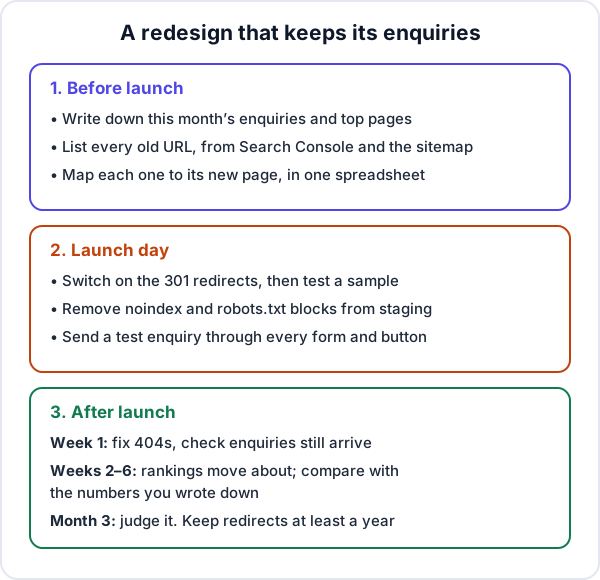
1. Where you are today
This is the step nearly everyone skips, and without it you cannot tell a normal dip from a real loss. Before anything changes, write down:
- Enquiries per week for the last two or three months, by route: form, phone calls, WhatsApp. If you use a CRM, it already has this by source.
- From Google Search Console’s Performance report, the last three months of clicks, and the pages that get them. Export it.
- Your top landing pages from Analytics, if it is set up.
2. Every old address
Google suggests building the list from your sitemap, analytics, the content system, server logs and Search Console. For a small business site, three sources catch almost everything: the sitemap (usually yoursite.com/sitemap.xml), the indexed pages in Search Console’s Pages report, and a click through every menu and footer link. Add PDFs such as brochures and price lists. People link to those too.
3. Where each one goes
Put old and new addresses side by side in one spreadsheet. Here is a made-up example for a small AC service company’s site:
| Old address | New address | Action |
|---|---|---|
| /ac-repair.html | /services/ac-repair | 301 redirect |
| /ac-installation.php | /services/ac-installation | 301 redirect |
| /services.html | /services/ | 301 redirect |
| /gallery.html | /our-work | 301 redirect |
| /blog/ac-gas-refill-cost | /blog/ac-gas-refill-cost | Keep as it is |
| /summer-offer-2024 | None | Let it return 404 or 410 |
The rule is the closest match, not the nearest convenient page. Two old pages that merge into one new page can both point to it. For each page that earns clicks, keep its main content and title unless you have a reason to change them, and improve rather than shorten. The cleanest redesign of all keeps the old addresses, and then the map is short.
Where the enquiries go: the part SEO checklists leave out
Rankings bring visitors. These bring the enquiries, and every one of them can break quietly on launch day:
- Forms. Where does a submission go now? Check the email address, the spam folder, and whether it still reaches your CRM. See sending your website form into a CRM.
- Call and WhatsApp buttons on every page, with the number you answer today.
- Tracking. If Analytics counted form submissions and button taps on the old site, set the same events up on the new one. Otherwise your comparison with the baseline is meaningless.
- Links you do not control: your Google Business Profile website link, ad destination addresses, marketplace and directory profiles, QR codes on brochures and vans, email signatures. Update the ones you can. The redirects cover the rest, which is another reason to keep them.
- Email. If the redesign comes with new hosting or new nameservers, copy the mail records across before switching. Otherwise business email stops on launch day, and it is often the first thing nobody notices.
Launch-day checklist
- Switch on the redirects as server-side 301s (Google treats 301 and 308 as permanent). Test twenty from the map in a browser. Each should land in one hop, not via a chain.
- Remove the staging blocks. Google’s own checklist says not to forget any noindex or robots.txt rules that were only there during development.
- Update internal links to the new addresses, so your own menus do not run through redirects.
- Submit the new sitemap in Search Console. Use the Change of Address tool only if the domain itself changes; a new design on the same domain does not need it.
- Send a test enquiry through every form, from a phone, and tap every call and WhatsApp button.
- Check Analytics is recording visits and the enquiry events.
- Test speed on a phone, not only on the office laptop.
After launch: what to watch, and when to worry
When addresses change, Google’s guidance is plain: “Expect temporary fluctuation in site ranking during the move.” For a medium-sized site it says the new addresses can take a few weeks or more to replace the old ones in results.
- Week one. Open Search Console’s Pages report and look for new “Not found (404)” errors. Each one is usually a missing line in the redirect map. Count enquiries daily, by route.
- Weeks two to six. Compare clicks and enquiries with the numbers you wrote down. Old addresses fading from results while new ones appear is normal.
- Month three. Judge it. A loss that is still there usually sits on particular pages, so compare those pages before and after: the redirect, the content, the title.
Fewer visitors with steady enquiries is fine; often the new site simply stopped attracting searches that never turned into work. Steady visitors with fewer enquiries is the alarm, and it points to the forms, buttons and numbers above, not to Google.
Keep the redirects for at least a year, as Google suggests, and on a small site there is little reason ever to remove them. If you moved to a new domain, keep renewing the old one too: if it lapses, the redirects stop working.
Where Enkay Technologies fits
Enkay Technologies builds business websites, including rebuilds of sites that already exist. Our written quotes start at about ₹25,000 before GST, most sites take 2 to 4 weeks once the content is in, Search Console and Analytics are set up and the sitemap submitted at launch, and the first 30 days of fixes are free. The domain stays in your name.
What we will not do is sell you a redesign your site does not need. If it already brings enquiries and only looks tired, a refresh on the same pages is cheaper and safer, and we will say so. And if the real problem is enquiries that arrive and are never followed up, a new website will not fix that. That is what Enkay CRM is for: a website form can post straight into it as a lead with a follow-up date.
Whoever you hire, ask for two things in writing before work starts: the list of old addresses with where each one will go, and a note of your current enquiries and top pages to compare against after launch.
Frequently asked questions
Does a website redesign affect SEO?
It can. Rankings usually drop for ordinary reasons: page addresses change without redirects, pages that earned clicks are deleted or cut down, titles are rewritten, a noindex tag is left on from the test site, or the new site is slower. A new look on the same pages, with the same addresses and content, carries much less risk.
How long does it take for rankings to settle after a redesign?
When addresses change, Google says to expect temporary fluctuation, and that a medium-sized site can take a few weeks or more before the new addresses replace the old ones in results. Judge the redesign at about three months. A drop that is still there by then usually points to particular pages: check their redirects, content and titles.
Should I use a 301 or a 302 redirect after a redesign?
Use a 301 (or 308) for a page that has moved for good. Google treats it as permanent and shows the new address. A 302 is temporary and tells Google to keep showing the old address. Set redirects up on the server, not with JavaScript, wherever you can.
Can I redirect all my old pages to the new home page?
No. Google advises against sending many old addresses to one unrelated page such as the home page, and may treat it as a soft 404. Send each old page to the closest matching new page. If a page has no equivalent, such as an expired offer, let it return a 404 or 410.
How long should I keep the redirects?
Google’s guidance is to keep them as long as possible, generally at least a year. Keeping them longer does no harm. Old addresses also live in brochures, profiles and other people’s links, which is a good reason not to remove them at all on a small site.
Do I need a full redesign or just a refresh?
If the site brings enquiries and only looks dated, a refresh is the safer choice: a new design on the same pages and addresses. A redesign is worth the extra risk when the structure itself is wrong, for example no page for each service, a platform nobody can update, or services that have changed.
Keep reading
Thinking of redesigning your website?
Send us your current site and what you sell. We will tell you whether it needs a rebuild or a few fixes, and quote in writing. The scoping call and the quote are free.