WhatsApp Business labels turn a long list of chats into a sales board: put one label on each chat for the stage it is at (New enquiry, Quoted, Payment due) and filter by label to see who needs what. Quick replies do the other half, saving the messages you type every day under a short shortcut. Set up together, with a label for each stage of the sale and ten good quick replies, they take a single phone a long way before you need any other software.
Most guides explain where the buttons are. This one is about what to put in them, how to use them in ten minutes a day, and where they stop being enough.
What labels and quick replies actually do
Both are free features of the WhatsApp Business app, alongside greeting messages, away messages and a catalogue, as listed on WhatsApp’s business app features page.
- Labels are coloured tags on a chat. A chat can carry more than one. Filtering by a label shows only those chats. Menu names move between app versions; look under the chat’s menu or the app’s business tools, sometimes called Lists.
- Quick replies are saved messages with a shortcut. Type a slash in a chat to pick one. The message lands in the text box, not in the chat, so you edit before sending.
- Greeting and away messages reply automatically to a new customer and outside your hours. Useful, with one warning further down.
Set up labels as your sales stages
The mistake is labelling chats by who the customer is (Builder, Retail, VIP). That tells you nothing about what to do next. Label by stage instead, so each label is a to-do list. The labels below mirror common sales pipeline stages; rename them for your trade.
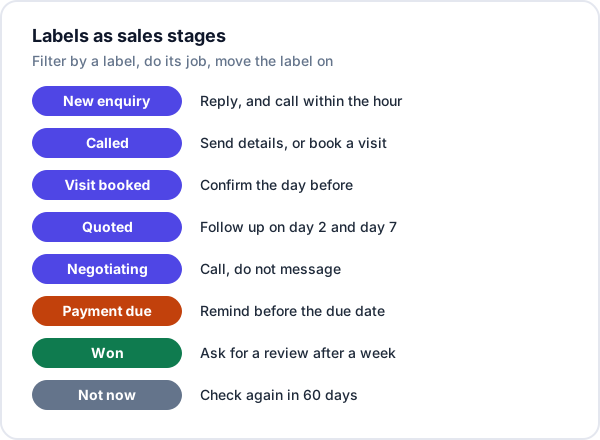
Three rules keep it working:
- One stage label per chat. When a chat moves from Quoted to Payment due, remove Quoted. A chat with four labels is in no stage at all.
- Label at the moment it changes. Send the quotation, then label it Quoted, before you close the chat. Labelling “later” means never.
- Keep it to about eight. If a label has not been filtered in a month, delete it. You can add one extra label that is not a stage, such as Repeat customer, if you genuinely act on it.
Ten quick replies worth saving
Save the messages you type more than a few times a week. Use short, obvious shortcuts, and put a placeholder in square brackets for anything you must change each time, so it stands out before you send. Full wording for most of these is in our follow-up message templates.
| Shortcut | When | What it says |
|---|---|---|
| /hi | First reply to a new enquiry | Thanks, your name, one question about their requirement, when you will call |
| /missed | After a missed call | Sorry I missed you, best time to call back? |
| /loc | Customer asks where you are | Address, map link, hours |
| /visit | Booking a site visit | Date and time slot, who will come, what to keep ready |
| /quote | Sending a quotation | The five lines that go with the PDF |
| /chase | Quotation follow-up | One new piece of information and one question |
| /pay | Payment details | UPI ID, bank details, “please share the reference” |
| /due | Payment reminder | Invoice [no.], ₹[amount], due [date], link |
| /thanks | Payment received | Amount received, receipt attached, thank you |
| /review | A week after the job | Hope it is working well, link to your Google review page |
The /quote message deserves the most care, because it travels with your price. Our post on sending a quotation on WhatsApp covers what it should say. The /due and /thanks messages are covered in detail in payment reminder messages.
Two quick replies quietly go wrong over time: prices and bank details. Put prices in the quotation, not in a quick reply, or a customer will be quoted last season’s rate. And when your bank account or UPI ID changes, change /pay the same day.
Greeting and away messages: one warning
A greeting message reassures a new customer that the enquiry landed. An away message tells someone writing at 9 pm when you will reply. Both are worth switching on. The warning: never promise a time you do not keep. “We reply within 10 minutes” followed by a reply the next afternoon is worse than no promise. Write “We will call you today before 6 pm” only if someone will.
The ten-minute daily check
Labels pay off only if someone filters by them. Once in the morning, once before closing:
- New enquiry: anyone not yet called? Call now.
- Quoted: anyone you have not heard from in two days? Send /chase or call.
- Payment due: anything due in the next three days? Send /due.
- Visit booked: tomorrow’s visits confirmed?
- Won: anyone a week past the job? Send /review, then remove the label.
That is the whole system. It works for one owner with up to a few enquiries a day, and it costs nothing.
Where labels and quick replies stop being enough
They are a good system with three holes, and it is worth knowing them before they cost you a sale.
- No dates. A label says what stage a chat is at, not when to act. A chat labelled Quoted three weeks ago looks exactly like one labelled yesterday, so the daily check depends on you scrolling and remembering.
- No owner. On a shared number, nothing shows who added a label or who replied. Two people answer the same customer differently, or each assumes the other did. Our post on WhatsApp for a sales team covers ways round this.
- Only WhatsApp. IndiaMART, JustDial and website enquiries never get a label, because they do not start as chats. Your board shows some of your sales, not all of them.
If two of those three are hurting, the labels are not the problem; the business has grown past one phone. The other signs are in 10 signs you have outgrown Excel and WhatsApp.
Where Enkay CRM fits, and where it does not
Enkay CRM, from Enkay Technologies, fills the three holes and leaves the conversation on WhatsApp. Each lead has a stage, an owner and a next follow-up date, and the Today screen lists what is overdue and due today. IndiaMART, JustDial and website enquiries arrive as leads on their own, so they sit on the same board as the WhatsApp ones. From any lead you open a WhatsApp chat in one tap, and saved WhatsApp message templates fill in the customer’s name and details for you, with each send logged on the lead’s timeline. Quotations and invoices go out on WhatsApp with the message already written. See WhatsApp CRM.
What it does not do: it does not read your WhatsApp chats, so an enquiry that arrives on WhatsApp is added as a lead by hand, which takes a few seconds; and messages are still sent from your own WhatsApp. Connecting your number to the official WhatsApp Business Platform, so customers’ messages land on their lead, is in development, and a shared team inbox is coming soon on the Standard plan. Keep using labels and quick replies on the phone; use Enkay for the dates, the owners and the other sources. See pricing.
The short version
Set up WhatsApp Business labels as sales stages, one per chat, about eight in all, and move them as the sale moves. Save ten quick replies for the messages you type every week, keeping prices out of them. Filter by label twice a day. When you need dates, owners or leads from outside WhatsApp, that is the point to add a system that has them.
Frequently asked questions
What are labels in WhatsApp Business?
Labels are coloured tags you put on a chat in the WhatsApp Business app, such as New enquiry or Quoted. You can then filter your chats by label to see, for example, every customer waiting for a quotation. They are only in the Business app, not ordinary WhatsApp, and newer versions of the app may show them under a Lists or Business tools menu.
Which labels should a small business use?
One label for each stage a sale goes through, and no more than eight or so in total. A workable set: New enquiry, Called, Visit booked, Quoted, Negotiating, Payment due, Won, and Not now. A label nobody filters by is clutter; drop it.
How do I use quick replies in WhatsApp Business?
Save a message under a short shortcut in the app’s business tools, then type a slash in any chat to pick it, or type the shortcut. The message fills the text box but is not sent until you press send, so you can edit the name, amount or date first. Save the messages you type more than a few times a week.
Can labels remind me to follow up?
No. A label says which stage a chat is at, not when to contact the customer next. That is the main gap: a chat labelled Quoted three weeks ago looks the same as one labelled yesterday. Keep follow-up dates somewhere that shows what is due today, whether that is a diary, a sheet or a CRM.
Do labels work when several people use the same WhatsApp Business number?
They help, but labels show only the stage of a chat. Nothing records who added a label or who replied, so two people can work the same chat or neither can. Agree who owns which chats, or give each label stage an owner.
Keep reading
Try Enkay CRM for 15 days
Every enquiry in one list, a follow-up date on each one, and your whole team on the same page. ₹49 for 15 days of the full Standard plan, unlimited users.